Implementing an AI customer service agent in an online store runs in five steps: connect your help desk and shop systems, let the AI draft the first policies from what you tell it, test them, start with drafts your team approves, then switch topics to autonomous one at a time. Connecting takes hours; how fast topics go autonomous is your call.
This page is the deployment detail under our guide to AI agents in customer service. We built it around the questions buyers ask us most: who builds the policies, how fast you go live, whether you can start with drafts, and where the AI gets its knowledge.
How does AI customer service agent implementation work, step by step?
AI customer service agent implementation works in five steps, followed by a sixth that never ends: connect, draft the policies, test, run drafts your team approves, switch topics to autonomous, and keep improving. The table shows who does what at each step.
The steps of an implementation
| Step | What happens | Who does it | What it takes from your team |
|---|---|---|---|
| 1. Connect the stack | The agent gets access to your help desk and shop systems | Someone with admin rights | Logins and permissions |
| 2. Draft the first policies | The AI proposes policies from the connected systems and what you tell it | The AI, corrected by your support lead | Decisions on your rules |
| 3. Test | You play the customer and check the answer and the action | Support team | A handful of realistic cases |
| 4. Drafts your team approves | The agent prepares reply and action; a person sends it | Your agents | Reading and correcting drafts |
| 5. Switch topics to autonomous | Per topic, the agent acts, replies and closes the ticket | Support lead | A go or no-go per topic |
| 6. Keep improving | Policies are adjusted as your rules change; a person approves what changes | Support lead | A regular review |
Test in two stages: play the customer in a test environment, then run drafts on real tickets that a person still sends. For which tasks to pick first, see our automation steps; for the stages between a macro and an autonomous agent, see the automation levels.
Who builds the policies, and how much work is it for your team?
The AI drafts the first policies and your team decides the rules. You do not write out every branch by hand. The work that stays with you is deciding what your return window is, when a reship is allowed and when a person takes over, then correcting the drafts.
Other vendors work the same way. Zendesk generates draft procedures for its agent-assist feature from a team’s common questions, solved tickets and knowledge articles, and a person reviews, edits and publishes them (Zendesk, 2026). How many hours it takes depends on how much you script by hand: for its customer-facing AI agents, Zendesk’s documentation says flexible generative procedures need less setup and upkeep than scripted dialogues, in exchange for less fine control (Zendesk, 2026).
Distrust any single hours figure. On 16 November 2026 we put the setup-time question to ChatGPT, Perplexity, Google AI Mode and Gemini, in English and Dutch. Seven of the eight runs returned an answer; those seven put the store team’s own hours anywhere between 6 to 12 and 36 to 98, and none cited a measured figure. Whether the effort pays off for a team of one or two is covered in our guide for small teams.
How long does it take to go live with an AI support agent?
Going live with an AI support agent has two separate timings. Connecting the systems and getting the first drafts takes hours. Autonomy on a topic follows once the drafts match what your team would send, and that pace is yours.
What the sources say about time
| Source | Time to connect or first answers | Time to answering alone | Type of source |
|---|---|---|---|
| Zendesk, 2026 | Minutes to a first agent that answers from existing knowledge sources | Not stated | Vendor documentation |
| eesel, 2026, an AI support vendor | An afternoon | 2 to 8 weeks | Vendor-stated |
| Fin guide, 2026, by Intercom | Not stated | One channel or segment first, watched for one to two weeks before widening | Vendor guidance |
The seven AI-engine answers we collected on 16 November 2026 put total setup time anywhere between a few hours and sixteen weeks. The answers do not separate connecting from answering alone.
The connection is not the slow part. What “live” means differs, so ask whether it means drafts in your help desk or an agent that closes tickets itself.
If you want the agent trusted before peak season, start in the quiet period, so your team has seen drafts on real tickets before volume rises. Our guide to seasonal peaks covers the planning.
Can you start with drafts your team approves and go live topic by topic?
Yes. In draft mode the agent prepares the reply and the action inside the help desk and a person sends it. Topics then switch to autonomous one at a time, once the drafts for that topic need no more corrections.
Our advice: start with the low-hanging fruit, the questions that are easy to automate, such as order status and returns. That is where you see results fastest. If you see other bottlenecks, you set the order. Gorgias’s documentation describes the same approach (Gorgias, 2026).
Some vendors also cap a pilot by numbers. Freshdesk offers a daily conversation cap, which it describes as useful for a staged rollout, and suggests a first pilot of 10 to 25 conversations a day (Freshdesk, 2026).
The draft phase is not lost time. In a study of 5,179 customer support agents, access to a generative AI assistant raised issues resolved per hour by 14% on average, and by 34% for novice and low-skilled agents (NBER, 2023). The study measured an assistant for human agents, not an autonomous one.
High-volume, rule-based topics such as order tracking and returns handling are common starting points. Which topics stay with a person is a matter of agent guardrails.
Where does an AI agent get its knowledge?
An AI agent gets its knowledge from four places: live data in your shop systems, your website and help centre, documents you add, and what your team tells it. Order, stock and price facts should come from the system that holds them, not from a page that may be out of date.
Two things are easy to mix up: knowledge is what the agent answers from; a policy is the process it follows and what it is allowed to do.
Other vendors work with similar sources. Gorgias lists the store website, help centre articles, documents, URLs and written guidance as sources, and requires at least one before the agent can be switched on (Gorgias, 2026).
Ask any vendor how often synced content refreshes. With Engaige you add the pages or the sitemap of your website as a knowledge source. That knowledge is fetched again every month, or straight away when you start a sync yourself.
A policy takes precedence over knowledge: if your website now says 30 days but a policy still says 14, the agent follows the policy. So when a rule changes, update the policy too. If you do not, it surfaces as soon as a ticket is handed over and your agent gives the right answer: Engaige AI then proposes the improvement.
How answering from articles works, and where it stops, is in our knowledge chatbot guide. With no documentation yet, start with a knowledge base.
Can an AI agent learn from past tickets and from what only your team knows?
Yes, but old tickets are a record of what was said, not of what your policy is today. They contain outdated answers and one-off exceptions. The safer route is learning from the replies your team sends now, with a person approving each change to how the agent behaves.
This is how it works with Engaige. Engaige AI reads your own support history and proposes the instructions and knowledge a new agent starts with. After that it reads, every week, the conversations the agent could not finish, works out what was missing and proposes the improvement. You approve what goes live.
Vendor documentation shows limits too: Intercom uses only the last four months of conversation history, for its assistant for teammates (Intercom, 2026).
Knowledge in people’s heads needs no interview project first. It surfaces when a colleague’s reply differs from the agent’s draft, and when someone tells the AI the rule in plain words.
Past tickets still have a practical use as test cases. Paste real ones into a test environment before go-live and check both the answer and the action. The rules themselves come from what your team decides now.
What does your team need to prepare, and do you need technical people?
You need three things, and no prompt engineer: admin access to your shop and help desk, your current rules for shipping, returns and refunds, and one person who can decide policy. In a self-service setup the technical task is granting access, which takes someone with admin rights.
A short checklist before you start:
- Admin logins for your shop platform and your help desk.
- Your written rules for shipping, returns and refunds, as they apply today.
- Your five most frequent ticket types, as candidates for the first topics.
- The topics to leave untouched at first.
- One person who decides policy and approves changes.
Where does Engaige fit?
Engaige (that’s us) is the AI support agent that works inside the help desk you already run, such as Zendesk or Gorgias. Keep your helpdesk. Replace the AI. Behind it is Engaige AI, which you brief in plain language.
You set everything up yourself, with Engaige AI as your main interface. You connect your shop platform and the rest of your stack. On Shopify, Engaige combines live data on catalogue, prices across markets, inventory, orders and customers with your storefront content, plus any documents you add. Engaige AI then proposes your first set of policies, so you do not start from a blank page. A policy is a branching set of plain-language steps that you change yourself.
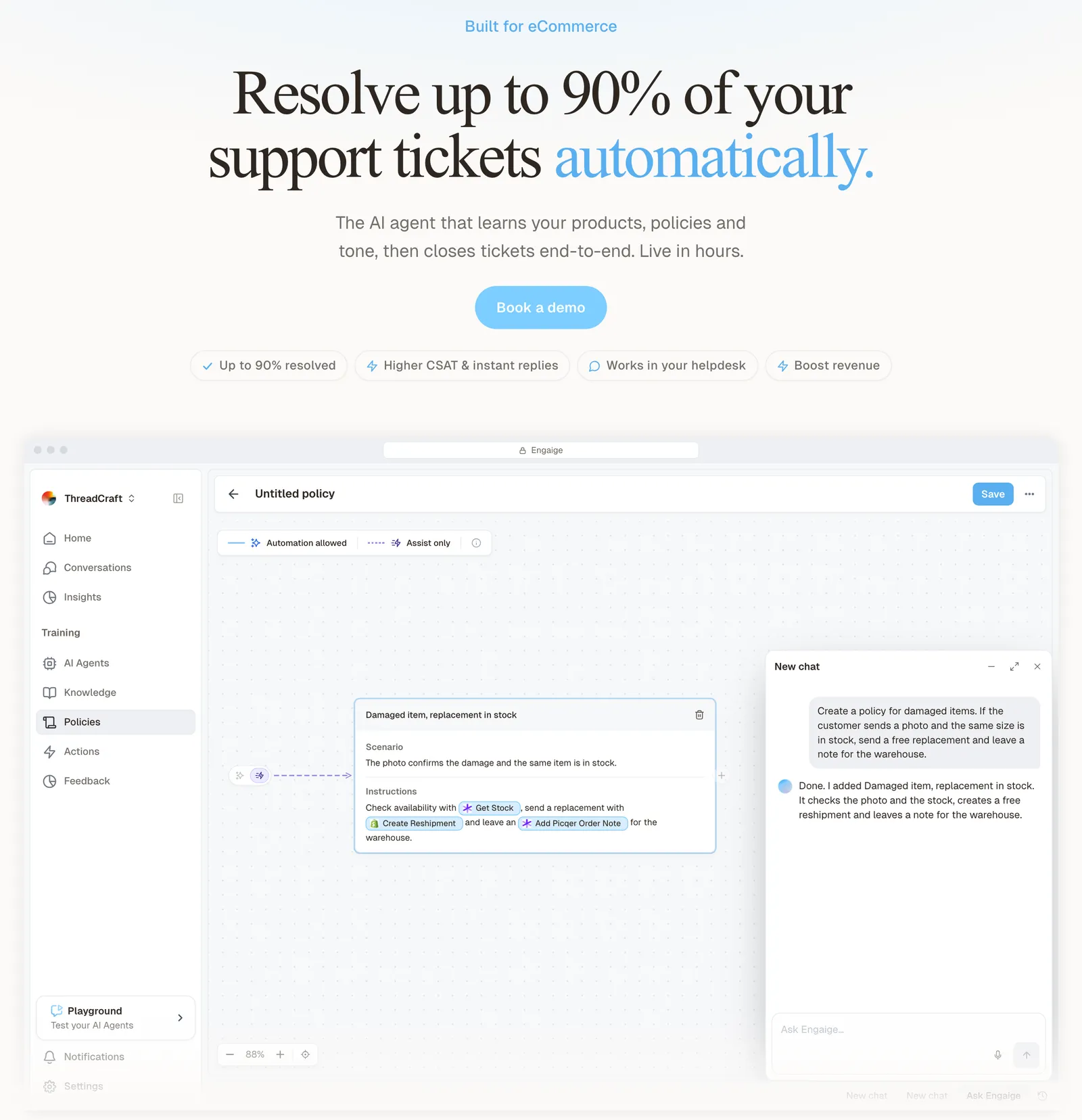
Test every policy in the Playground before it goes live, including real past tickets you paste in. Then you go live in Agent Assist in hours, or autonomous from day one if you are ready. Agent Assist first, then autonomous, is the most common path.
In Agent Assist, Engaige drafts replies and suggested actions inside your help desk, and no ticket closes without a person. Every reply your team sends is compared with what the agent suggested. That is one of the signals Engaige AI learns from. It also learns from your conversations and from what you tell it in plain language. The improvements it proposes are shown with their reasoning, and you approve what goes live.

Hello Potential New Client
What would you like to get done today?
Could you analyse this week's conversations and show me some automation opportunities?
Ask Engaige…
Searched and found 4 contact reasons · 2.4s
Your agent resolved 426 of 512 conversations. 86 were handed over, and one contact reason accounts for most of them.
Searched and found 1 policy · 1.6s
Delivery status hands over whenever tracking is older than 24 hours, which is 40 of those 46.
Editing Delivery status · 1.9s
Done. It now handles stale tracking itself. Those 40 a week stay with your agent.
What were the reasons for handover, and how can we improve?
Fix it.
Reply…
Once you trust a ticket type, you switch it to autonomous. Engaige can also take only chosen ticket types while an existing AI agent keeps handling the rest. Most brands are fully autonomous in about a week, and Engaige automates up to 90% of supported tickets.
The learning continues after the switch. In autonomous mode Engaige AI surfaces emerging trends and the tickets the agent hands back to a person, and updates its policies from those, under the same approval.
The product gets you live on its own. Every customer also gets a dedicated Slack channel and hands-on help when they want it.
Engaige proved to be invaluable. Their hands-on support during the implementation phase resulted in significant improvements to our automated resolution rate and CSAT.

What share of tickets that leads to is covered in our guide to resolution rate; Otrium has 60% of 120,000 annual tickets resolved end to end with Engaige.
Frequently asked questions
Do you need to script every customer scenario in advance?
No. The AI drafts the first policies and your team decides the rules. With Engaige, Engaige AI proposes the first set, so you do not start from a blank page.
How many hours does implementing an AI agent take from your own team?
The AI answers we checked ranged from 6 to 12 hours up to 36 to 98, with no measured source. Ask a vendor for two things instead: how soon you see the first draft, and what it takes before a topic runs on its own.
Can an AI agent be live before peak season?
Yes, if you start in the quiet period. Agree first what live means: drafts in your help desk can start within hours, while an agent that closes tickets itself needs your team to have seen its drafts on real tickets first.
Does an AI agent need years of ticket history?
No. An agent can start from your current rules and learn from the replies your team sends now, with a person approving each change. A few real past tickets are enough to test with.
Do you have to replace your help desk to implement an AI agent?
No. Keep your helpdesk. Engaige works inside the one you already run, and tickets, macros and history stay where they are.
Can the agent work on some ticket types only?
Yes. With Engaige you switch ticket types to autonomous one at a time, and you decide per policy step whether the agent acts on its own or drafts for your team.
Can an AI agent run next to the AI you already use?
Yes. Engaige can take chosen ticket types while an existing AI agent keeps handling the rest, so you can compare both on your own tickets before switching over.
What is the difference between a policy and a knowledge article?
A knowledge article is something the agent answers from, such as a help centre page on your return window. A policy is the process the agent follows and what it may do, such as checking the order and creating the return.