Use cases

WISMODamaged & missing itemsSubscriptionsProduct adviceRefunds & returns
Case studies Integrations Sign in

Changelog

See what we have shipped

Engaige changes every week. This is the running record of what went live: new capabilities, deeper integrations and the improvements our customers asked for, newest first.

Engaige MCP is now live

Engaige now speaks MCP, so an assistant you already use can read your workspace directly instead of you going to the dashboard for it. It can search your conversations and open a full thread, follow how the agent reasoned and which What this meansSomething the agent actually does in another system, such as issuing a refund or changing a delivery address, as opposed to something it says. it ran on a case, search your What this meansThe documents and answers you give the agent to work from, such as your returns page or a product manual. documents, and read your agents, What this meansA set of instructions you write for how the agent should handle one kind of request, such as a return or a late delivery. and configured actions.

Everything it can reach is read-only and bound to your own organisation: twenty-four tools that look, and none that change anything. You connect it once and ask your questions where you already work.

Engaige AI is on for every customer

Engaige AI is now switched on for every workspace. It reads your own support history and tells you what to improve next, answers questions about your numbers and draws them as charts, explains what happened in any conversation, and proposes the instructions and What this meansThe documents and answers you give the agent to work from, such as your returns page or a product manual. a new agent should open with.

The last stretch of work before this was about the hard cases. An investigation that stalls now picks itself back up instead of leaving you waiting, and the What this meansThe record of how the agent reached a reply: which policy it followed, which data it read, and what it decided. behind an answer shows each step as it happens, including the work Engaige AI hands to its own specialists, so a long answer is something you can watch being built rather than a spinner.

Improvements 8
  • Agent New versions of the agent are scored by replaying real support conversations against them, hardest on claims no What this meansSomething the agent actually does in another system, such as issuing a refund or changing a delivery address, as opposed to something it says. backs up, so a change to the agent arrives with evidence instead of an opinion
  • Policies A What this meansA set of instructions you write for how the agent should handle one kind of request, such as a return or a late delivery. step can point at a What this meansThe documents and answers you give the agent to work from, such as your returns page or a product manual. document instead of repeating its text, so you update the article once and every step that references it follows
  • Inbox Conversations can be found by the customer's name or email address, not only by ticket id, so you reach the thread you remember by the person
  • Insights Charts on the Insights page can be downloaded as CSV or copied as an image, so a number you want in a deck no longer has to be screenshotted
  • Platform The dashboard works on a tablet: the menu and the dense screens reflow, so the conversation list and settings are reachable on an iPad
  • Agent A file can be attached to a playground message, so a customer sending a photo, the commonest real case, can be tried before it happens for real
  • Engaige AI Engaige AI can search your What this meansThe documents and answers you give the agent to work from, such as your returns page or a product manual. documents and list your folders, so it answers from what you actually wrote instead of asking you where it is
  • Inbox The conversation thread shows a divider at each calendar day in your own timezone, so a long thread reads as days rather than one stream

PostNL connected

Shops shipping with PostNL can connect it so the agent answers where-is-my-parcel questions from the carrier itself, by barcode, rather than a colleague opening the tracking portal.

Actions and improvements 3
  • Action Track any parcel, so the agent can share live tracking the moment a customer asks
  • Action Give a delivery update, so the agent can explain the latest carrier events in plain language
  • Action Chase a late delivery, so the agent can spot the problem and say what happens next

BigCommerce connected

Shops on BigCommerce can now connect their store and put the agent to work on their orders, the way Shopify and Magento shops already could. The agent can look an order up and check it against the customer's email, list a customer's recent orders, cancel an order that has not shipped, correct a delivery address, check stock per variant, and issue a refund in full, in part or for a custom amount, with a free reshipment for what went missing.

Actions and improvements 5
  • Action Track an order, so the agent can give the status and delivery date on the spot
  • Action Cancel an order, so the agent can cancel it in the conversation when plans change
  • Action Issue a refund, so the agent can handle a full, partial or custom refund
  • Action Update a delivery address, so the agent can correct it before the parcel leaves
  • Action Answer product questions, so the agent can read stock and prices per variant

Image fraud detection

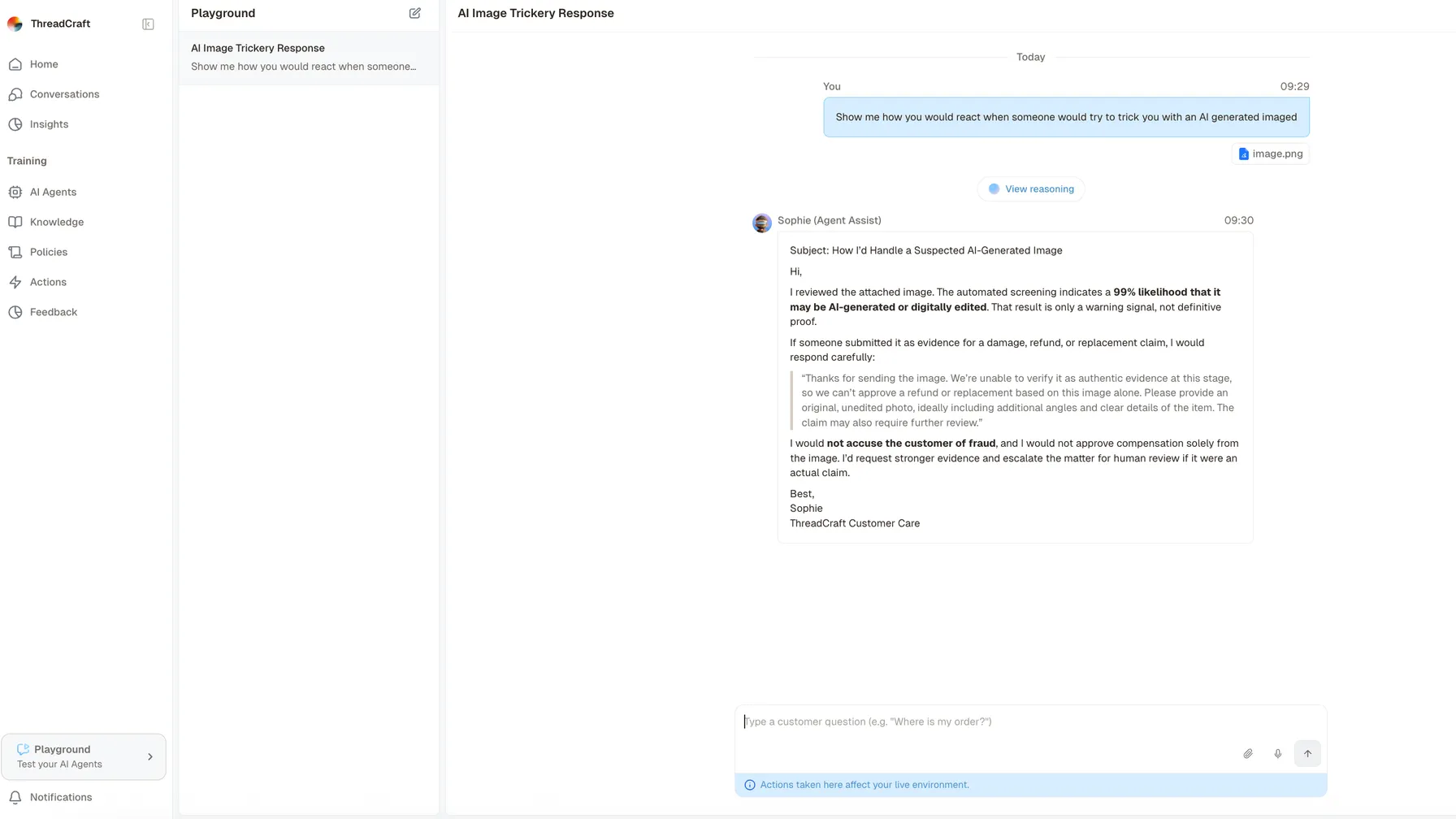
The playground, with a tester asking the agent how it would react to someone trying to trick it with an AI-generated image, and attaching one. The agent replies that the automated screening puts the likelihood of the image being AI-generated or digitally edited at 99 per cent, states plainly that the result is a warning signal and not proof, and drafts a reply asking the customer for an original unedited photo. It closes by saying it would not accuse the customer, would not approve compensation on the image alone, and would escalate the matter for human review.

A refund claim that arrives with a photo now gets the photo looked at. When you switch image fraud detection on for an agent, every image a customer attaches is screened for signs it was AI-generated or AI-edited, and the result travels with the agent's reasoning, so a claim built on a fabricated picture no longer rides through on the strength of the text alone.

The screening is a signal, not a verdict, and the agent is instructed accordingly: a high score never turns into an accusation towards the customer, it turns into a quiet escalation to your team. Before an image is checked, everything identifying is stripped from its metadata, and an image that cannot be cleaned is simply not sent.

Off by default. Turn it on per agent, in the agent's settings.

Klaviyo connected

The agent can look up a customer's marketing profile and manage their email subscriptions from inside a support conversation, so unsubscribing someone no longer means a colleague switching tools. Subscribing honours the list's own single or double opt-in setting, and you decide how broad an unsubscribe may reach. Email only: SMS subscriptions are left alone.

Actions and improvements 2
  • Action See what a customer was sent, so the agent can check which campaigns and flows reached them
  • Action Answer a subscription question, so the agent can say what someone is signed up for

Your data comes back as a chart

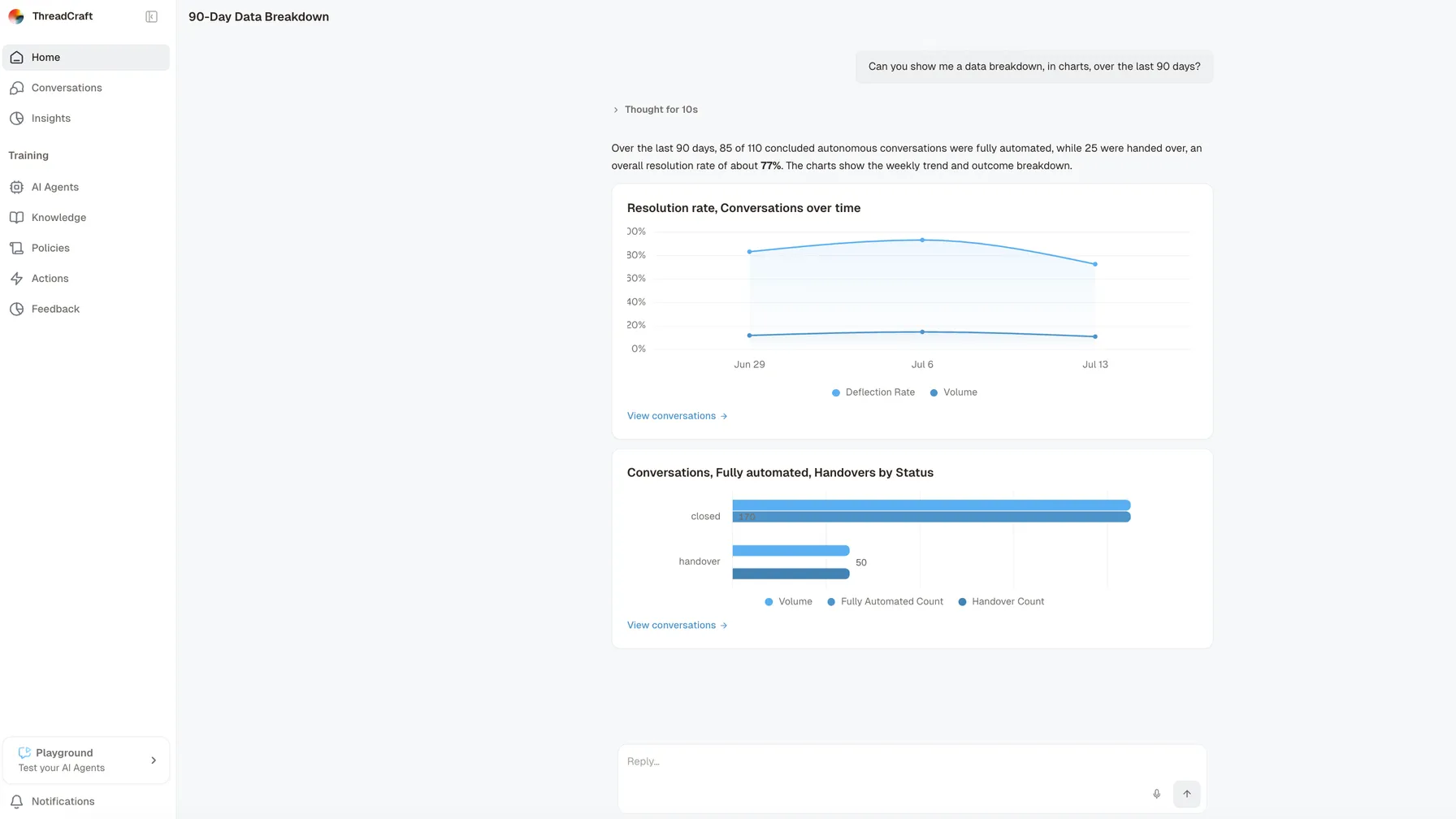
Engaige AI answering a request for a data breakdown in charts over the last ninety days. It reports that 85 of 110 concluded autonomous conversations were fully automated and 25 were handed over, an overall resolution rate of about 77 per cent, then draws two charts: a line chart of the weekly trend, and a bar chart splitting closed and handed-over conversations by outcome. Each chart carries a link through to the conversations behind it.

Customers ask us for insights they can act on. Engaige AI could already answer questions about your support data with real numbers, but the answers arrived as text and tables. They now come back as a chart whenever the numbers suit one, in the conversation and on your home screen, so the shape of an answer is something you see rather than something you work out.

Improvements 5
  • Agent An agent can claim a What this meansThe list of waiting conversations in your helpdesk that a person or an agent picks work from. as either the one that helps your team or the one that answers on its own, so two of them can share the same queue
  • Inbox The conversation screen shows an agent run that is queued or still going, so an empty thread no longer reads as nothing happening
  • Inbox The conversation filter asks what the agent actually did rather than how it was configured, so what you filter on matches what happened
  • Agent Setting operating hours now says plainly that the agent stops entirely outside them and answers everything at once when it reopens, so the trade-off is visible before you make it
  • Engaige AI Engaige AI can investigate a conversation that had no agent assigned, and says why when one cannot be investigated, so a dead end comes with a reason

See how much of the queue the agent really carries

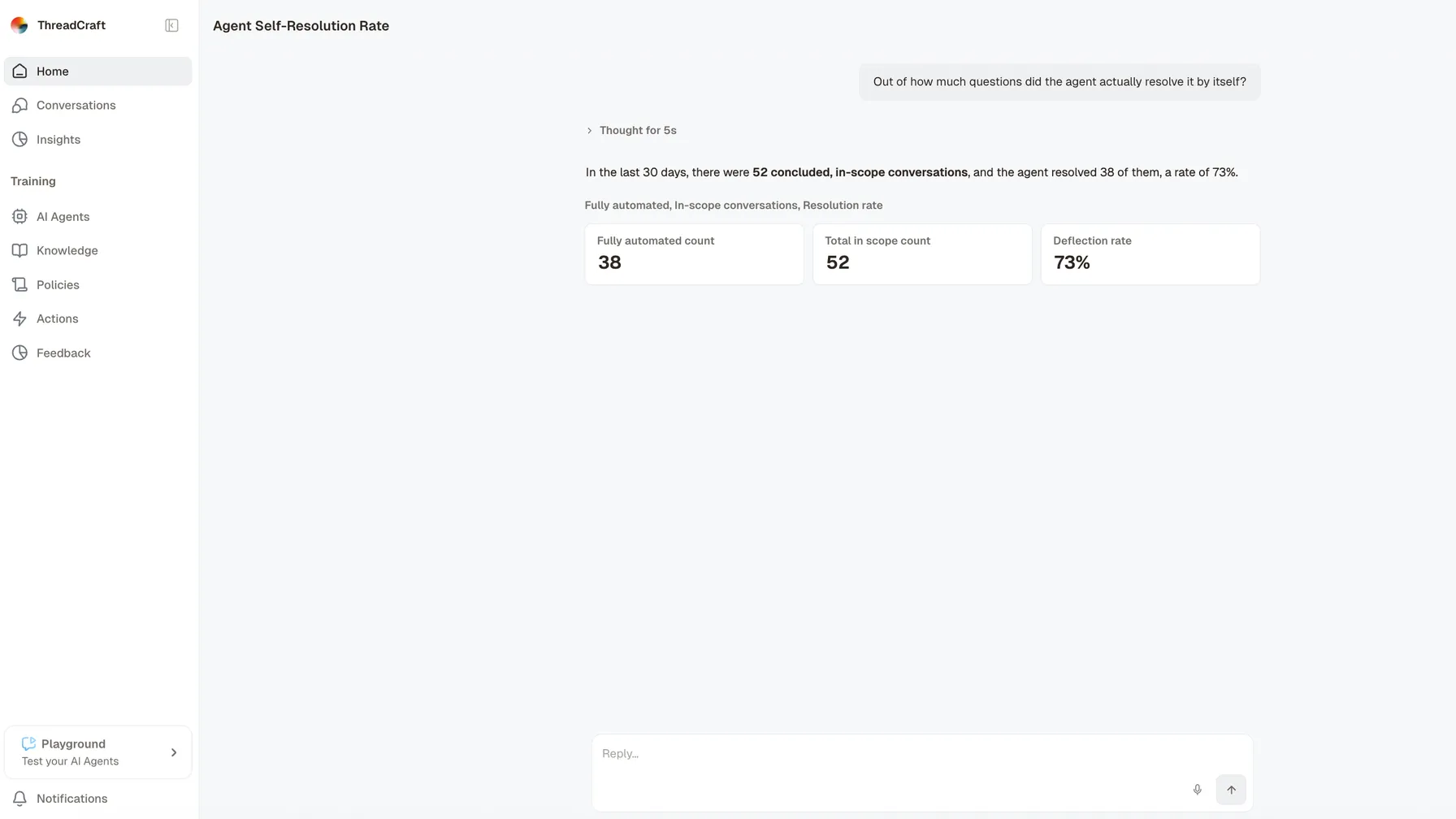
Engaige AI answering the question of how many of the incoming questions the agent resolved on its own. It reports that over the last thirty days there were 52 concluded, in-scope conversations and that the agent resolved 38 of them by itself, a rate of 73 per cent, and repeats the three figures as cards beneath: the number fully automated, the total in scope, and the rate itself.

The Coverage view answers the question every support lead asks first: of everything that came in, how much did the agent actually take? It shows the share it handled end to end, the share it forwarded, and the reason it forwarded each one, so the number you report is one you can trace rather than one you estimate.

Forwarded conversations used to be missing from Insights altogether, which made every coverage figure quietly optimistic. They are counted now, and grouped by why they left the agent, so the gap between what it handles and what it could handle is the thing you are looking at.

Point a knowledge folder at your website

A knowledge folder can now be pointed at your sitemap instead of pasting page URLs one at a time. Engaige reads the sitemap, picks up the pages behind it, and keeps the folder in step as the site changes, so the answers the agent gives come from what your site says today.

A folder that fails to sync says so on the folder itself, rather than going quiet and leaving the agent to answer from something stale.

Decide step by step what the agent handles on its own

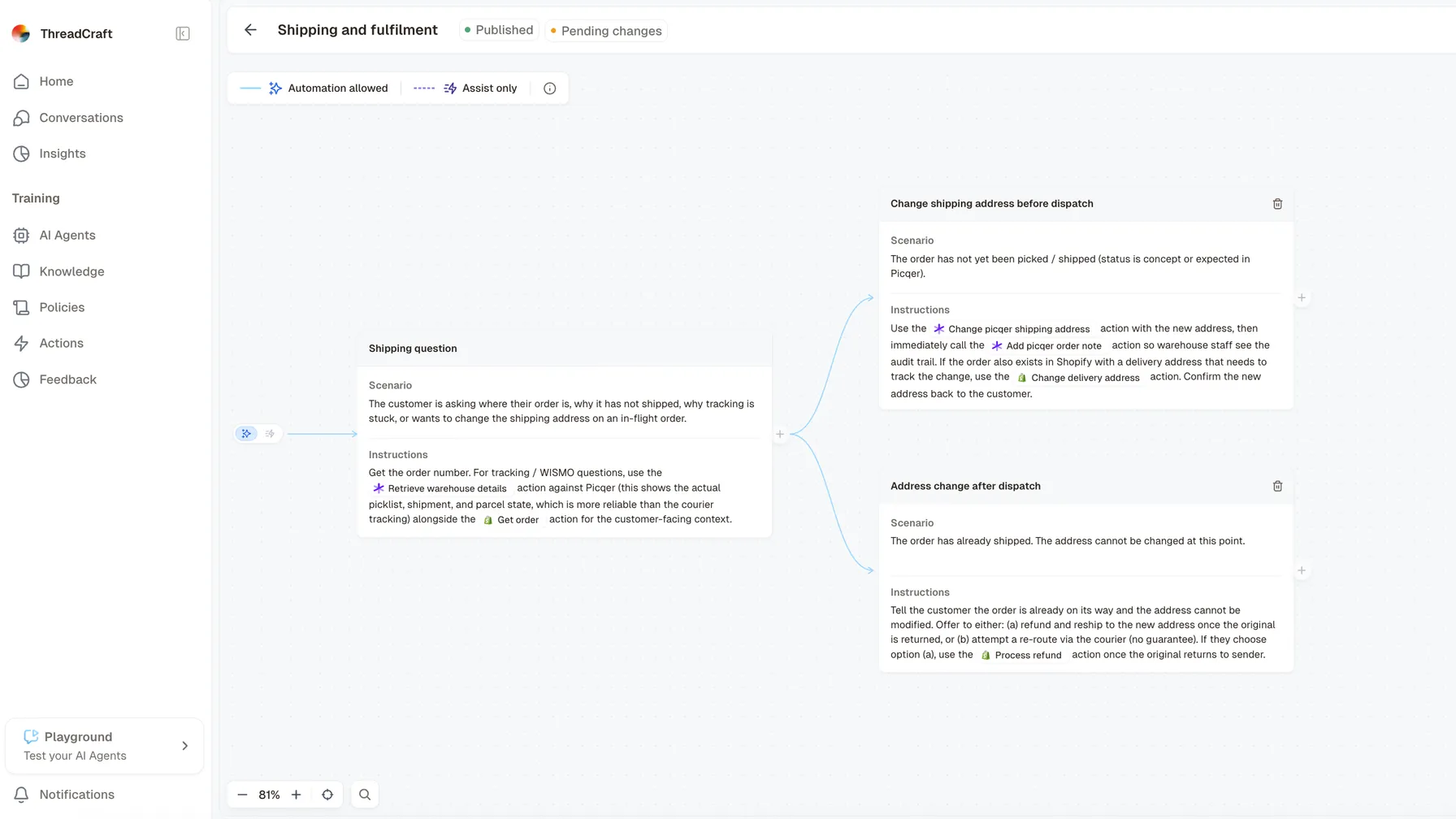
The policy builder for a policy about shipping questions. A legend across the top names the two modes a step can be set to: a solid blue line with a sparkle icon for automation allowed, and a dotted purple line with a lightning icon for assist only. Below it a root step, describing a customer asking where an order is, branches out; the view is scrolled to two of those branches, one for changing the shipping address before dispatch and one for handling an address change after it has shipped. Each card carries the scenario it covers and the instructions the agent follows, naming the actions it may call.

Customers wanted finer control: the agent takes one part of a request while a person takes another. Every What this meansOne instruction inside a policy, like a single line in a set of instructions for your team. in a What this meansA set of instructions you write for how the agent should handle one kind of request, such as a return or a late delivery. can now be marked What this meansThe agent answers the customer itself, without waiting for someone on your team to check the reply first. or What this meansThe agent writes a reply and leaves it for someone on your team to send, change or discard.. When the agent is working on its own and reaches a step marked assist, it passes the conversation to a person at that exact point instead of carrying on.

So a refund inside the window you allow can run unattended, while the exception one step below it always reaches a colleague. Where that line sat used to depend on the agent's own judgement about when to ask for help. It now sits in the instructions you wrote, which means you can put it where you want it and see where it currently runs.

Improvements 6
  • Policies Move a whole branch to assist, or a path back to autonomous, in one action, so changing where the line sits is a decision and not an afternoon
  • Policies A heads-up when an agent has steps marked autonomous but nothing set up that lets it act on them, so the gap shows up before a customer meets it
  • Policies Existing policies were set to match how their agent already worked, so nothing changed on the day for anyone
  • Platform New messages from your What this meansThe tool your team already answers customers in, such as Gorgias, Zendesk or Trengo. Engaige works inside it rather than replacing it. reach the agent by a quicker route, so it starts on a ticket sooner after it arrives
  • Policies Find and replace across a What this meansA set of instructions you write for how the agent should handle one kind of request, such as a return or a late delivery., with a preview of every change before you commit it, so correcting a phrase everywhere is one edit rather than an afternoon
  • Insights Insights can be reported in Singapore time, so teams there read their numbers in their own day

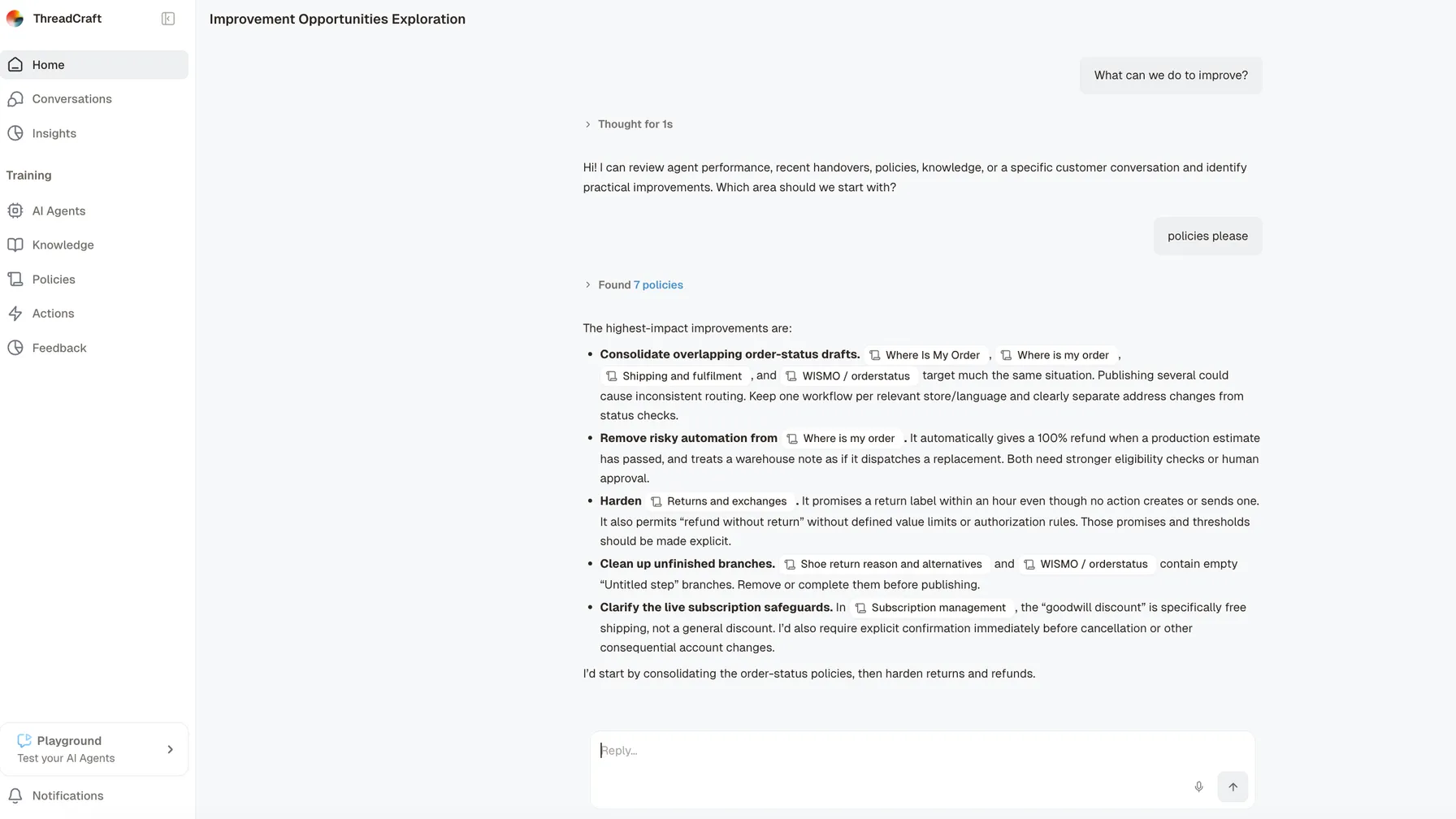
Engaige AI tells you what to improve next

Engaige AI answering the question ‘What can we do to improve?’. It offers to review agent performance, recent handovers, policies, knowledge or a single customer conversation, is asked for policies, reports that it found seven, and lists the five it rates highest: consolidating four policies that all cover order-status questions, removing an automation that refunds in full whenever a production estimate has passed, hardening a returns policy that promises a label no action sends, clearing empty untitled steps out of two policies, and correcting a discount described as goodwill when the configured one is free shipping. It closes by naming the two it would start with.

Knowing that the agent could do better is the easy part. Knowing what to change means reading conversations, and that was work you had to do yourself. Engaige AI now reads your own support history and comes back with what to change: the gaps in your instructions behind repeated What this meansThe moment the agent stops answering by itself and gives the conversation to a person., the What this meansThe documents and answers you give the agent to work from, such as your returns page or a product manual. it turns out to be missing, and the answers your team keeps rewriting. Its strongest signal is the difference between what the agent drafted and what your colleague actually sent, taken across many similar conversations rather than judged one message at a time.

Suggestions arrive as cards you approve or set aside, and nothing is applied on your behalf. Engaige AI then checks quietly whether the thing behind an approved card really did go away, so over time it gets better at knowing which suggestions are worth your attention.

A new agent gets the same treatment. Once enough of your past tickets are in, Engaige AI works through them and proposes the instructions and What this meansThe documents and answers you give the agent to work from, such as your returns page or a product manual. to open with, so nobody starts from an empty setup.

Engaige AI links to what it names

Checking a suggestion used to mean leaving the conversation and looking the item up by hand. When Engaige AI now mentions a What this meansA set of instructions you write for how the agent should handle one kind of request, such as a return or a late delivery. or a conversation, it appears as a small button that opens the real thing, and other references it names are labelled with what they are. More of them become buttons as we go.

Answers that draw on many conversations at once

The two specialists behind Engaige AI, the one that digs through conversations and the one that writes instructions, now run as separate helpers it hands work to. The one that digs can take on many conversations in a single turn instead of working through them one after another, so a question about a pattern comes back in one answer rather than one conversation at a time.

Improvements 1
  • Inbox The conversation screen moved onto our own interface, and the What this meansThe record of how the agent reached a reply: which policy it followed, which data it read, and what it decided. behind each reply was reworked while we were in there, so what the agent did is easier to follow

Ecomflow connected

Shops fulfilling through Ecomflow can connect it so the agent looks up shipment details, tracks a parcel and searches stock, instead of a colleague doing that in a second screen.

Actions and improvements 3
  • Action Look up a shipment, so the agent can pull the shipment behind an order
  • Action Track a parcel, so the agent can give the carrier's latest position
  • Action Search stock, so the agent can check what is available in the warehouse

QLS connected

Shops shipping with QLS can connect it so the agent pulls the fulfilment picture for an order, warehouse side included, and the details of a specific shipment. A delivery question is answered from what QLS actually knows rather than from the last status a colleague remembers.

Actions and improvements 2
  • Action Retrieve the fulfilment picture, so the agent can read what the warehouse knows about an order
  • Action Look up a shipment, so the agent can give the details of one specific shipment

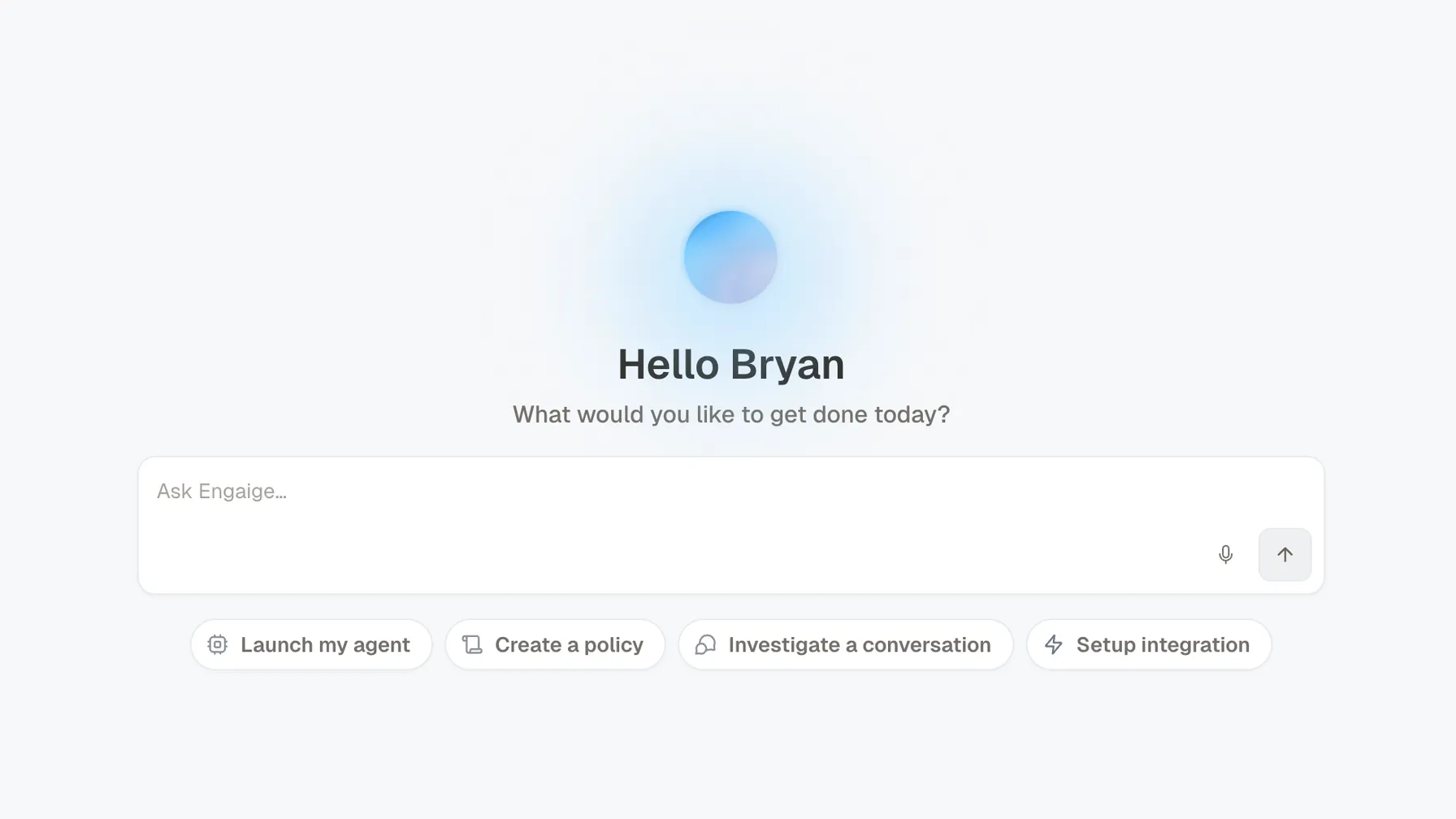
Engaige AI is the home screen

The Engaige home screen: a greeting, an Ask Engaige box, and four ready-made prompts for launching an agent, creating a policy, investigating a conversation and setting up an integration.

Signing in used to open a dashboard that showed you numbers and left the next move to you. It now opens Engaige AI, with what to improve next, the questions you ask most as ready-made prompts, your earlier conversations, and the drafts waiting on you, which you can approve without going anywhere else.

The point of it is that improving the agent and running it happen in the same place. You read what Engaige AI found, open the What this meansA set of instructions you write for how the agent should handle one kind of request, such as a return or a late delivery. or the conversation behind it, and act on it there.

One agent that hands over and keeps helping

One agent can now answer on its own, pass a conversation to a colleague, and carry on drafting replies inside that same conversation. Answering on its own and helping your team used to be two separate setups, so a conversation that changed hands changed agent with it. It is also what makes both starting points the same product: begin with the agent drafting for your team and let it take work over as it earns it, or let it answer on its own from day one and step back to a person where you say so.

An email when something needs you

Choose to be emailed about the few things worth hearing the same day: the agent running into more trouble than usual, a connection to another system about to expire, and What this meansSomething the agent actually does in another system, such as issuing a refund or changing a delivery address, as opposed to something it says. that are not going through.

Improvements 3
  • Agent What this meansHow the agent looks through your documents to find the passage that answers the question in front of it. moved to a new engine, which improved which of your documents the agent finds
  • Agent An agent and the channel it answers in became one thing to set up, so there is a single place for it instead of two
  • Agent The agent setup screen was rebuilt around the settings people actually change, so the ones you need are not buried

Logic4 connected

Connect Logic4 and the agent works in it directly, so it can retrieve an order by its order number and look up a customer by email address, instead of a colleague opening a second screen to find out.

Actions and improvements 2
  • Action Get order, so the agent can retrieve an order by its order number
  • Action Get customer, so the agent can look up a customer by email address

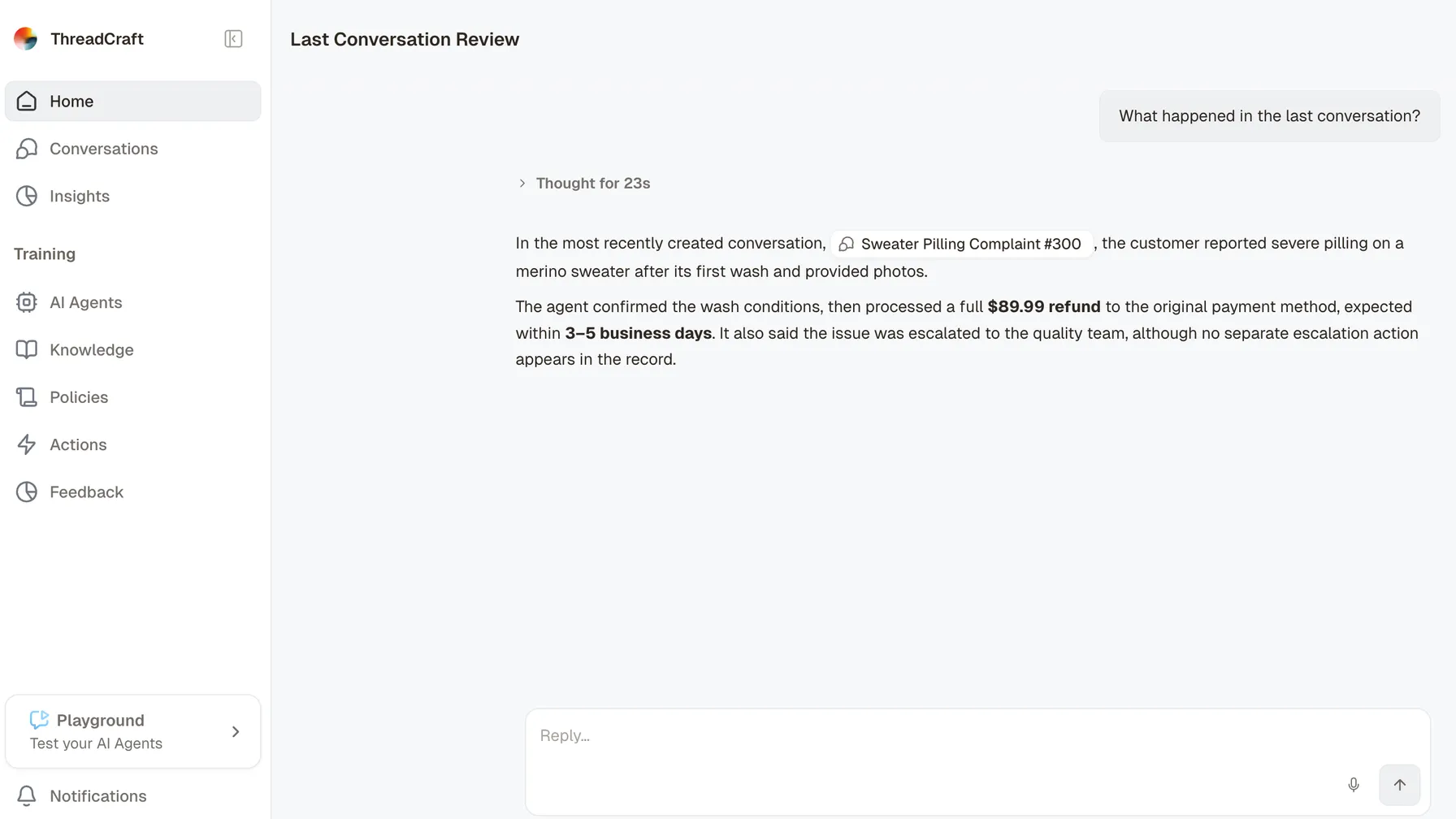
Ask what happened in a conversation

Engaige AI answering the question ‘What happened in the last conversation?’. Above the answer sits a collapsed step reading ‘Thought for 23s’. The answer names the conversation it is about, then reports that the customer described severe pilling on a merino sweater after its first wash and sent photos, that the agent confirmed the wash conditions and refunded the order in full to the original payment method within three to five business days, and that the agent said the issue was escalated to the quality team although no separate escalation action appears in the record.

Ask Engaige AI what happened in any conversation and it comes back in plain language: what the customer wanted, what the agent did, which What this meansA set of instructions you write for how the agent should handle one kind of request, such as a return or a late delivery. it followed and where it handed over. You get the account of it without reading the thread yourself.

It is the fastest way into a conversation you want to understand. Instead of scrolling to find the moment, you ask, and then open the What this meansA set of instructions you write for how the agent should handle one kind of request, such as a return or a late delivery. or the step behind the answer from there.

Adobe Commerce connected

Connect Adobe Commerce and the agent works in it directly, so it can retrieve an order with its full details and find all of a customer's orders by email address, instead of a colleague opening a second screen to find out.

Actions and improvements 8
  • Action Get order, so the agent can retrieve an order with its full details
  • Action Get customer orders, so the agent can find all of a customer's orders
  • Action Cancel order, so the agent can cancel an order while it is still
  • Action Create discount code, so the agent can generate a coupon code from a sales
  • Action Create online credit note, so the agent can refund a customer through the original payment
  • Action Create offline credit note, so the agent can issue a manual credit memo without contacting
  • Action Send invoice, so the agent can email the order invoice to the customer
  • Action Unsubscribe from newsletter, so the agent can remove a customer from the newsletter

Belco connected

Engaige works inside Belco: it answers in the channel your team already uses, and hands a conversation to a colleague where your policies say so.

Actions and improvements 7
  • Action Replies in-channel, so the agent can answer on the customer's own channel inside Belco: email, live chat, WhatsApp and social messages
  • Action Claims and owns tickets, so the agent can take ownership of the tickets it handles, or draft without claiming so your team stays in control and sends
  • Action Tags and labels tickets, so the agent can apply tags so your existing Belco views, workflows and automations keep firing exactly as they do today
  • Action Assigns and routes, so the agent can route a ticket to the right team or queue when it belongs elsewhere, instead of leaving it stuck
  • Action Adds internal notes, so the agent can leave private notes for your team and log what it did on the ticket, so there is a clear trail
  • Action Hands a ticket to a colleague, so the agent can escalate with a full summary and the right tags the moment a ticket needs a person, with no context lost
  • Action Closes and resolves, so the agent can mark a ticket resolved once it is handled, keeping your inbox clean

Front connected

Engaige works inside Front: it answers in the channel your team already uses, and hands a conversation to a colleague where your policies say so.

Actions and improvements 7
  • Action Replies in-channel, so the agent can answer on the customer's own channel inside Front: email, live chat, WhatsApp and social messages
  • Action Claims and owns tickets, so the agent can take ownership of the tickets it handles, or draft without claiming so your team stays in control and sends
  • Action Tags and labels tickets, so the agent can apply tags so your existing Front views, workflows and automations keep firing exactly as they do today
  • Action Assigns and routes, so the agent can route a ticket to the right team or queue when it belongs elsewhere, instead of leaving it stuck
  • Action Adds internal notes, so the agent can leave private notes for your team and log what it did on the ticket, so there is a clear trail
  • Action Hands a ticket to a colleague, so the agent can escalate with a full summary and the right tags the moment a ticket needs a person, with no context lost
  • Action Closes and resolves, so the agent can mark a ticket resolved once it is handled, keeping your inbox clean

Skio connected

Connect Skio and the agent works in it directly, so it can retrieve a customer's subscriptions by email address and change quantity, price, or product variant on a subscription, instead of a colleague opening a second screen to find out.

Actions and improvements 3
  • Improvement New ready-made What this meansSomething the agent actually does in another system, such as issuing a refund or changing a delivery address, as opposed to something it says. for Skio subscriptions, Shopify tags, Loop return links, outbound Gorgias email and Sendcloud returns, so the agent can finish those requests itself instead of handing them over
  • Action Get customer subscriptions, so the agent can retrieve a customer's subscriptions by email address
  • Action Update subscription, so the agent can change quantity

WooCommerce connected

Connect WooCommerce and the agent works in it directly, so it can retrieve a specific order from your store and pull up a customer's recent orders by email address, instead of a colleague opening a second screen to find out.

Actions and improvements 2
  • Action Get order, so the agent can retrieve a specific order from your store
  • Action Get customer orders, so the agent can pull up a customer's recent orders

Returnless connected

Connect Returnless and the agent works in it directly, so it can find any return by order number plus email or postcode, and answer instantly on status, items, compensation and refund details and give live tracking on the return shipment, down to confirming that it has arrived at your warehouse, instead of a colleague opening a second screen to find out.

Actions and improvements 7
  • Improvement Returnless connects through its App Store instead of a pasted API key, so setup no longer means copying a secret between two tabs, and existing connections keep working
  • Action Look up a return, so the agent can find any return by order number
  • Action Track the return parcel, so the agent can give live tracking on the return shipment
  • Action Check what the return flow allows, so the agent can verify the order and the requester
  • Action Start a return in the conversation, so the agent can create the return directly in Returnless
  • Action Send the return label again, so the agent can re-send a lost or expired label
  • Action Approve, reject or update a return, so the agent can set the request outcome and update return

Recharge connected

Connect Recharge and the agent works in it directly, so it can pull up a customer's subscriptions and schedule and update the shipping address on a subscription, instead of a colleague opening a second screen to find out.

Actions and improvements 2
  • Action Get customer subscriptions, so the agent can pull up a customer's subscriptions and schedule
  • Action Change subscription address, so the agent can update the shipping address on a subscription

Picqer connected

Connect Picqer and the agent works in it directly, so it can look up the order, picklist, shipments, backorders, and returns in the warehouse and check live stock levels, instead of a colleague opening a second screen to find out.

Actions and improvements 7
  • Improvement Order lookup can fall back to the webshop order number for Picqer and Monta shops, so a customer quoting the number on their confirmation email is found
  • Action Retrieve warehouse details, so the agent can look up the order
  • Action Get stock, so the agent can check live stock levels
  • Action Add order note, so the agent can add a note or comment
  • Action Change shipping address, so the agent can update the shipping address on an order
  • Action Pause order, so the agent can put an order on hold
  • Action Cancel shipment, so the agent can cancel an order that has not been

Loop Returns connected

Connect Loop Returns and the agent works in it directly, so it can look up a return by order name and customer email and flag a return for human review and add an explanatory note, instead of a colleague opening a second screen to find out.

Actions and improvements 3
  • Action Get return details, so the agent can look up a return by order name
  • Action Flag return, so the agent can flag a return for human review
  • Action Cancel return, so the agent can cancel a return by its ID

Juo connected

Connect Juo and the agent works in it directly, so it can pull up a customer's subscriptions, schedule, and next delivery and skip one of a customer's upcoming orders, instead of a colleague opening a second screen to find out.

Actions and improvements 12
  • Action Get customer subscriptions, so the agent can pull up a customer's subscriptions
  • Action Skip order, so the agent can skip one of a customer's upcoming orders
  • Action Reschedule upcoming order, so the agent can move an upcoming order to a new
  • Action Update order address, so the agent can change the shipping address on an upcoming
  • Action Apply order discount, so the agent can apply a discount to an upcoming order
  • Action Update order products, so the agent can change the products or quantities
  • Action Cancel subscription, so the agent can cancel one of the customer's subscriptions
  • Action Reactivate subscription, so the agent can bring a cancelled subscription back to life
  • Action Pause subscription, so the agent can pause a subscription
  • Action Resume subscription, so the agent can resume a customer's paused subscription
  • Action Change subscription address, so the agent can update the delivery address for a whole
  • Action Update subscription items, so the agent can add items

Kustomer connected

Engaige works inside Kustomer: it answers in the channel your team already uses, and hands a conversation to a colleague where your policies say so.

Actions and improvements 7
  • Action Replies in-channel, so the agent can answer on the customer's own channel inside Kustomer: email, live chat, WhatsApp and social messages
  • Action Claims and owns tickets, so the agent can take ownership of the tickets it handles, or draft without claiming so your team stays in control and sends
  • Action Tags and labels tickets, so the agent can apply tags so your existing Kustomer views, workflows and automations keep firing exactly as they do today
  • Action Assigns and routes, so the agent can route a ticket to the right team or queue when it belongs elsewhere, instead of leaving it stuck
  • Action Adds internal notes, so the agent can leave private notes for your team and log what it did on the ticket, so there is a clear trail
  • Action Hands a ticket to a colleague, so the agent can escalate with a full summary and the right tags the moment a ticket needs a person, with no context lost
  • Action Closes and resolves, so the agent can mark a ticket resolved once it is handled, keeping your inbox clean

Shopify connected

Connect Shopify and the agent works in it directly, so it can pull any order with line items, SKUs, prices in the customer's currency, discounts, financial and fulfilment status, shipping address, tags, and fulfilment tracking (carrier, number, status, URL) and look up a customer by email, with their profile and linked orders, instead of a colleague opening a second screen to find out.

Actions and improvements 13
  • Improvement Shopify order lookups say which items were free and what is still refundable per item, so a refund is worked out from what the customer actually paid
  • Action Get order, so the agent can pull any order with line items
  • Action Get customer, so the agent can look up a customer by email
  • Action Get customer orders, so the agent can see a customer's most recent orders
  • Action Search products, so the agent can search the live catalogue by title
  • Action Get product details, so the agent can check variants
  • Action Issue refund, so the agent can refund in full
  • Action Cancel order, so the agent can cancel an unfulfilled order with optional refund
  • Action Change delivery address, so the agent can update the shipping address on an order
  • Action Apply a discount, so the agent can add the customer to an existing discount
  • Action Add tag, so the agent can tag an order or customer
  • Action Send order invoice, so the agent can email an invoice for an unpaid
  • Action Send account invite, so the agent can invite a guest shopper to create

Trengo connected

Engaige works inside Trengo: it answers in the channel your team already uses, and hands a conversation to a colleague where your policies say so.

Actions and improvements 7
  • Action Replies in-channel, so the agent can answer on the customer's own channel inside Trengo: email, live chat, WhatsApp and social messages
  • Action Claims and owns tickets, so the agent can take ownership of the tickets it handles, or draft without claiming so your team stays in control and sends
  • Action Tags and labels tickets, so the agent can apply tags so your existing Trengo views, workflows and automations keep firing exactly as they do today
  • Action Assigns and routes, so the agent can route a ticket to the right team or queue when it belongs elsewhere, instead of leaving it stuck
  • Action Adds internal notes, so the agent can leave private notes for your team and log what it did on the ticket, so there is a clear trail
  • Action Hands a ticket to a colleague, so the agent can escalate with a full summary and the right tags the moment a ticket needs a person, with no context lost
  • Action Closes and resolves, so the agent can mark a ticket resolved once it is handled, keeping your inbox clean

Freshdesk connected

Engaige works inside Freshdesk: it answers in the channel your team already uses, and hands a conversation to a colleague where your policies say so.

Actions and improvements 8
  • Improvement Freshdesk What this meansThe moment the agent stops answering by itself and gives the conversation to a person. tickets can be formatted the way your team reads them, so the colleague picking one up finds what they need where they expect it
  • Action Replies in-channel, so the agent can answer on the customer's own channel inside Freshdesk: email, live chat, WhatsApp and social messages
  • Action Claims and owns tickets, so the agent can take ownership of the tickets it handles, or draft without claiming so your team stays in control and sends
  • Action Tags and labels tickets, so the agent can apply tags so your existing Freshdesk views, workflows and automations keep firing exactly as they do today
  • Action Assigns and routes, so the agent can route a ticket to the right team or queue when it belongs elsewhere, instead of leaving it stuck
  • Action Adds internal notes, so the agent can leave private notes for your team and log what it did on the ticket, so there is a clear trail
  • Action Hands a ticket to a colleague, so the agent can escalate with a full summary and the right tags the moment a ticket needs a person, with no context lost
  • Action Closes and resolves, so the agent can mark a ticket resolved once it is handled, keeping your inbox clean

ReturnGO connected

Connect ReturnGO and the agent works in it directly, so it can list a customer's returns (RMAs) and get the details of a single return, instead of a colleague opening a second screen to find out.

Actions and improvements 2
  • Action Get customer returns, so the agent can list a customer's returns (RMAs)
  • Action Get return details, so the agent can get the details of a single return

Zendesk connected

Engaige works inside Zendesk: it answers in the channel your team already uses, and hands a conversation to a colleague where your policies say so.

Actions and improvements 8
  • Improvement A workspace can hold more than one Zendesk connection, so shops running separate Zendesk instances no longer have to choose
  • Action Replies in-channel, so the agent can answer on the customer's own channel inside Zendesk: email, live chat, WhatsApp and social messages
  • Action Claims and owns tickets, so the agent can take ownership of the tickets it handles, or draft without claiming so your team stays in control and sends
  • Action Tags and labels tickets, so the agent can apply tags so your existing Zendesk views, workflows and automations keep firing exactly as they do today
  • Action Assigns and routes, so the agent can route a ticket to the right team or queue when it belongs elsewhere, instead of leaving it stuck
  • Action Adds internal notes, so the agent can leave private notes for your team and log what it did on the ticket, so there is a clear trail
  • Action Hands a ticket to a colleague, so the agent can escalate with a full summary and the right tags the moment a ticket needs a person, with no context lost
  • Action Closes and resolves, so the agent can mark a ticket resolved once it is handled, keeping your inbox clean

ShopWeDo connected

Connect ShopWeDo and the agent works in it directly, so it can retrieve order details by Shopify order ID and cancel an order before fulfilment starts, instead of a colleague opening a second screen to find out.

Actions and improvements 2
  • Action Get order, so the agent can retrieve order details by Shopify order ID
  • Action Cancel order, so the agent can cancel an order before fulfilment starts

Salesforce Service Cloud connected

Engaige works inside Salesforce Service Cloud: it answers in the channel your team already uses, and hands a conversation to a colleague where your policies say so.

Actions and improvements 7
  • Action Replies in-channel, so the agent can answer on the customer's own channel inside Salesforce Service Cloud: email, live chat, WhatsApp and social messages
  • Action Claims and owns tickets, so the agent can take ownership of the tickets it handles, or draft without claiming so your team stays in control and sends
  • Action Tags and labels tickets, so the agent can apply tags so your existing Salesforce Service Cloud views, workflows and automations keep firing exactly as they do today
  • Action Assigns and routes, so the agent can route a ticket to the right team or queue when it belongs elsewhere, instead of leaving it stuck
  • Action Adds internal notes, so the agent can leave private notes for your team and log what it did on the ticket, so there is a clear trail
  • Action Hands a ticket to a colleague, so the agent can escalate with a full summary and the right tags the moment a ticket needs a person, with no context lost
  • Action Closes and resolves, so the agent can mark a ticket resolved once it is handled, keeping your inbox clean

Richpanel connected

Engaige works inside Richpanel: it answers in the channel your team already uses, and hands a conversation to a colleague where your policies say so.

Actions and improvements 8
  • Improvement The agent reads attachments on Richpanel and on Gorgias WhatsApp conversations, inline images and chat files included, so a photo of the problem is part of the conversation it works from
  • Action Replies in-channel, so the agent can answer on the customer's own channel inside Richpanel: email, live chat, WhatsApp and social messages
  • Action Claims and owns tickets, so the agent can take ownership of the tickets it handles, or draft without claiming so your team stays in control and sends
  • Action Tags and labels tickets, so the agent can apply tags so your existing Richpanel views, workflows and automations keep firing exactly as they do today
  • Action Assigns and routes, so the agent can route a ticket to the right team or queue when it belongs elsewhere, instead of leaving it stuck
  • Action Adds internal notes, so the agent can leave private notes for your team and log what it did on the ticket, so there is a clear trail
  • Action Hands a ticket to a colleague, so the agent can escalate with a full summary and the right tags the moment a ticket needs a person, with no context lost
  • Action Closes and resolves, so the agent can mark a ticket resolved once it is handled, keeping your inbox clean

CM.com connected

Engaige works inside CM.com: it answers in the channel your team already uses, and hands a conversation to a colleague where your policies say so.

Actions and improvements 7
  • Action Replies in-channel, so the agent can answer on the customer's own channel inside CM.com: email, live chat, WhatsApp and social messages
  • Action Claims and owns tickets, so the agent can take ownership of the tickets it handles, or draft without claiming so your team stays in control and sends
  • Action Tags and labels tickets, so the agent can apply tags so your existing CM.com views, workflows and automations keep firing exactly as they do today
  • Action Assigns and routes, so the agent can route a ticket to the right team or queue when it belongs elsewhere, instead of leaving it stuck
  • Action Adds internal notes, so the agent can leave private notes for your team and log what it did on the ticket, so there is a clear trail
  • Action Hands a ticket to a colleague, so the agent can escalate with a full summary and the right tags the moment a ticket needs a person, with no context lost
  • Action Closes and resolves, so the agent can mark a ticket resolved once it is handled, keeping your inbox clean

Re:amaze connected

Engaige works inside Re:amaze: it answers in the channel your team already uses, and hands a conversation to a colleague where your policies say so.

Actions and improvements 7
  • Action Replies in-channel, so the agent can answer on the customer's own channel inside Re:amaze: email, live chat, WhatsApp and social messages
  • Action Claims and owns tickets, so the agent can take ownership of the tickets it handles, or draft without claiming so your team stays in control and sends
  • Action Tags and labels tickets, so the agent can apply tags so your existing Re:amaze views, workflows and automations keep firing exactly as they do today
  • Action Assigns and routes, so the agent can route a ticket to the right team or queue when it belongs elsewhere, instead of leaving it stuck
  • Action Adds internal notes, so the agent can leave private notes for your team and log what it did on the ticket, so there is a clear trail
  • Action Hands a ticket to a colleague, so the agent can escalate with a full summary and the right tags the moment a ticket needs a person, with no context lost
  • Action Closes and resolves, so the agent can mark a ticket resolved once it is handled, keeping your inbox clean

Help Scout connected

Engaige works inside Help Scout: it answers in the channel your team already uses, and hands a conversation to a colleague where your policies say so.

Actions and improvements 7
  • Action Replies in-channel, so the agent can answer on the customer's own channel inside Help Scout: email, live chat, WhatsApp and social messages
  • Action Claims and owns tickets, so the agent can take ownership of the tickets it handles, or draft without claiming so your team stays in control and sends
  • Action Tags and labels tickets, so the agent can apply tags so your existing Help Scout views, workflows and automations keep firing exactly as they do today
  • Action Assigns and routes, so the agent can route a ticket to the right team or queue when it belongs elsewhere, instead of leaving it stuck
  • Action Adds internal notes, so the agent can leave private notes for your team and log what it did on the ticket, so there is a clear trail
  • Action Hands a ticket to a colleague, so the agent can escalate with a full summary and the right tags the moment a ticket needs a person, with no context lost
  • Action Closes and resolves, so the agent can mark a ticket resolved once it is handled, keeping your inbox clean

HubSpot connected

Engaige works inside HubSpot: it answers in the channel your team already uses, and hands a conversation to a colleague where your policies say so.

Actions and improvements 7
  • Action Replies in-channel, so the agent can answer on the customer's own channel inside HubSpot: email, live chat, WhatsApp and social messages
  • Action Claims and owns tickets, so the agent can take ownership of the tickets it handles, or draft without claiming so your team stays in control and sends
  • Action Tags and labels tickets, so the agent can apply tags so your existing HubSpot views, workflows and automations keep firing exactly as they do today
  • Action Assigns and routes, so the agent can route a ticket to the right team or queue when it belongs elsewhere, instead of leaving it stuck
  • Action Adds internal notes, so the agent can leave private notes for your team and log what it did on the ticket, so there is a clear trail
  • Action Hands a ticket to a colleague, so the agent can escalate with a full summary and the right tags the moment a ticket needs a person, with no context lost
  • Action Closes and resolves, so the agent can mark a ticket resolved once it is handled, keeping your inbox clean

Next Chapter connected

Connect Next Chapter and the agent works in it directly, so it can retrieve order details by order code and customer email, instead of a colleague opening a second screen to find out.

Actions and improvements 1
  • Action Get order, so the agent can retrieve order details by order code

Intercom connected

Engaige works inside Intercom: it answers in the channel your team already uses, and hands a conversation to a colleague where your policies say so.

Actions and improvements 7
  • Action Replies in-channel, so the agent can answer on the customer's own channel inside Intercom: email, live chat, WhatsApp and social messages
  • Action Claims and owns tickets, so the agent can take ownership of the tickets it handles, or draft without claiming so your team stays in control and sends
  • Action Tags and labels tickets, so the agent can apply tags so your existing Intercom views, workflows and automations keep firing exactly as they do today
  • Action Assigns and routes, so the agent can route a ticket to the right team or queue when it belongs elsewhere, instead of leaving it stuck
  • Action Adds internal notes, so the agent can leave private notes for your team and log what it did on the ticket, so there is a clear trail
  • Action Hands a ticket to a colleague, so the agent can escalate with a full summary and the right tags the moment a ticket needs a person, with no context lost
  • Action Closes and resolves, so the agent can mark a ticket resolved once it is handled, keeping your inbox clean

Gorgias connected

Engaige works inside Gorgias: it answers in the channel your team already uses, and hands a conversation to a colleague where your policies say so.

Actions and improvements 8
  • Improvement Gorgias shows an Engaige card in the ticket sidebar, so your team opens the full conversation from the ticket they are already looking at
  • Action Replies in-channel, so the agent can answer on the customer's own channel inside Gorgias: email, live chat, WhatsApp and social messages
  • Action Claims and owns tickets, so the agent can take ownership of the tickets it handles, or draft without claiming so your team stays in control and sends
  • Action Tags and labels tickets, so the agent can apply tags so your existing Gorgias views, workflows and automations keep firing exactly as they do today
  • Action Assigns and routes, so the agent can route a ticket to the right team or queue when it belongs elsewhere, instead of leaving it stuck
  • Action Adds internal notes, so the agent can leave private notes for your team and log what it did on the ticket, so there is a clear trail
  • Action Hands a ticket to a colleague, so the agent can escalate with a full summary and the right tags the moment a ticket needs a person, with no context lost
  • Action Closes and resolves, so the agent can mark a ticket resolved once it is handled, keeping your inbox clean

Rever connected

Connect Rever and the agent works in it directly, so it can look up returns and their progress by order ID and customer email, instead of a colleague opening a second screen to find out.

Actions and improvements 1
  • Action Get returns, so the agent can look up returns and their progress

Monta connected

Connect Monta and the agent works in it directly, so it can pull up an order with its fulfilment status and update the delivery address on an order, instead of a colleague opening a second screen to find out.

Actions and improvements 4
  • Action Retrieve order details, so the agent can pull up an order with its fulfilment
  • Action Change delivery address, so the agent can update the delivery address on an order
  • Action Cancel shipment, so the agent can cancel a shipment
  • Action Unblock order, so the agent can release a blocked order so it can

eDesk connected

Engaige works inside eDesk: it answers in the channel your team already uses, and hands a conversation to a colleague where your policies say so.

Actions and improvements 7
  • Action Replies in-channel, so the agent can answer on the customer's own channel inside eDesk: email, live chat, WhatsApp and social messages
  • Action Claims and owns tickets, so the agent can take ownership of the tickets it handles, or draft without claiming so your team stays in control and sends
  • Action Tags and labels tickets, so the agent can apply tags so your existing eDesk views, workflows and automations keep firing exactly as they do today
  • Action Assigns and routes, so the agent can route a ticket to the right team or queue when it belongs elsewhere, instead of leaving it stuck
  • Action Adds internal notes, so the agent can leave private notes for your team and log what it did on the ticket, so there is a clear trail
  • Action Hands a ticket to a colleague, so the agent can escalate with a full summary and the right tags the moment a ticket needs a person, with no context lost
  • Action Closes and resolves, so the agent can mark a ticket resolved once it is handled, keeping your inbox clean

SendCloud connected

Connect SendCloud and the agent works in it directly, so it can pull up an order with its outbound shipments and get the latest tracking events for a parcel, instead of a colleague opening a second screen to find out.

Actions and improvements 2
  • Action Retrieve order details, so the agent can pull up an order with its outbound
  • Action Track parcel, so the agent can get the latest tracking events

Dixa connected

Engaige works inside Dixa: it answers in the channel your team already uses, and hands a conversation to a colleague where your policies say so.

Actions and improvements 7
  • Action Replies in-channel, so the agent can answer on the customer's own channel inside Dixa: email, live chat, WhatsApp and social messages
  • Action Claims and owns tickets, so the agent can take ownership of the tickets it handles, or draft without claiming so your team stays in control and sends
  • Action Tags and labels tickets, so the agent can apply tags so your existing Dixa views, workflows and automations keep firing exactly as they do today
  • Action Assigns and routes, so the agent can route a ticket to the right team or queue when it belongs elsewhere, instead of leaving it stuck
  • Action Adds internal notes, so the agent can leave private notes for your team and log what it did on the ticket, so there is a clear trail
  • Action Hands a ticket to a colleague, so the agent can escalate with a full summary and the right tags the moment a ticket needs a person, with no context lost
  • Action Closes and resolves, so the agent can mark a ticket resolved once it is handled, keeping your inbox clean

Crisp connected

Engaige works inside Crisp: it answers in the channel your team already uses, and hands a conversation to a colleague where your policies say so.

Actions and improvements 7
  • Action Replies in-channel, so the agent can answer on the customer's own channel inside Crisp: email, live chat, WhatsApp and social messages
  • Action Claims and owns tickets, so the agent can take ownership of the tickets it handles, or draft without claiming so your team stays in control and sends
  • Action Tags and labels tickets, so the agent can apply tags so your existing Crisp views, workflows and automations keep firing exactly as they do today
  • Action Assigns and routes, so the agent can route a ticket to the right team or queue when it belongs elsewhere, instead of leaving it stuck
  • Action Adds internal notes, so the agent can leave private notes for your team and log what it did on the ticket, so there is a clear trail
  • Action Hands a ticket to a colleague, so the agent can escalate with a full summary and the right tags the moment a ticket needs a person, with no context lost
  • Action Closes and resolves, so the agent can mark a ticket resolved once it is handled, keeping your inbox clean

Want the next one on your tickets?

Book a demo and we'll show you how Engaige resolves the tickets your team is handling this week.