
A ticket requester is the person a support ticket is for: the customer who asked for help and gets the replies. In Zendesk every ticket has a requester and a submitter, the user who created it. Zendesk sets the requester from an email’s Reply-To header, then From. For a store, it decides which customer and orders sit behind the ticket.
This guide is for a support lead running a store on Zendesk. It covers how the roles differ, how Zendesk picks the requester, how to change it, and where it goes wrong for e-commerce. For the wider picture, see our guide to Zendesk e-commerce.
What is a ticket requester?
Zendesk’s API docs define the requester as the user who is asking for support through a ticket, and the requester appears as the author of the ticket’s first comment. It is usually an end user, meaning your customer, but an agent can be a requester too. “Zendesk requester” is the same field: requester_id on the ticket.
Our view: on a store’s helpdesk, the requester is the link from a conversation to a customer record and an order. Get it wrong and every later step, from the reply to a refund, works with the wrong person.
How is the requester different from the submitter, assignee, CCs and followers?
The assignee is the agent who owns the ticket, and CCs and followers are other people kept in the loop. By default the requester is the submitter, per Zendesk; the two differ when someone creates the ticket for another person.
| Role | Who it is | Sees the ticket and gets emails | Store example |
|---|---|---|---|
| Requester | The user asking for support; author of the first comment | Yes, public comments | The shopper asking where their parcel is |
| Submitter | The user who created the ticket; defaults to the authenticated user | Only if they are also the requester or a CC | The agent who logged the ticket after a phone call |
| Assignee | The agent currently assigned; only one at a time | Yes, as the owner | The agent working the return |
| CC | Agents or end users copied on the ticket | Copied on ticket email replies | A partner copied on the order thread |
| Follower | An agent or admin following the ticket | Gets update emails; invisible externally | A team lead watching a high-value order |
When an agent creates a ticket through the API with their own ID as the submitter, the ticket shows the agent created it “on behalf of” the customer. A worked example: a customer phones about a parcel and the agent logs the ticket. The customer is the requester and the agent is the submitter.
How does Zendesk decide who the ticket requester is?
For email, Zendesk reads headers to find the requester: usually the Reply-To header, and From when Reply-To is missing. The body plays no part. Zendesk’s own wording on this rule is short: “This behavior can’t be changed.”
| Channel | How the requester is set | What can go wrong |
|---|---|---|
| Inbound email | Reply-To, then From | A form or tool that sends from your own address makes you the requester |
| Forwarded email | An agent forwards to the support address and uses the mail API #requester syntax or a text command to set the original sender | Headers still apply, so check who Zendesk shows as requester |
| Agent-created ticket | The Requester field; blank means the agent | The agent becomes the requester of their own ticket |
| API | A requester object or requester_id; if both are sent, requester_id wins | A user may be created automatically, depending on account settings |
| Messaging | See the messaging section below | An unverified email is marked in the Agent Workspace, and the wrong identity can stick if the visitor is not authenticated (Zendesk) |
One more behaviour matters for stores. When an existing customer writes from an address that isn’t on their profile, a new and separate user account is created (Zendesk docs), and Zendesk recommends merging the duplicates afterwards.
How do you change the requester or create a ticket on someone’s behalf?
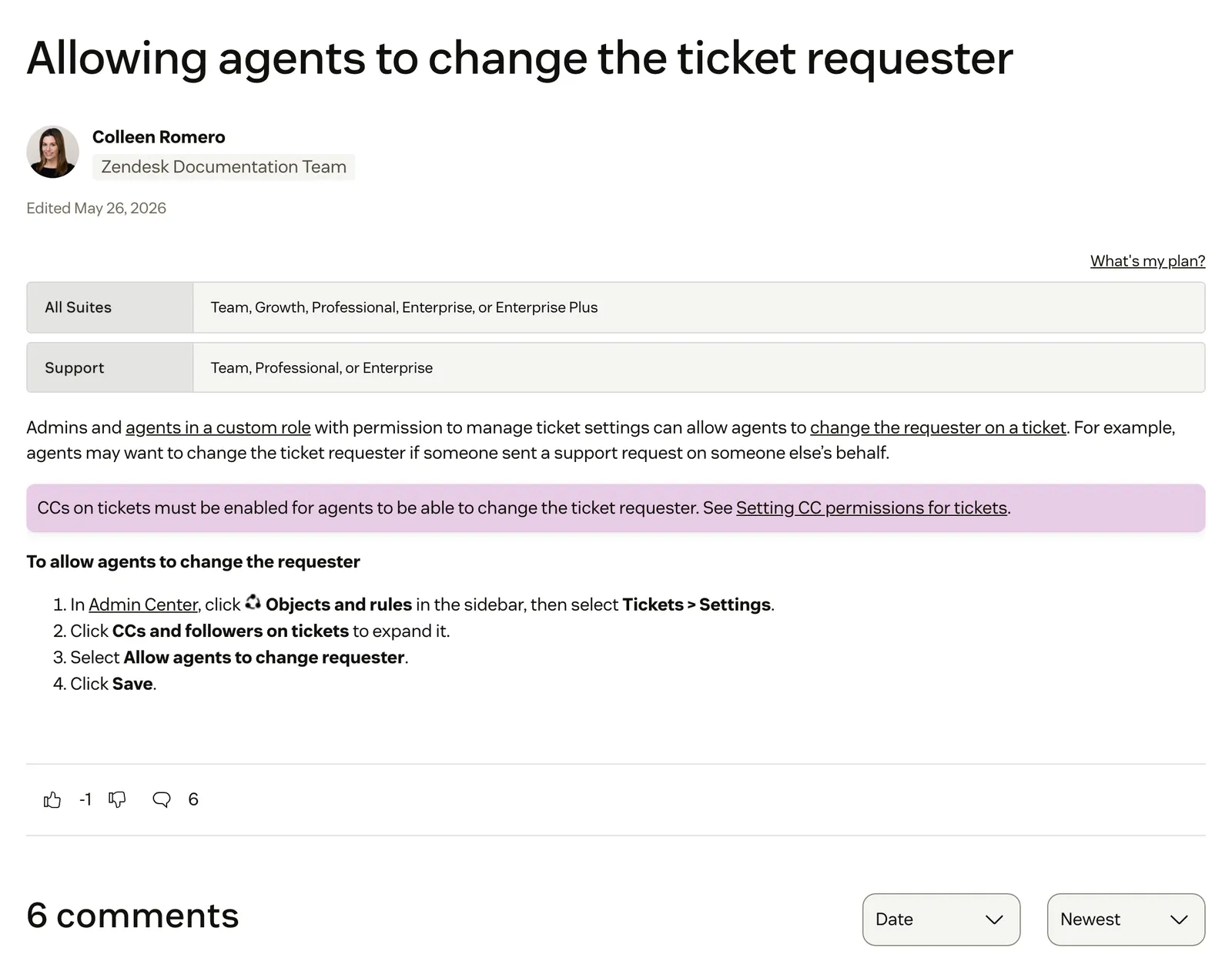
Agents can change a requester once an admin allows it, and they can create a ticket for a customer from the +Add menu. Both depend on settings, and a blank field has a side effect: the agent becomes the requester. Zendesk’s steps for the setting:
- In Admin Center, click Objects and rules, then Tickets, then Settings.
- Expand CCs and followers on tickets. CCs on tickets must be enabled first.
- Select Allow agents to change requester.
- Click Save.
Admins, or agents in a custom role that can manage ticket settings, can switch it on. It is available on Suite Team, Growth, Professional, Enterprise and Enterprise Plus, and on Support Team, Professional and Enterprise.
To create a ticket on someone’s behalf (Zendesk steps), hover over +Add and select Ticket. If private ticket creation is on, click Public Reply so the customer can access the ticket. Type the person’s name, email domain, phone number or organisation into Requester, or use +Add user for a new one, then click Submit as New. From a user’s profile, User options then New ticket fills the requester in for you.
Two pitfalls. A blank Requester makes the agent the requester. And a private ticket starts as an internal note, so the “Email user (requester and CCs)” action is suppressed until a public comment is added. The customer hears nothing.
Our view: it is one account-wide switch. Anyone who can change a requester can also attach a ticket to the wrong customer, so agree who uses it.
What happens to the requester when you merge tickets or users?
Merging tickets can leave two customers on one thread, and merging users rewrites every ticket one customer ever raised. With CCs on, you can merge two tickets with different requesters (Zendesk docs), and the closed ticket’s requester is added as a CC on the surviving ticket. Tickets must be below Solved, a warning appears across organisations, brands or requesters, and merges are permanent.
August 2026We often want all relevant information merged into 1 active ticket, but often the other requesters and CCs are not needed after the merge. We can manually remove them post-merge, however this is quite manual and also has room for a sensitive reply being added to the ticket after the merge before they are removed. · Zendesk CommunityMerging users is stricter:
- It can’t be undone, and works only between end users. With JWT or SAML SSO, it works only if the merging user has no external IDs.
- All of the merging user’s requested tickets move to the receiving user.
- Those updates appear in the event log as a requester change, but do not cause triggers to fire.
- The merging user’s tags, details, notes and user fields are lost.
- Their email is kept as a secondary address on the receiving user.
Our view: in a store, a ticket merge across two customers puts one customer on the other’s order thread as a CC. Check both requesters before you merge.
How does messaging decide who the requester is?
In messaging, the requester depends on whether the visitor is authenticated. Unauthenticated users are end users who give an email address in answer to a Zendesk bot prompt. Their email is unverified and marked in the Agent Workspace, and a verified identity supersedes an unverified one. Zendesk warns that allowing this can make you vulnerable to people impersonating other users.
With JWT authentication, the external ID in the token is the primary identifier. Zendesk first resolves an existing user by external ID and uses email only when no user matches. If an unauthenticated Web Widget or Mobile SDK user authenticates and that user already exists, Zendesk merges them. Messaging authentication is on all Suite plans.
Our view: for a store, a chat visitor who typed an email is a claim, not a customer. Authenticating logged-in shoppers is what ties the chat to a real account.
How do triggers and views use the ticket requester?
Several standard triggers are built on the requester. Zendesk’s standard triggers include:
- Notify requester and CCs of received request: fires when a ticket is created with a public comment by an end user.
- Notify requester of new proactive ticket: fires when an agent creates a ticket with a public comment, so the customer is told.
- Notify requester and CCs of comment update: fires on a public comment on an update.
- Notify assignee of comment update: carries the condition “Assignee is not (requester)”, so an agent who is both is not notified twice.
In the conditions reference, requester_id is shared by views, triggers, automations and SLA policies, while requester_role (agent, admin or end-user) is trigger-only. The “Present, and requester can see the comment” condition also covers private comments if the requester may view them (trigger reference). Since a rollout in late June 2026, views can also filter by the requester’s email address, which they could not do before (announcement).
The same requester conditions feed automations.
Can a light agent be a ticket requester?
Yes. Zendesk lists “Be the ticket requester” among what light agents can do. They can’t be assigned tickets, and can’t change ticket status unless they are the requester.
Light agent comments are private, including the first comment of tickets they create. The exception: if a light agent is the requester and not a member of the ticket’s group or brand, their private comment is converted to public. End users can’t see light agents who are CC’d. Included seats are up to 50 on Suite Growth, 100 on Professional, 1,000 on Enterprise and 5,000 on Enterprise Plus, with Suite Team as an add-on.
A store example, ours: a warehouse or finance colleague on a light seat raises an internal ticket about a return. They are the requester.
Why does the ticket requester matter more for an online store?
In e-commerce the requester is how a conversation finds a customer and their orders. Zendesk is a proven ticketing foundation, but it is horizontal and doesn’t think in orders, so a wrong requester often goes unnoticed until the wrong order gets discussed.
| Symptom | Likely cause | What to do |
|---|---|---|
| Every contact-form ticket comes from your own store address | Shopify’s theme contact form sends submissions to your store sender email, and its help page does not say what reply-to it sets. Separately, the Shopify Forms app sets reply-to to the customer with form notification emails on (changelog, 12 June 2025) | Submit your own form and check who Zendesk shows as requester |
| Order history is split across two people | A second email address created a second user | Merge the users, knowing it can’t be undone and fires no triggers |
| A chat visitor can’t be tied to an account | Unauthenticated messaging | Set up JWT authentication for logged-in shoppers |
| A ticket you logged for a customer goes quiet | Blank Requester, or a private ticket that started as an internal note | Set the requester and reply publicly |
| Merged tickets from two customers | The closed ticket’s requester is now a CC | See the merge section above |
Zendesk’s Shopify integration gives agents an app to view Shopify order information (setup article), and with the Refunds and cancellations option on, they process refunds and cancellations in the Support app. That is the human agent’s view. The jobs that depend on the right customer are WISMO and refunds.
A help centre article can answer a policy question for anyone. An order question needs the right requester, which is why self-service and account-specific questions split. Our guide to the knowledge base covers the first half.
Where does Engaige fit?
Engaige (that’s us) isn’t where the requester is set: Zendesk keeps the requester field, your triggers and your views. Engaige is the AI support agent that plugs into your Zendesk agent workspace. Behind it is Engaige AI, which learns from your conversations and inputs, configures your support agent and shows which policies it used. Keep your helpdesk. Replace the AI.

At MR MARVIS, Engaige handles over 120,000 questions a year, resolving over 60% of the conversations it’s involved in.
On Shopify, Engaige combines live Admin API data, pricing across markets and SKUs, inventory, orders and customers, with the marketing content from your storefront. Text gives it time to read the order and check your policy before it answers, and it combines what the help desk, the store and the carrier each say. It shows why it answered or acted as it did, with the source.
Hi, where is my order? It's been eight days and the tracking hasn't moved.

Shopify
Order 48219 · fulfilled

Picqer
Still processing Contradicts Shopify

DHL
Returned to depot · 3 delivery attempts
Settles it: the parcel is not with the customer
Reasoning…
Not deliverable. Reship to a confirmed address, booked in Picqer.
Suggested reply
Your parcel went back to the depot after three delivery attempts, so it will not arrive. I have booked a reshipment to the address you confirmed, arriving Thursday.
That visible reasoning is also how your team improves the agent.
Within the AI we can see the reasoning, and how it comes to a response. That shows us where information is missing or unclear, and helps us improve our workflow.

You go live in Agent Assist in hours. Engaige AI compares what your team sent with the draft, learns from the difference and proposes changes you approve. Ticket types switch to autonomous one at a time, most brands in about a week, up to 90% of supported tickets. In Zendesk, the action happens in the connected system first, then Engaige replies and closes the ticket. See the Zendesk comparison, the Zendesk integration and the MR MARVIS story.
Frequently asked questions
What is a ticket requester in Zendesk?
The user asking for support through a ticket, and the author of its first comment. It is usually your customer, and it is the requester_id field on the ticket. For a store, it links the conversation to a customer and their orders.
What is the difference between the requester and the submitter?
The requester is who the ticket is for; the submitter is the user who created it. By default they are the same person. When an agent logs a ticket for a customer, the agent is the submitter and the customer is the requester.
Why is the wrong person the requester on my email tickets?
Zendesk reads the Reply-To header, then From, and ignores the body. If a form or tool sends from your own address, that address becomes the requester. A customer writing from a second address also gets a separate user account. Test your own forms.
How do I change the requester on a Zendesk ticket?
An admin turns on Allow agents to change requester under CCs and followers on tickets, which needs CCs on tickets enabled first. Agents can then change the requester on a ticket. A blank Requester field makes the agent the requester.
What happens to the requester when I merge users?
All of the merging user’s requested tickets move to the receiving user. The change shows in the event log but fires no triggers, tags and user fields are lost, and the merge can’t be undone.
Can a light agent be a ticket requester?
Yes. Light agents can be the requester and can change status on their own ticket, but can’t be assigned tickets. Their comments are private, except that a requester light agent outside the ticket’s group or brand has them converted to public.
How does an AI agent use the customer and order behind a ticket?
Engaige works from the live customer profile and order history in your store (on Shopify via the Admin API, plus WooCommerce, Magento, BigCommerce and custom systems), and shows why it answered or acted, with the source. Zendesk keeps the requester field itself.
Do I have to replace Zendesk to use a different AI agent?
No. Keep your helpdesk. Replace the AI. Engaige plugs into your Zendesk agent workspace on your existing tickets, takes the action in the connected system, then replies and closes the ticket in Zendesk.







