
A Zendesk sandbox is a separate test copy of your Zendesk account. It replicates your configuration and up to 10,000 tickets, so you can change triggers, macros and AI agents without customers noticing. Support Enterprise includes one sandbox, Suite Enterprise and Enterprise Plus include two, and Growth or Professional plans can add one. It does not stay in sync.
This guide is for an e-commerce support lead or Zendesk admin who wants to change something safely. Our view is simple: a sandbox proves your configuration works, and it does not prove an AI agent can resolve a store’s order tickets. For the wider picture, see our guide to Zendesk e-commerce.
What is a Zendesk sandbox?
Zendesk defines a sandbox as “a test environment with the replicated configurations and data from your production environment”, where you can “test, learn, and make mistakes without affecting your production environment” (Zendesk docs). Production is your live account. The sandbox is a separate copy on its own URL.
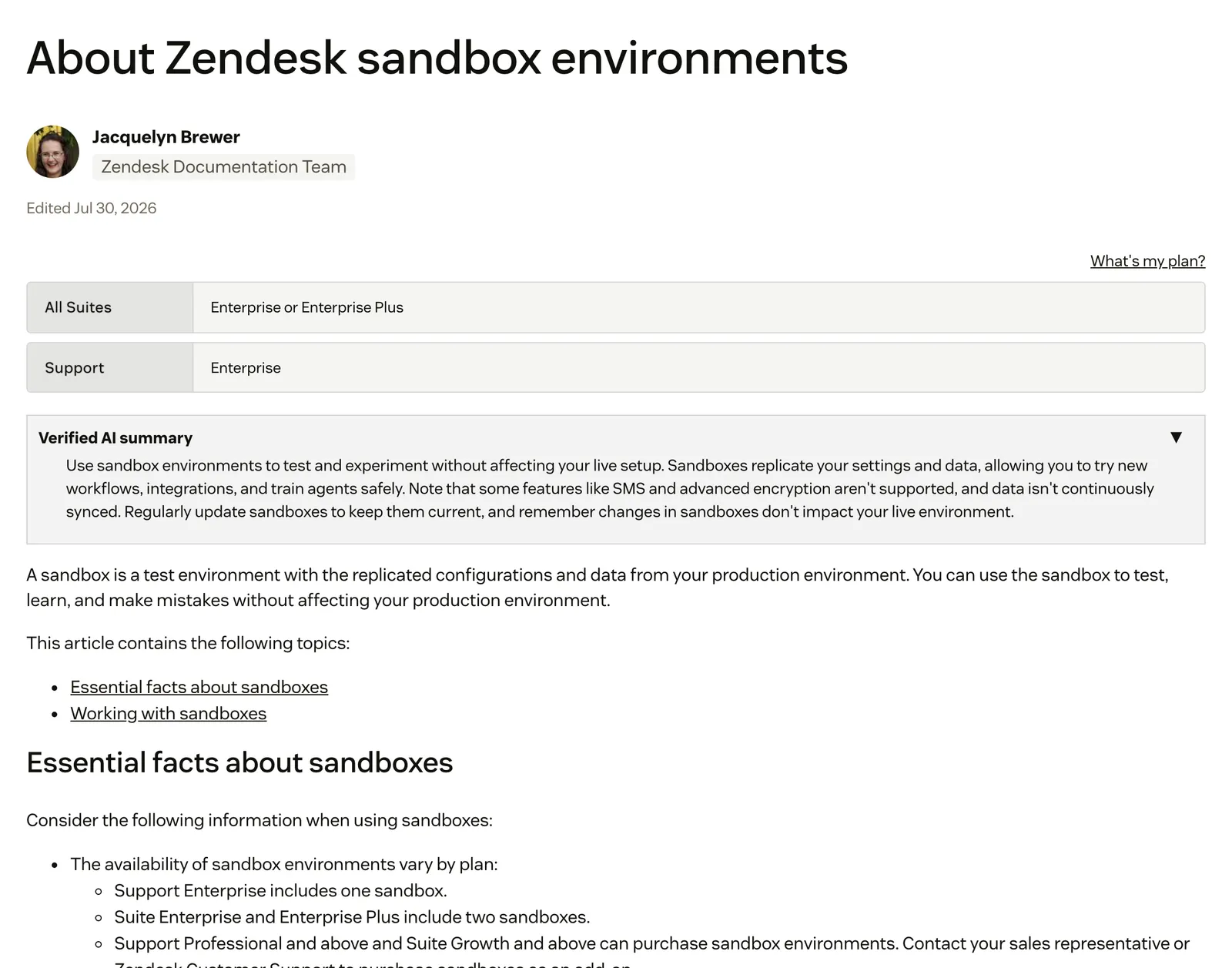
It is a moment-in-time copy. Zendesk’s own marketing page describes “a secure, isolated space to test workflow updates and onboard agents”.
Mature teams do run change control this way. GitLab’s public support handbook, last modified in July 2026, says:
July 2026We utilize the Zendesk Sandbox in all our change management processes. · Zendesk sandboxGitLab is not a store, so read it as proof of discipline, not of fit for order tickets. The same page lists “Some integrations may not work or have not been setup” as a limitation, which matters later.
Which Zendesk plans include a sandbox?
Support Enterprise includes one sandbox. Suite Enterprise and Enterprise Plus include two. Support Professional and above and Suite Growth and above can buy sandboxes as an add-on through a sales representative or Zendesk Customer Support, per the Zendesk docs.
| Plan | Sandboxes included | Can buy as add-on | Configuration deployments |
|---|---|---|---|
| Suite Team | Not listed | Not listed | Not listed |
| Suite Growth | None | Yes | Yes |
| Suite Professional | None | Yes | Yes |
| Suite Enterprise | Two | Yes | Yes |
| Suite Enterprise Plus | Two | Yes | Yes |
| Support Professional | None | Yes | Yes |
| Support Enterprise | One | Yes | Yes |
Zendesk’s own pages disagree. The “What’s my plan?” boxes on its articles list only the Enterprise tiers, while the body text adds the Growth and Professional add-on. The UK marketing page says a sandbox is included in “all Suite Enterprise and above plans” and does not mention Support Enterprise. The help article body is the most specific source. Confirm your entitlement in Admin Center under Account, then Sandbox, or ask your Zendesk representative.
Three traps sit in the fine print:
- Sandbox trials (on request, Suite Growth and Support Enterprise and above) let you try another plan or add-on with your configuration. They are not counted as regular sandboxes and you cannot deploy from them to production.
- Downgrades: if you move to a plan without sandbox access and delete your existing sandboxes, you cannot create a new one (Zendesk docs).
- Advanced encryption: sandboxes cannot be created after you activate it.
What does a sandbox copy, and what does it leave behind?
A sandbox copies settings, branding, templates, fields, forms, groups, roles, shared views, shared macros, triggers, automations, agents and up to 10,000 recent tickets. It leaves out closed tickets, action flows, authenticated apps, personal macros, Talk configuration, Guide, SMS and API tokens.
| Copied | Copied but switched off or altered | Not copied |
|---|---|---|
| Brands, ticket fields and forms, user and organisation fields | Webhooks and targets (inactive by default) | Closed tickets and open tickets not updated in six months |
| Groups, custom roles, agents, shared views | Targets that need a password (invalid credentials, disabled) | Linked incident tickets and ticket sharing agreements |
| Shared macros, triggers, automations | Apps and early-access features (off until you enable them) | Comments after the first 100 on a ticket |
| Templates, branding, channel and permission settings | Side conversations (off until enabled) | API tokens, which you must recreate |
| Tickets you choose, with their end users | User emails rewritten to @example.com | Personal views and macros, skills for skills-based routing |
| Custom object definitions | External support addresses converted to internal ones | Custom object records, action flows, legacy agents |
| Free Marketplace apps with no authentication | Paid or authenticated apps, Talk, Guide, SMS |
A few details change how you plan a test:
- Webhooks: Zendesk deactivates them “to prevent unintended interactions with the live APIs they’re designed to connect to”.
- Emails: user addresses are rewritten to @example.com so no customer is emailed by accident. An admin can reverse this per user.
- AI agents: two are created automatically in every new sandbox, one for messaging and one for email.
- Talk: sandboxes created after May 2023 get a Talk trial while production has Talk, but the Talk configuration itself is not copied.
- Guide: not copied, unless you have the Copilot add-on, which can bring across the Guide default brand and auto assist procedures (step 5 below).
- Closed tickets inside the sandbox are archived automatically after three days, and tickets created through the API show as via web.
For a store, two gaps stand out. Closed tickets are not copied, so your solved refund and return history is missing from the test. And only free apps that need no authentication come across, so anything that talks to your store has to be reconnected. Zendesk’s Shopify integration page says nothing about sandboxes. That is an inference, not a documented fact, but expect to reconnect store integrations yourself. For the parts around help centre content, see our guide to the help centre.
How do you create a Zendesk sandbox, and how long does it take?
You create one in Admin Center under Account, then Sandbox, then Environments. Pick 0, 500, 5,000 or 10,000 tickets and Zendesk builds the copy. A small copy takes minutes to a couple of hours. A full copy can take a week or more.
- Set a default group. Zendesk asks you to configure one before creating a sandbox (Zendesk docs).
- Open Environments. Go to Admin Center, then Account, then Sandbox, then Environments.
- Select Create Sandbox and enter a name.
- Choose the ticket count: 0, 500, 5,000 or 10,000.
- Optionally replicate Guide and auto assist. The Guide default brand and auto assist procedures come across only with the Copilot add-on.
- Select Create. Then open it from Sandbox, then Sandboxes, with Open Sandbox, and sign in with your normal admin credentials.
Each sandbox gets its own unique URL with a ten-digit number after your domain name. Timing comes from the About article: a few minutes to a couple of hours for a small copy, and up to a week or more for a full copy with 10,000 tickets and a million organisations. An express sandbox setting reduces the organisation data copied. Zendesk’s Create article gives different timings, so treat any single number as a guide.
Open the creation report afterwards. It stays available for 30 days and lists what failed to replicate. You can run a maximum of 10 replications a month.
Decide the ticket count before you click. GitLab recommends copying 0 tickets, which suits pure configuration testing. If you want to rehearse order scenarios such as WISMO, you need open tickets that exercise them, because closed ones are not copied.
How do you move changes from a sandbox to production?
On Suite Growth and above or Support Professional and above, use configuration deployments. Save a snapshot, create a deployment, pick items and their dependencies, run a test deploy, then deploy. Zendesk snapshots production first so you can revert. Data never moves, and private apps must be installed separately.
The route is in Admin Center under Account, then Sandbox, then Deployments, and needs admin rights in both environments (Zendesk docs). A snapshot is a read-only version of an environment’s configuration. Deployments move through Draft, Deploying, Deployed and Failed, and you can revert or redeploy the last two.
One caveat is easy to miss:
October 2026Deploying a renaming of a ticket, user, or organization custom field results in the deletion of the original custom field and data associated with it · Deploying configurationsAs an illustration, not a reported incident: if your order-number or return-reason field were renamed in the sandbox and deployed, you would lose that field’s data in production. Check the field list before every deploy.
Zendesk’s older articles still say sandbox changes must be reproduced by hand in production. Deployments replace that where your plan has them, and manual recreation remains the fallback for private apps. Replacing a sandbox is heavier than it sounds: the URL and every object ID change, apps and sharing agreements are removed, and custom help centre themes are lost unless you export them first. Anything that hard-codes IDs could break.
Can you test a Zendesk AI agent in a sandbox?
Yes. Zendesk calls the sandbox the best place to test an AI agent, every new sandbox gets a messaging and an email agent, and you can clone agents that are Ready to activate or Active. Tests in the sandbox do not use automated resolutions.
Zendesk’s testing guide documents four routes:
| Route | Uses automated resolutions? | What it does not replicate |
|---|---|---|
| Sandbox | No | Whatever the sandbox does not copy (see above) |
| Production | May, unless you use the widget or simulator | Not a copy: customers can see what you test |
| Test widget | No | Restricted help centre content and CRM actions |
| Conversation simulator | No | Needs initial configuration; runs scenarios you write |
The widget line is the one to read twice. Zendesk says there are “aspects of your configuration that the test widget can’t replicate, such as restricted help center content or CRM actions”.
Cloning has limits too. A clone carries use cases, procedures, configured actions, API integrations, templates, search rules and personalisation, and arrives with the status Setup incomplete. Custom actions and action flows are not cloned and must be recreated and reconnected (Zendesk docs). Help centre content and import schedules stay behind as well. Zendesk’s advice on testers is sound: pick people who did not build the flows, because builders test the paths they designed.
September 2026It is now at the point where it is ready to go live into production but there is no way we can easily copy this back over without hours of manual labour/creating a whole new bot and losing months of analytics. · Zendesk CommunityFor what Zendesk’s bot is and how it is set up, see our guide to the Zendesk chatbot.
Sandbox vs production: does it stay in sync?
No. A sandbox is a moment-in-time copy. After creation you can deploy configuration and sync plan or add-on subscription changes, but tickets and users refresh only when you recreate it, which Zendesk recommends doing regularly. Deleting a sandbox is permanent.
| Production | Sandbox | |
|---|---|---|
| Customer impact | Live, customers see changes | None, isolated copy |
| Ticket data | All tickets | Up to 10,000 recent tickets |
| Customer emails | Real addresses | Rewritten to @example.com |
| Webhooks and targets | Active | Inactive by default |
| Apps | All installed | Free, no-authentication apps only |
| API tokens | Yours | Must be recreated |
| SMS | Supported | Not supported |
| AI agent resolutions | May use automated resolutions | Do not use them |
| How it updates | Live | Deployments for configuration, recreate for data |
Zendesk’s marketing page promises you can “reset the Sandbox anytime to keep it synchronised with your production environment”. The help articles are clearer: a reset is a fresh copy, not a live sync, and the docs say the data “doesn’t stay synchronized”. Treat the help article as the behaviour.
Only the first 100 comments per ticket are copied and the data does not stay synchronised, so a sandbox ticket is a snapshot of a conversation.
Where does a sandbox stop for an online store?
A sandbox tests configuration on a frozen snapshot. For a store, the risky part is the order action: a refund, a cancellation, an address change. Zendesk documents that action flows, custom actions and authenticated apps do not come across, and that the test widget cannot replicate CRM actions. Zendesk’s Shopify pages say nothing about sandboxes, so we expect the order action to be the part you must rebuild.
Here is a store test checklist. Where Zendesk’s docs are silent, the cell is our inference.
| Scenario | Testable in a sandbox as copied? | What you must rebuild or reconnect | What is still not proven |
|---|---|---|---|
| WISMO | Triggers and macros, yes | Carrier and store connections (likely needs reconnecting) | Live tracking data in a reply |
| Return inside the window | Rules and fields, yes | Any action flow that creates the return | The return actually being created |
| Return outside the window | Rules, yes | Same as above | Whether the exception follows your policy |
| Cancellation before fulfilment | Rules, yes | Store integration (likely needs reconnecting) | Live order status at the moment of the ticket |
| Partial refund | Rules, yes | Refund action and permissions | The right amount reaching the customer |
| Address change | Rules, yes | Store integration (likely needs reconnecting) | Whether the order is still editable |
The snapshot also drifts. Peak-season policy changes, new SKUs and live stock never reach it unless you recreate it, which can take up to a week or more for a full copy, per the About article. Zendesk documents no order-lifecycle, return-window or subscription reasoning in its AI, so a configuration that passes a test still says little about a refund decision.
This is why we suggest a buyer’s test in our Shopify roundup: ask every vendor, us included, to run a refund or cancellation on your store before you sign. For the refund side, see refunds.
Where does Engaige fit?
Engaige (that’s us) isn’t a test environment, and it isn’t a sandbox add-on for Zendesk. It is the e-commerce AI support agent you test on real tickets inside your Zendesk before it acts alone. Keep your helpdesk. Replace the AI. Behind it is Engaige AI, which learns from your conversations and inputs, configures your support agent and shows which policies it used. Engaige AI lets you test every policy before launch.

The proving ground is your live queue, without the risk. You go live in Agent Assist in hours, inside the Zendesk agent workspace. The agent drafts replies and suggests actions on real tickets, and nothing closes without a human. Otrium resolves 60% of its 120,000 annual tickets end to end.
With Engaige, we are able to automatically resolve 60% of the 120,000 support tickets that we receive annually.

Once a ticket type is autonomous, each resolution happens in the connected system first, then Engaige replies and closes the ticket in Zendesk.
You decide how fast it takes over. Policy-governed control sets how the agent reasons, which process it follows and when it may act, so you choose which ticket types, and which steps of a policy, run on their own and where a person checks first.
As the agent matches your team on a ticket type, you flip that type to autonomous, one at a time, up to 90% of supported tickets, most brands in about a week. Brands that are ready can also launch autonomous from day one.
Scenario
The customer asks about a delivery address.
Instructions
Read the order with Get order , then take the branch that matches.
 Get order
 Scenario
The order has not been picked yet.
Instructions
Move it with Change picqer shipping address .
 Change picqer shipping address
 Scenario
The parcel has already left the warehouse.
Instructions
Say it cannot be redirected, then offer Process refund .
Engaige AI compares what your team said with what the agent suggested, learns from the difference and improves itself under your supervision: you approve the changes.
See the Zendesk integration or the Zendesk comparison for how it sits next to your helpdesk.
Frequently asked questions
Is a Zendesk sandbox included in my plan?
Support Enterprise includes one sandbox, and Suite Enterprise and Enterprise Plus include two. Support Professional and above and Suite Growth and above can buy one as an add-on. Zendesk’s pages disagree in places, so see the plan section above.
How many tickets does a Zendesk sandbox copy?
You choose 0, 500, 5,000 or 10,000. Closed tickets and open tickets untouched for six months are never copied, and only the first 100 comments per ticket come across.
How long does it take to create a Zendesk sandbox?
From a few minutes for a small copy to a week or more for a full 10,000-ticket copy, per Zendesk’s About article. Its Create article gives different timings.
Does a Zendesk sandbox stay in sync with production?
No. It is a moment-in-time copy. You push configuration with deployments, or recreate the sandbox for fresh tickets and users.
What is the difference between a Zendesk sandbox and production?
Production is live and customer-facing. The sandbox is an isolated copy with @example.com emails, inactive webhooks, no SMS and no API tokens.
Does testing an AI agent in a sandbox use automated resolutions?
No. Sandbox tests, the test widget and the conversation simulator do not use them. Other tests in production may.
Can I connect my store to a Zendesk sandbox?
Only free apps that need no authentication are copied, and action flows do not replicate, so store connections must be set up again. That is our inference, because Zendesk’s Shopify docs do not cover sandboxes.
Do I need a sandbox to test an AI agent safely?
Not with Engaige. In Agent Assist it drafts on real tickets inside your Zendesk and nothing closes without a human.
Can I test Engaige before it answers customers on its own?
Yes. In Agent Assist, Engaige drafts on real tickets inside your Zendesk and nothing closes without a human. You then switch each ticket type to autonomous only when you trust it, or launch autonomous from day one.







