The Freshdesk ticketing system is the core of Freshdesk, the help desk from Freshworks. Every email, portal form or help widget message becomes a ticket with a requester, subject, type, status, priority, group and agent. Omniroute assigns it and automation rules triage it, SLA policies time it, and it moves from Open through Pending and Resolved to Closed.
This guide is for the support lead or store owner who runs Freshdesk, or is weighing it, and wants to know how requests become tickets, what a ticket holds, how it moves and where the customer’s order shows up. Freshdesk is a widely used, capable help desk with broad channels. A ticket records and routes the request, while the order the customer asks about lives in your store platform.
For the wider suite, see the Freshworks family.
What is the Freshdesk ticketing system?
The Freshdesk ticketing system is how Freshdesk turns every customer request into one ticket record that agents work, assign, time and close. Whatever the channel, the request ends up as the same object in the same queue, with the same fields, so a team can track, route and report on it in one place.
As of October 2026, Freshworks describes Freshdesk as an “AI-powered customer service solution with omnichannel ticketing and automated workflows”. Its ticketing page promises to “manage every ticket in one place”.
For the generic concept, our guide to the ticketing system explains what a help desk ticketing system is; this guide stays on how Freshdesk does it. Smaller teams choosing a tool can start with our guide to help desks for small businesses.
What is Freshdesk?
Freshdesk is the customer service help desk from Freshworks, used to run customer support from one ticket queue. Freshworks’ About page lists Freshdesk (“Effortless customer service and support”) next to Freshservice (“Modern and intuitive IT service management”).
On customer numbers, both figures are vendor-stated and belong to different pages. The Freshdesk page says it is “Trusted by 50,000+ businesses worldwide” (source); the About page says “Trusted by 74,000+ businesses worldwide” (source) for Freshworks as a whole.
The wider family (Freshdesk Omni, Freshchat, Freshservice) and the plans are covered on the hub. Freshdesk also ships its own built-in AI, Freddy, which our Freshchat AI guide covers.
How do email, portal and widget requests become Freshdesk tickets?
Each channel ends in the same ticket. Email arrives by forwarding your support mailbox to Freshdesk, and the portal and help widget by a form. The Source field then records which channel the ticket came from, so you can report on it later.
| Channel | How it becomes a ticket | What Freshdesk records |
|---|---|---|
| Your support mailbox forwards to a Freshdesk long forwarding address, set under Admin > Channels > Email | Source = Email | |
| Support portal | The customer submits the form | Source = Portal, plus a public ticket page where the customer checks status and replies |
| Help widget | A small icon on your site and portal opens a contact form: four simple fields, or a form with your ticket fields | The submitted request; the API lists a “Feedback Widget” source value |
The routes come from Freshdesk’s multi-channel article, the portal article, the help widget article and the API reference.
In Freshdesk Omni’s Inbox, per its getting started article, “Every message becomes a ticket” and agents can convert chats into trackable tickets. The wider channel list, including chat, phone and social, is on our Freshdesk Omni page.
One trap for stores, from Freshdesk’s email troubleshooting article: emails only become tickets once forwarding works, so test by sending to the long forwarding address and to the support address. It also warns that “If the contact associated with the ticket is deleted, tickets raised by them will be automatically marked as spam.”
What does a Freshdesk ticket hold?
A ticket is the request plus metadata: who asked, about what, through which channel, how urgent, its status, and which group and agent own it. It also carries two due times, one for the first response and one for the resolution, so the team knows when it is late.
Freshdesk’s ticket fields article defines a ticket field as “a piece of metadata that tells you more about a request”, and says Freshdesk comes with a set of default fields.
| Field | What it records | Note for a store |
|---|---|---|
| Requester | The customer (requester_id in the API) | The shopper who wrote in |
| Subject and description | The request itself | The email subject and body |
| Type | The kinds of issue you define, which the user must select | A store might use order status, return, damaged item (our suggestion) |
| Source | The channel the request came from, such as Email, Portal or Feedback Widget | Lets you report on where tickets come from |
| Status | ”the current state of the ticket”: Open, Pending, Resolved, Closed | Where the conversation stands |
| Priority | Four values: Low, Medium, High, Urgent | An Urgent flag on a missed delivery date |
| Group | The agent group the ticket is assigned to | A returns group |
| Agent | The support agent the ticket is assigned to | The person who owns the case |
| Tags, CC emails, custom fields | Extra labels, recipients and fields you define | Labels such as a product line |
| due_by and fr_due_by | When the ticket is due to be resolved and when the first response is due | The deadline the SLA policy sets |
Field values come from the API ticket properties. A field can also be made “Required when closing the ticket”, which Freshdesk describes as making a field mandatory before an agent can close it. A store could make the order number required before close.
There is no order field in that list. The default ticket fields hold no order data. A store can add a custom field for the order number, and the Shopify app (covered below) shows the order itself, while the order, its status and its refund state stay in your store platform.
How does a Freshdesk ticket move from Open to Closed?
Statuses record where a ticket is. Omniroute assigns it to an agent, automation rules change it on creation, on update or by the hour, and SLA policies set its deadlines by priority. Together they carry a ticket from arrival to a closed record without anyone moving it by hand.
Statuses
The default statuses are Open, Pending, Resolved and Closed. Per the portal article, “The ticket is marked as Resolved when the agent provides the solution” and “The ticket is marked as Closed when the customer confirms the resolution of the ticket”. Requesters see open and pending tickets as “Being processed”, and “The customer can reply to the ticket at any point to reopen for further questions.”
Assignment
Omniroute is, in Freshdesk’s words, “the routing engine that powers automatic routing”, described in its routing article. It offers three methods:
- Round-robin: tickets go to available agents within a group in a circular order.
- Load-based: tickets are assigned by the capacity agents can handle across channels.
- Skill-based: tickets are assigned to agents based on their skills.
You enable it per group under Admin > Groups > Group Properties > Advanced Automatic Routing. As of October 2026, the routing article lists it for the Pro and Enterprise plans of Freshdesk and Freshdesk Omni.
Automations
Freshdesk has three automation rule types:
- Ticket Creation: checks a new ticket against conditions and runs actions on a match, for example deleting spam, auto-replies and out-of-office emails.
- Ticket Updates: listens for events, for example reopening a ticket when there is an update on it.
- Hourly Triggers: scans tickets once an hour for a condition held over a period, for example closing resolved tickets after 48 hours if the customer has not responded. Only tickets updated in the last 30 days match.
“Enabled rules are executed from top to bottom.” For creation rules you choose first matching or all matching rules; update and hourly rules run all matches.
SLA policies
SLA policies set first-response, every-response and resolution-time targets for each priority level, on business hours or calendar hours (24*7). You can switch escalations on for alerts when an SLA is violated. As of October 2026, the article lists agent reminders and escalations from the Pro plan onwards on Freshdesk and Freshdesk Omni.
| Stage | What moves the ticket | Freshdesk tool |
|---|---|---|
| Arrives | The channel sets the source | Channel setup |
| Triaged | Type, priority and tags are set | Ticket Creation rules |
| Assigned | Group and agent are chosen | Omniroute |
| Waiting on the customer | The agent sets the status | Pending |
| Customer replies | The ticket reopens | Portal behaviour, Ticket Updates rules |
| Solved | The agent provides the solution | Resolved |
| Closed | The customer confirms, or an hourly rule closes it after a set time | Closed, Hourly Triggers |
A store example: a WISMO email arrives, a creation rule sets the type and priority, Omniroute assigns it, and the agent opens the order in the Shopify app to answer. The agent sets Resolved, and an hourly rule closes the ticket later.
Where does the order sit on a Freshdesk ticket?
Freshdesk’s Shopify app shows the customer’s orders in a widget on the ticket for your human agents, who can refund or cancel from there, within the limits the app sets. The order record stays in Shopify, and the ticket’s default fields hold no order data.
Freshdesk’s article on integrating Shopify describes what an agent gets:
- Orders: the widget shows the current order, with its number, date, status, products and shipping. “To view past orders, click Show past orders.”
- Shipping: the address, carrier and tracking number, and “Click the tracking number to view details directly on the Carrier’s website.”
- Refunds: “The Shopify app allows for full or partial refunds, depending on the company’s policy”. Agents can restock the items and send a refund notification to the customer.
- Cancellations: admins configure whether agents can cancel and refund from the widget. Cancelling works before payment, or when an order is paid but not yet ready to ship. “Once the customer has made payment and the order has been shipped/fulfilled, you cannot cancel the order”, and the cancel option is disabled.
- Stores: “You can optionally connect multiple stores.”
In Freshdesk’s Shopify app the order shows in a widget on the ticket for your agents to read and act on.
Freshworks says Freddy AI Agents “update records, process refunds, and change subscription plans” (as of October 2026, per its Freddy AI page).
What does the Freshdesk ticketing system do for a store?
Freshdesk is a widely used, capable help desk with broad channels. It records each request as a ticket, assigns it, times it and closes it, while the order stays in your store platform and shows in a widget on the ticket in the Shopify app.
Freshdesk is a general-purpose help desk for every industry; Engaige is built for e-commerce, with live Shopify Admin API data plus your storefront, and native actions you enable (refunds, cancellations, address changes). Freddy takes actions through pre-built Shopify and Stripe skills from its Skills Library, and through custom skills a team builds in AI Agent Studio (as of October 2026, per Freshworks’ June 2025 launch post).
Where does Engaige fit?
Engaige (that’s us) is the e-commerce-native AI support agent that works inside your existing Freshdesk, with no migration. Keep your helpdesk. Replace the AI. Behind it is Engaige AI, which learns from your conversations and inputs, configures your support agent and shows which policies it used. MR MARVIS (Shopify Plus, over 120,000 questions a year) has Engaige resolving over 60% of the conversations it is involved in, and Otrium has 60% of 120,000 annual tickets resolved end to end.
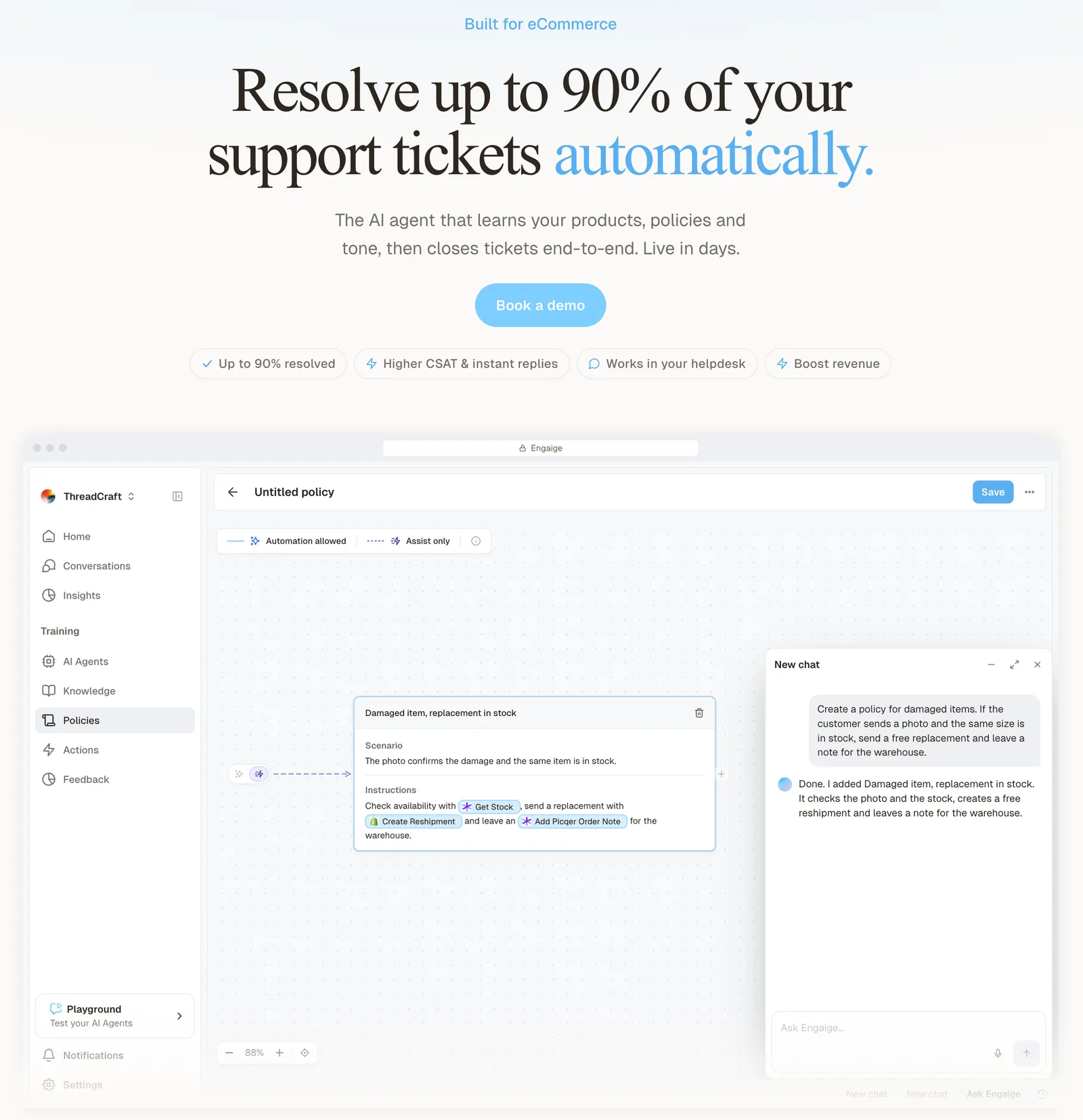
On the order tickets Engaige supports (WISMO, refunds and returns, cancellations and address changes, subscription changes, product advice), Engaige takes the action in the connected system first. Then it replies and closes the ticket inside Freshdesk. Freshdesk keeps capturing, threading and routing the request.
| Job on the ticket | Freshdesk | Engaige | Your team |
|---|---|---|---|
| Capture and thread the request | Yes | ||
| Route and assign | Yes | ||
| Do the order action, such as a refund, cancellation or address change | In the connected system, under your policy | ||
| Reply to the customer | Yes | ||
| Close the ticket it resolved | Yes, inside Freshdesk | ||
| Policy-set hand-offs, with reasoning note | Yes |
You can start in Agent Assist, live in hours, or launch autonomous from day one. In Agent Assist, Engaige drafts the reply and the suggested action in the ticket, and your team checks and sends. Every reply your team sends is compared with what the agent suggested; that is one of the signals Engaige AI learns from. It then proposes the policy change with its reasoning, and you approve what goes live. Nothing changes behind your back.

Hello Potential New Client
What would you like to get done today?
Could you analyse this week's conversations and show me some automation opportunities?
Ask Engaige…
Searched and found 4 contact reasons · 2.4s
Your agent resolved 426 of 512 conversations. 86 were handed over, and one contact reason accounts for most of them.
Searched and found 1 policy · 1.6s
Delivery status hands over whenever tracking is older than 24 hours, which is 40 of those 46.
Editing Delivery status · 1.9s
Done. It now handles stale tracking itself. Those 40 a week stay with your agent.
What were the reasons for handover, and how can we improve?
Fix it.
Reply…
Then you flip ticket types to autonomous one at a time. Brands that move quickly are autonomous in about a week, and Engaige automates up to 90% of supported tickets. It keeps learning once autonomous, from hand-offs and emerging trends.
You decide per step whether the agent acts on its own or drafts for your team. Anything outside your policies, or above a threshold you set (for example refunds over a certain amount), goes to a person first, with the agent’s reasoning left as an internal note in the ticket. On Shopify, Engaige combines live Admin API data with the content from your storefront.
Open any conversation in Engaige and you see the full reasoning behind every answer and action.
HelloPrint reports 80% of tickets automated, first response 90% faster and a team that went from 100 to 28 agents.
Engaige proved to be invaluable. Their hands-on support during the implementation phase resulted in significant improvements to our automated resolution rate and CSAT.

Keep Freshdesk and add the AI: see how it works in our Freshdesk integration. Engaige is text-first by design: email, chat, WhatsApp, SMS and social DMs, no voice AI. A live call gives an AI seconds to reason; text gives it time to read the order, check your policy and act, so resolution quality is higher. If phone is a big share of your mix, a voice specialist is the honest answer.
Frequently asked questions
What is the Freshdesk ticketing system?
It is the part of Freshdesk that turns every customer request, on any channel, into one ticket with a requester, status, priority, group, agent and due times. Automation rules, Omniroute and SLA policies then route, time and close it.
What is Freshdesk used for?
Freshdesk is the customer service help desk from Freshworks. Teams use it to run support from one ticket queue, with email, portal and help widget requests landing in the same place.
Which channels create tickets in Freshdesk?
In the core Freshdesk flow, email, the support portal and the help widget. The Source field records which one it was. The wider channel list is on the Freshdesk Omni page.
What are the ticket statuses in Freshdesk?
The defaults are Open, Pending, Resolved and Closed. Resolved means the agent provided the solution; Closed means the customer confirmed it, or a rule closed it after a set time.
How does Freshdesk assign tickets to agents?
Through Omniroute, enabled per group under Advanced Automatic Routing: round-robin, load-based or skill-based. As of October 2026, automatic routing is listed for the Pro and Enterprise plans.
Can a Freshdesk ticket show Shopify order information?
Yes, through the Shopify app, for your human agents. It shows current and past orders, shipping and tracking, and allows full or partial refunds. Cancellation is disabled once an order is paid and fulfilled.
Do I have to replace Freshdesk to automate order tickets?
No. There is no migration: Engaige connects to the Freshdesk account you already run, and Freshdesk stays the ticketing system and the record.
What does Engaige do on a Freshdesk ticket?
On the order tickets it supports (WISMO, refunds and returns, cancellations and address changes, subscription changes, product advice), it takes the action in the connected system, replies and closes the ticket inside Freshdesk. In Agent Assist your team sends and Engaige AI learns from the difference, proposing changes you approve; then ticket types go autonomous one at a time.