Freshdesk Omni is the omnichannel edition of Freshworks’ Freshdesk help desk. It brings email, web chat, WhatsApp, Instagram, Facebook and phone (through Freshcaller) into one agent inbox, where every message becomes a ticket. Plain Freshdesk is the email-first edition. Freshworks is the company behind both, and Freshchat is its separate messaging product.
This guide is for the store owner or support lead who runs Freshdesk, or is weighing it, and wants to know what the Omni tier adds and which channels a store really needs. For the wider suite, see the Freshworks family. Everything about Freshworks below is as of October 2026.
What is Freshdesk Omni?
Freshdesk Omni is the Freshdesk edition built for more than email. Freshworks’ own description of the Omni product is to “unify customer service across email, chat, phone, and messaging”, and its help article says every message becomes a ticket, so agents answer without switching tools.
Freshworks sells two core Freshdesk products that differ by capabilities and channel support: Freshdesk Omni, which its Getting Started article labels “most popular”, and Freshdesk, the email-first edition. Omni is the successor to the older Customer Service Suite, a bundle of Freshdesk ticketing, Freshchat and Freshcaller, according to Freshworks’ guide.
The same guide says a team that runs almost entirely on email may be better served by Freshdesk. That matches our view. For a store, the question is which channels your customers already write on, not which tier sounds bigger.
Freshdesk vs Freshdesk Omni vs Freshchat: how do they compare?
Freshdesk is email-first ticketing. Omni adds chat, WhatsApp, Instagram and phone to the same ticket inbox. Freshchat is Freshworks’ messaging and bot product (its bot is covered in our Freshchat AI guide), and Freshworks itself suggests an upgrade to Omni for advanced ticketing, knowledge bases and more. Freshworks says, in its Omni guide, that the difference between Freshdesk and Omni is primarily channel coverage and workflows.
| Freshdesk | Freshdesk Omni | Freshchat | |
|---|---|---|---|
| What it is | The email-first help desk | The multichannel edition of the help desk | An “AI-powered omnichannel messaging platform” |
| Channels | Email, Facebook and a basic web chat | Email, web chat, WhatsApp, Facebook, Instagram, plus phone via the Freshcaller add-on | ”Messaging, live chat, even email and voice” |
| AI agent included | Email AI Agent only | AI Agent Studio (with live chat support) and the Email AI Agent | Not stated on its Freshworks page |
| Workspace | One ticket inbox | One unified inbox across channels | Messaging inbox, with a Freshworks-suggested path to Omni “for advanced ticketing, knowledge bases, and more” |
| Routing and per-channel SLAs | Round-robin, load-balanced and skill-based assignment; automations and SLAs limited to email, Facebook, portal and ticket form | The same assignment plus Intelliassign; automations and SLAs on email, chat, caller, Facebook, Instagram, portal and ticket form | Not stated on its Freshworks page |
Sources: Freshworks’ Getting Started article and Omni guide, and its Freshchat page. Freshchat is compared here only on what its own page states, and its upgrade line reads “upgrade to Freshdesk Omni for advanced ticketing, knowledge bases, and more”.
On price, Freshworks lists the current Omni plans on its Omni pricing page, and the hub covers per-agent plans.
Which channels does Freshdesk Omni cover?
Omni covers email, web chat, WhatsApp Business, Instagram (DMs, story replies and comments), Facebook Messenger and comments, the customer portal, and phone through Freshcaller. All of it lands as tickets in one inbox. WhatsApp and Instagram are Omni only, while Facebook and a basic web chat are in plain Freshdesk too.
| Channel | What Omni does with it | In plain Freshdesk? |
|---|---|---|
| Tickets in the shared inbox | Yes | |
| Web chat | Advanced chat with live chat, topic routing and AI Agent integration | Basic web chat with knowledge base integration and ticket forms |
| WhatsApp Business | Connect your WhatsApp Business number, reply in real time and send approved message templates | No, Omni only (accounts that signed up before December 2025 can keep their existing WhatsApp integration) |
| Manage DMs, story replies and comments | No, Omni only | |
| Messenger and comments | Yes | |
| Portal and knowledge base | Customer portal, with portal tickets covered by automations and SLAs | Yes |
| Phone | Freshcaller integration: voice calls beside other channels, tickets from inbound calls, recordings and transcripts in the ticket | Not included |
Source: Freshworks’ Getting Started article, modified 29 July 2026, and the Omni guide, where phone is a Freshcaller add-on.
A caveat on completeness. Freshworks has also documented SMS and LINE as Omni conversation channels in an older help article (October 2024), but the current Getting Started article does not list them. Ask Freshworks what your account includes. Omni plans also list bring your own channel and bring your own telephony, which connect other channels through APIs.
How does Freshdesk omnichannel work in one agent workspace?
Every message, whatever the channel, becomes a ticket in the Freshdesk Command Center inbox, with the customer’s history attached. An agent can answer a WhatsApp message and an email from the same screen. Freshworks describes its agent workspace as bringing channels, customer history, ticketing and teams together. What a ticket holds is in our Freshdesk tickets guide.
The flow, in short:
- A message arrives on a channel, such as chat, WhatsApp or email.
- It becomes a ticket in the central inbox.
- It is routed to an agent or group, by Intelliassign or skill-based assignment.
- Its SLA runs per channel.
- The agent replies in the same inbox, with threads and private notes for colleagues.
Freshworks’ agent workspace page promises “a complete 360-degree view of customer history”. Its Omni guide gives an example: “A customer can start on chat, move to email, and call the next day, and the agent picking up each one sees what came before.”
On AI, Omni includes AI Agent Studio chat agents across WhatsApp, web chat, Facebook and Instagram, while plain Freshdesk gets the Email AI Agent only.
Which channels matter for an online store?
The channels that matter are the ones your customers already use to ask where their order is, start a return or check a size. For most stores that is email and chat first, then WhatsApp or Instagram DMs where your audience lives. Phone is worth running only if customers really call.
A practical way to decide:
- Look at where last month’s questions came from before you buy a tier.
- Remember that WhatsApp and Instagram need Omni, while Facebook and a basic chat do not.
- Decide who owns each channel and its SLA before you switch it on.
Freshworks’ own guide tells the story of Hobbycraft, a UK arts and crafts retailer, which moved to Omni in stages: social channels first, then email and a web form, then voice, so agents grew comfortable at each step. That order is Freshworks’ account, but the lesson is ours: add channels as your team can own them.
Phone is a different kind of channel. In Omni, phone runs through Freshcaller as an add-on and stays with your team. If phone is a big share of your mix, a voice specialist is the honest answer. For WhatsApp automation, see our WhatsApp chatbots guide.
Where does Engaige fit?
Engaige (that’s us) is the AI support agent that works inside the Freshdesk your tickets land in. Omni stays your omnichannel help desk, and Engaige replaces the built-in AI on those tickets. Keep your helpdesk. Replace the AI. Behind the agent is Engaige AI, which learns from your conversations and inputs, configures your support agent and shows which policies it used.
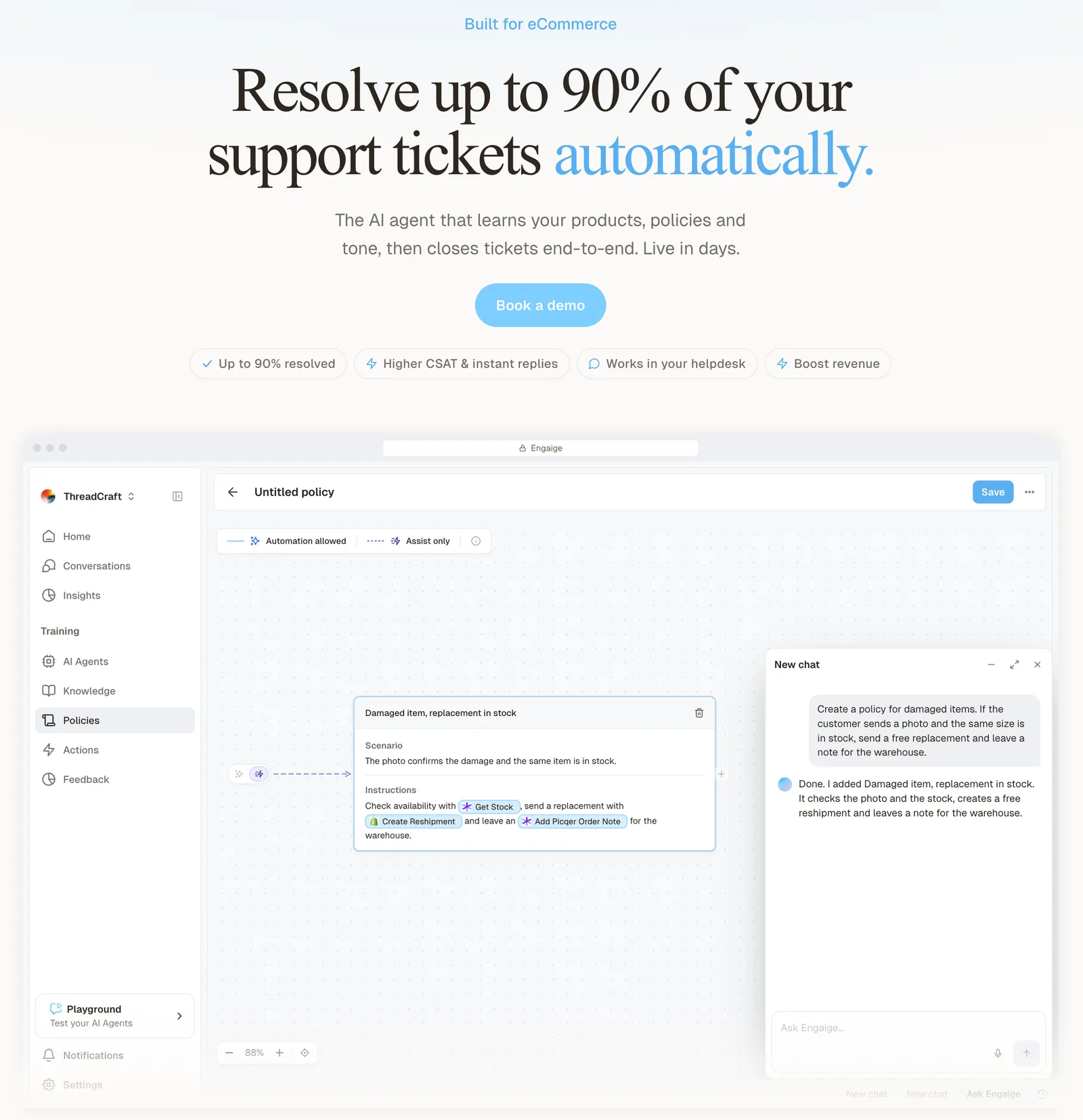
In Agent Assist, every reply your team sends is compared with what the agent suggested; that is one of the signals Engaige AI learns from. It proposes policy changes with its reasoning, and you approve what goes live, so nothing changes behind your back.
As the agent matches your team on a ticket type, you flip that type to autonomous, one at a time, and the learning continues.
Engaige resolves the hard middle end to end, reading live order, catalogue and policy data (on Shopify, the Admin API plus your storefront content), then takes the action, replies and closes the ticket in Freshdesk. Setup is self-service, live in hours with no migration, and you open any conversation to see the full reasoning behind every answer and action.
MR MARVIS, a Shopify Plus store, has Engaige handle over 120,000 questions a year and resolve over 60% of the conversations it is involved in. Otrium built Oliver, an AI agent powered by Engaige, that resolves 60% of 120,000 annual tickets end to end.
The angle here is policies on the ticket. You write a policy once, in plain language, and the agent follows it on every Freshdesk ticket it answers.
A policy is a branching set of plain-language steps, and each step has its own mode, Automated or Agent Assist. You decide per step whether the agent acts on its own or drafts for your team, and you can set thresholds, such as sending refunds above a certain amount to a person first. You choose the amount.
Scenario
The customer asks about a delivery address.
Instructions
Read the order with Get order , then take the branch that matches.
 Get order
 Scenario
The order has not been picked yet.
Instructions
Move it with Change picqer shipping address .
 Change picqer shipping address
 Scenario
The parcel has already left the warehouse.
Instructions
Say it cannot be redirected, then offer Process refund .
Control stays with your team. You can start in Agent Assist, review what the agent drafts, and let a ticket type go autonomous only when you trust it.
Engaige offered control, flexibility, and the ability to really incorporate AI in a more human way.

Engaige works on your Freshdesk tickets, and every ticket it answers meets the same policies. The action happens in the connected system first, for example Shopify, before Engaige replies and closes the ticket inside Freshdesk. You keep Omni as it is, and our Freshdesk integration page shows how it connects.
Engaige is text-first by design: email, chat, WhatsApp, SMS and social DMs, no voice AI. If phone is a big share of your mix, a voice specialist is the honest answer. Pricing is a flat monthly fee tied to your ticket volume, predictable as you scale. If you are weighing a switch rather than an add-on, see the Freshdesk alternatives guide.
Frequently asked questions
What is Freshdesk Omni?
Freshdesk Omni is the omnichannel edition of Freshdesk: email, web chat, WhatsApp, Instagram, Facebook and phone through Freshcaller, with every message as a ticket in one inbox.
Is Freshdesk Omni the same as the Freshworks Customer Service Suite?
Not exactly: Omni is its successor. Per Freshworks, the Customer Service Suite was an older bundle of Freshdesk ticketing, Freshchat and Freshcaller.
Does Freshdesk Omni include phone support?
Yes, through Freshcaller as an add-on, according to Freshworks’ guide. Engaige is text-first by design, so calls stay with your team.
Can I use WhatsApp without Freshdesk Omni?
In the current SKU table WhatsApp Business is Omni only. Accounts that signed up for Freshdesk before December 2025 can keep their existing WhatsApp integration.
How much does Freshdesk Omni cost?
Omni is priced per agent per month on Growth, Pro and Enterprise tiers, above plain Freshdesk because it adds channels. Freshworks lists the current plans on its Omni pricing page, and our hub has the per-agent prices.
Should I upgrade from Freshchat to Freshdesk Omni?
Freshworks’ own upgrade path is “for advanced ticketing, knowledge bases, and more”. It makes sense if you need tickets, SLAs and a portal on top of messaging.
Can I keep Freshdesk Omni and add Engaige?
Yes. Omni stays your help desk and Engaige replaces the built-in AI on its Freshdesk tickets. You write plain-language policies once, the agent follows them on every Freshdesk ticket it answers, and it learns from your team’s replies with your approval.
Can Engaige decide when a person checks a refund first?
Yes. You decide per step whether the agent acts on its own or drafts for your team, and you can set thresholds, such as sending refunds above a certain amount to a person first. You set the amount.