Gorgias Shopify is the Gorgias help desk connected to your store through the Gorgias app. Each ticket shows the customer’s Shopify orders, fulfilment status and lifetime spend, and agents can refund, cancel, duplicate or edit orders without leaving it. Its AI Agent can cancel unfulfilled orders and edit addresses on its own, within conditions you set.
This guide explains what the integration shows in a ticket, which order changes people and the AI can make, how to connect a store, and where the seams are.
How does the Gorgias Shopify integration work?
The Gorgias app connects your Shopify store to the Gorgias help desk. Customers, orders and tags flow into every ticket, and agents and the AI Agent can change orders from there. Gorgias is the help desk; the Shopify app is the connection. Setting it up takes an owner or admin on both sides.
On the Shopify App Store the app is listed as “Gorgias: AI Helpdesk & Chat”. It launched on 1 March 2017 and was rated 4.3 from 706 reviews as of October 2026 (Shopify listing). Gorgias says it is trusted by 17,000+ brands (vendor-stated, as of October 2026; Gorgias, 2026). The listing describes a help desk built for Shopify, where you can edit orders, refund and cancel inside tickets.

How the help desk compares with Zendesk on a Shopify store is covered in our guide versus Zendesk.
What Shopify data does Gorgias show in a ticket?
Each ticket carries the customer’s Shopify profile: order history, lifetime spend and tags, plus each order’s fulfilment status and notes. Draft orders, metafields and customer notes sit alongside. Agents act on all of it from the sidebar, and macros can run the same actions on send. The table lists each piece with its limit.
The table pulls four Gorgias help-centre articles into one view, as of October 2026: the Shopify integration, the Shopify actions, the macro actions and the discount code generator.
| Data or action | What it shows or does | Who uses it | Limit or note |
|---|---|---|---|
| Customer profile | Order history, lifetime spend, tags | Agents, macros | Needs a matching Shopify profile |
| Order status and notes | Fulfilment status and order notes in the sidebar | Agents | Shown per order |
| Customer notes | Sync both ways with Shopify | Agents | Not synced for customers with profiles in several stores |
| Profile matching | Uses the phone number on the default shipping address to match a contact | Gorgias | Helps when a shopper writes from another email address |
| Metafields | Imported into profiles and the widget, usable as macro variables | Agents, macros | Widget fields can be rearranged; the layout applies to every ticket |
| Draft orders | The last 5 are visible, and you can create one from a ticket | Agents | Cannot be edited in Gorgias once created |
| Create or duplicate order | Duplicate opens with a 100% discount by default, which suits a free replacement; stock shows live | Agents, macros | Duplicate last order is also a macro action |
| Cancel | Set refund quantities and shipping, a custom amount, a reason, restock and notify | Agents, macros | Runs from the cancel modal |
| Refund | The quantity defaults to 0, so it is not booked as a return | Agents, macros | One payment gateway only; gift cards excluded |
| Edit order | Change what is on the order | Agents | Not for archived, over 60 days old or other-currency orders |
| Edit shipping address | Update the address on an order | Agents, macros | Macro covers the last order |
| Product links and cards | Insert a product into a reply | Agents | Cards only in chat; email and social get a link |
| Discount codes | Create and send a one-time code | Agents | Created from the ticket message view; needs discount permissions on the Shopify app |
| Tags | Edit customer and order tags | Agents | Synced to Shopify |
| Macro actions | Cancel (last) order, duplicate last order, edit last order’s address, refund last order’s shipping, partial refund | Macros | Run on send; the agent can preview or remove them first, and a failed action reopens the ticket |
Why do Shopify stores use Gorgias in 2026?
Stores use it to answer and change orders in one tab. Shopify data sits in every reply, macros can change orders, and the AI Agent can act before fulfilment, which matters because order changes are time-sensitive. Several stores can share one help desk, with per-store views and statistics.
Gorgias states that order changes often have to happen within minutes or hours of the order (Gorgias docs, 2026).
With several stores connected, you can filter views and statistics by store and set business and holiday hours per store (Gorgias, 2026). For the wider picture of running support on Shopify, see our guide to Shopify support.
Which Shopify order changes can the built-in AI make alone?
It cancels unfulfilled orders, with a full refund and restock, edits shipping addresses, removes or replaces an item, reships lost or damaged orders for free and adds order notes. You set the conditions, and shoppers confirm irreversible actions. A replacement that costs more, or involves several items, goes to your team.
These six actions come from Gorgias’s AI actions doc. They need no setup beyond the Shopify connection, and with several stores you pick the store from a dropdown. The table shows what the AI checks first and where each action stops.
| Action | What the AI checks first | What happens | Where it stops or hands over |
|---|---|---|---|
| Cancel order | The order is unfulfilled | Cancels the order, restocks, the shopper gets a full refund and a confirmation email | Shopify only, see the limits below |
| Edit shipping address | The order is unfulfilled; the shopper confirms the new address | Updates the address in Shopify | Cannot recalculate tax or shipping charges |
| Remove order item | The order is unfulfilled; the shopper confirms the item | Removes and restocks the item, refunds its value, emails the updated order | Shopper confirmation first |
| Replace order item | Stock for the new item | Swaps one item (size or colour, for example), restocks the old one, refunds the difference if the total drops | Hands to your team if the total rises or more than one item is involved |
| Reship for free | The order looks lost in transit (from Shopify shipping info) or arrived damaged | Duplicates the order, emails the shopper, no extra charge | Limited to lost or damaged orders |
| Add to order note | Nothing; it is a step in an action | Writes a note you define, such as “address updated by AI Agent” | Only what your action defines |
Conditions can look at the customer (for example tags), the order (for example fulfilment status or order total) and inputs collected in the conversation (Gorgias docs, 2026). For irreversible actions such as cancelling, shopper confirmation is on automatically. Actions installed from a connected app only run once added to a skill or guidance (Gorgias docs, 2026).
Beyond Shopify, app actions cover subscriptions (Recharge, Skio, Loop Subscriptions), returns (Loop Returns) and 3PLs (ShipStation, ShipBob, ShipHero, ShipMonk), plus custom HTTP-based actions. “Where is my order” questions are the classic fit, as our order status page shows. The AI Agent also shows a summary of its reasoning with each message, readable from the Basic role up (Gorgias, 2026).
How do you connect a Shopify store to Gorgias?
You need to be the account owner or an admin in Gorgias and a store owner or administrator in Shopify. In Gorgias, go to Settings > Workspace > Store > Add new store > Shopify, install the app from the Shopify App Store, approve the permissions and return. Gorgias then imports customers and orders in the background.
The steps, per Gorgias’s Shopify set-up article (updated October 2026), which applies to all Helpdesk plans:
- Click the Settings icon at the bottom left, then Workspace, then Store.
- Choose Add new store, then Shopify, then Connect Shopify.
- On the Shopify App Store listing, install the Gorgias app.
- Approve the permissions; Shopify sends you back to Gorgias.
- Wait for the import of customer profiles and order history; larger stores take longer.
For several stores, repeat the steps per store. Gorgias checks for an existing connection, so you do not create duplicates, and you can then assign channels such as email and chat to each store and filter views and rules by store. The AI Agent requires a connected Shopify store.
BigCommerce and Magento 2 stores also connect to Gorgias.
Where does the Gorgias Shopify integration stop?
The limits sit in edge cases, payments and handoffs to other systems rather than in the core. These are normal integration seams, and worth testing on your own order flow.
- Refunds: only orders paid through one payment gateway can be refunded from Gorgias, and gift cards are excluded from the refundable total.
- Edit order: not available for archived orders, orders older than 60 days or orders in a different currency from the store’s.
- Draft orders: you cannot edit one in Gorgias once created.
- 3PL handoff: an AI cancel or address edit changes Shopify only. Gorgias suggests an order-age condition, for example under 2 hours, or separate 3PL cancel actions.
- Addresses and items: an address change cannot recalculate tax or shipping, and Replace swaps a single item.
- Several stores: customers with profiles in more than one store lose note sync, and some macro actions fail.
- Product cards: they render in chat only.
How do you evaluate Gorgias on your Shopify store?
Test it on your own order flow, not on a demo store. The questions that decide it are how long orders wait before your 3PL takes them, what your payment mix looks like and which actions the AI may take alone.
- Handoff time: the gap between order and 3PL handoff, which sets your cancel and address-edit window.
- Payments: split tender and gift cards fall outside single-gateway refunds.
- Several stores: customers who buy from more than one of your stores.
- Autonomy: which actions the AI takes alone and which need a person.
- Review: which actions you want a person to check before they run.
- Testing: Gorgias test conversations show the AI’s reasoning and can re-simulate an existing ticket.
For the wider field of AI agents on Shopify, see our guide to AI agents, and for the help desk route itself, Gorgias alternatives.
Does the built-in AI replace your support team?
Not on its own. In the sourced cases the AI Agent hands over to your team: a replacement that costs more, or involves several items. Gorgias says of Gaia, its AI teammate for running the help desk, “It doesn’t replace your support team” (Gorgias, 2026, as of October 2026). Gaia drafts changes that you approve.
Gaia drafts changes to skills, rules, macros and articles and waits for your approval, unless Auto-run is on (Gorgias docs, 2026). Opportunities flag topics the AI Agent has repeatedly handed to your team, for you to review and approve (Gorgias, 2026). For the chat side of a Shopify store, our Shopify live chat guide has the detail. How the Gorgias chat widget and its AI work is covered in our Gorgias Chat guide.
Where does Engaige fit?
Engaige is the AI support agent that works inside the help desk your conversations land in. Keep your helpdesk. Replace the AI. Engaige plugs into Gorgias and your Shopify store together through the Gorgias integration and replaces only the built-in AI. Your team keeps Gorgias, its Shopify app and its macros, with no migration.
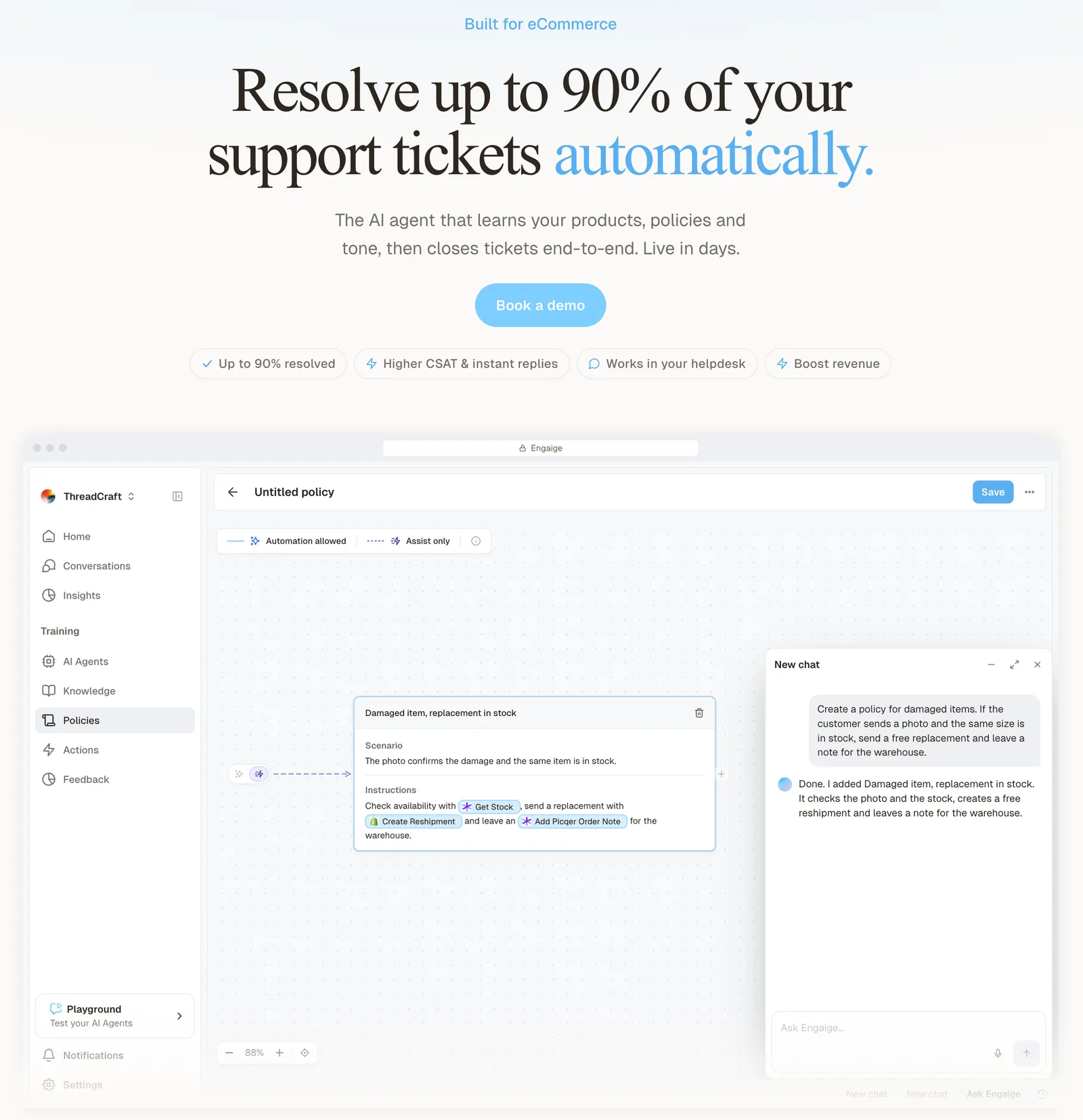
Engaige (that’s us) improves through Engaige AI. MR MARVIS, a Shopify Plus brand, handles over 120,000 questions a year and resolves over 60% of the conversations Engaige is involved in (MR MARVIS).
You go live in Agent Assist in hours. In Agent Assist, every reply your team sends is compared with what the agent suggested; that is one of the signals Engaige AI learns from, next to conversations, your inputs, hand-offs and emerging trends. Engaige AI proposes changes with its reasoning, and you approve every change. Most brands reach autonomy in about a week, with up to 90% of supported tickets automated, and Engaige AI keeps learning once autonomous.
Gaia and Opportunities learn mainly from hand-overs and coaching. Engaige AI also learns from your team’s normal work from day one: every Agent Assist reply is compared with the agent’s suggestion. The Gaia and Opportunities documentation describes no draft-versus-sent signal, as of October 2026 (Gorgias, 2026).
On Shopify, Engaige combines live Admin API data, pricing across markets and SKUs, inventory, orders and customers, with the marketing content from your storefront and your brand voice. It reads several live systems in one answer, such as Shopify with returns, subscriptions and carriers, and takes native refunds, cancellations, address changes and discounts. It has 50+ native integrations and connects to any system.
Engaige resolves the hard middle end to end: it reads the live order, catalogue and policy data, takes the action in Shopify and replies to the shopper. Otrium runs it at that scale (Otrium).
With Engaige, we are able to automatically resolve 60% of the 120,000 support tickets that we receive annually.

Gorgias also gates actions with conditions. In Engaige you decide per step whether the agent acts on its own or drafts for your team, and you can set thresholds, such as sending refunds above a certain amount to a person first.
Scenario
The customer asks about a delivery address.
Instructions
Read the order with Get order , then take the branch that matches.
 Get order
 Scenario
The order has not been picked yet.
Instructions
Move it with Change picqer shipping address .
 Change picqer shipping address
 Scenario
The parcel has already left the warehouse.
Instructions
Say it cannot be redirected, then offer Process refund .
Open any conversation in Engaige and you see the full reasoning behind every answer and action. When the agent hands a ticket to your team, it leaves a summary of its reasoning as an internal note in the Gorgias ticket. Test every policy in the Playground before it goes live, including a past ticket you paste in.
Engaige is text-first by design: email, chat, WhatsApp, SMS and social DMs, no voice AI. A live call gives an AI seconds to reason; text gives it time to read the order, check your policy and act, so resolution quality is higher. If phone is a big share of your mix, a voice specialist is the honest answer. Our comparison page shows Gorgias and Engaige side by side.
Frequently asked questions
Does Gorgias integrate with Shopify?
Yes. Install the Gorgias app from the Shopify App Store via Settings > Workspace > Store. Orders, lifetime spend and tags then show next to each ticket, and agents can cancel, refund, duplicate and edit orders from the sidebar.
Can you connect several Shopify stores to one Gorgias account?
Yes. Repeat the connection per store, assign channels per store and filter views and statistics by store. Customers with profiles in more than one store lose note sync, and some macro actions can fail.
Which Shopify order changes can Gorgias’s built-in AI make without a person?
It cancels unfulfilled orders (with a full refund), edits addresses, removes or replaces an item, reships lost or damaged orders for free and adds order notes, within conditions you set. Shoppers confirm irreversible actions.
Does a Gorgias cancellation reach my 3PL?
No. The AI Agent’s Shopify cancel and address edit change Shopify only. Gorgias suggests an order-age condition, or separate cancel actions for ShipStation, ShipMonk or ShipBob.
Can you keep Gorgias and use a different AI agent?
Yes. Engaige plugs into Gorgias and your Shopify store together and replaces only the built-in AI. Your team keeps Gorgias, its Shopify app and macros, with no migration.
How quickly can Engaige run on Gorgias and Shopify?
You go live in Agent Assist in hours. Every reply your team sends is compared with the agent’s suggestion as one learning signal, you approve changes, and most brands reach autonomy in about a week, with up to 90% of supported tickets automated.
Who decides what the AI may change in Shopify?
In Engaige you decide per step whether the agent acts on its own or drafts for your team, and you can set thresholds, such as sending refunds above a certain amount to a person first.