
PrestaShop live chat comes from a chat module on PrestaShop Addons, a third-party chat widget, or your help desk’s chat widget so chats land next to email. PrestaShop’s documentation describes a contact form, not live chat. The harder choice is who answers, and whether they can read the order, carrier and return first.
What is PrestaShop live chat?
PrestaShop live chat is a chat window on your shop pages that always comes from a module or a third-party widget. PrestaShop’s user guide describes a contact form and a back-office customer service tool, not live chat.
That tool stores a contact-form thread only if the contact has “Save messages?” enabled. Otherwise the message is simply sent to the contact’s email address and is not stored in PrestaShop. Replies to emails sent from the tool come back through your IMAP settings.
So on PrestaShop, conversations scatter unless you choose where they land. Adding the bubble takes minutes. The real decision is who answers inside it, and whether they can see the order, the carrier and the return before they answer. For the wider picture of chat for a store, start at our chat hub.
How big is PrestaShop, and why does chat work differently there?
PrestaShop says more than 230,000 stores run on it worldwide, generating EUR 22 billion in GMV. It was founded in 2007 and, in 2026, joined the European tech group cyber_Folks alongside Sylius. Those are the vendor’s own figures.
For an independent check, W3Techs (October 2026) puts PrestaShop at 0.7% of websites whose content management system it knows, 2.8% of e-commerce systems in its surveys and 0.5% of all websites.
Chat works differently here than on a hosted platform. PrestaShop is open source and self-hosted, so chat arrives as a module you install, or upload as a zip, rather than an app embed. Order data typically reaches a chat tool through a module, the Webservice or the newer Admin API. If you are on Shopify instead, read our guide to Shopify chat.
How do you add live chat to a PrestaShop store?
You add live chat in four routes: a chat module from Addons, a third-party chat widget with its own PrestaShop module or script, a help desk chat widget connected to PrestaShop, or a help desk chat with an AI support agent connected to your orders. Choose on where chats land and what the answerer can read.
| Route | How it installs | Where conversations land | Can the answerer see the order? | When you are offline |
|---|---|---|---|---|
| Chat module from PrestaShop Addons | Module Manager, then install or upload | The module’s own inbox, or the vendor’s service | Depends on the module | Varies by module |
| Third-party chat widget (for example Tidio, Smartsupp) | Its PrestaShop module or a script | The vendor’s inbox | Some show order history to a human agent | Varies by tool |
| Help desk chat widget (for example Gorgias) | A connected app plus the widget | The help desk, next to email | In Gorgias’s case, a partner app shows order data to a human agent | Usually an offline form that becomes a ticket, depending on setup |
| Help desk chat plus an AI agent connected to orders | Help desk widget, then the agent connected to PrestaShop | The help desk | The agent reads the order before answering | Answered from the order and closed; tickets your policy routes to a person go to your team with full context |
The examples are examples, not a ranking, and we compare no prices. The install steps are generic. In the back office, the module page has module docs: the connection to Addons and the “Upload a module” option. Buy or download the module on Addons or from the vendor, install or upload it, configure it and check it shows on the pages you want.
Addons has a dedicated Addons category named Support & Online Chat. We could not read its module count, so we give none. PrestaShop’s homepage says only that thousands of modules and themes are available.
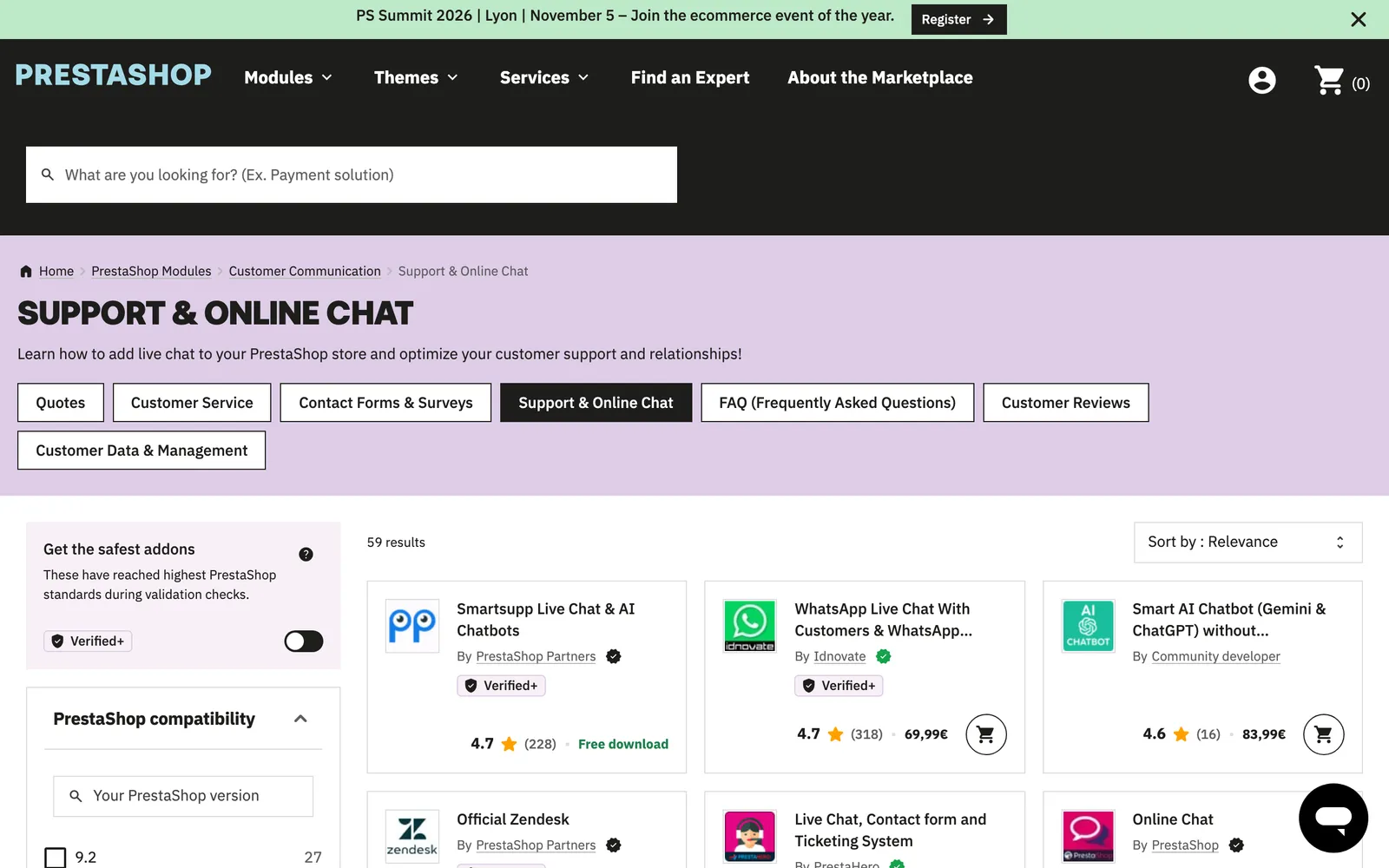
On the order question, Smartsupp says its PrestaShop integration lets you see order details and history in one place, which is the vendor’s claim. On the help desk side, Gorgias’s PrestaShop app, built by a partner, BlueAnt, shows order data in the widget.
Pick the route on where the conversation lands and what the answerer can read, not on the bubble’s design. For chat on any website, see our website bots guide, and for one help desk in detail, our Crisp guide.
What should a PrestaShop chat be able to read?
A PrestaShop chat should be able to read the order status, the carrier and tracking number, the return record and the customer’s order history. All of it exists in PrestaShop already. A widget alone shows none of it to the shopper, a widget with an order panel shows it to your agent, and an AI agent with order access can read it and answer.
| Shopper question | Where the answer lives in PrestaShop | Widget only | Widget with an order panel (a person reads it) | An AI agent with order access |
|---|---|---|---|---|
| Where is my order? | Order status and order history | Cannot answer | Agent looks it up | Reads it and answers |
| Which carrier, and where is the parcel? | Carrier and tracking number on the order, plus the carrier’s Tracking URL | Cannot answer | Agent reads the tracking code | Reads it and answers |
| Can I return this? | Merchandise returns: return window in days and return status | Recites the policy | Agent checks the return | If it can read the return record, answers from it |
| Change my address or cancel | Order state, before it ships | Takes a message | Agent checks the state | Answers from the order where your connection allows |
| What did I order last time? | Customer order history | Cannot answer | Agent reads the history | Reads it and answers |
The data is documented. In the Webservice, the order_carrier resource links an order to its carrier and holds the tracking number, with fields including id_order and id_carrier. In the carrier settings you add the carrier’s Tracking URL with ”@” where the tracking number goes, and customers receive that link after purchase.
Returns need care. Per the returns guide, product returns are not activated by default. You set the number of days during which a return request can be made, and a request appears as “Waiting for confirmation” and moves through statuses such as “Waiting for the package”, “Package received”, “Return denied” and “Return completed”. A chat that cannot read the return record can only recite the policy, not answer “where is my return?”.
The data also shows up for your team: when a customer service thread is tied to an order, the back office shows the order details. The data exists. The question is whether your chat reads it. For order-status questions in depth, see WISMO automation, and for the difference between a bot and an agent, our chatbot comparison.
Why can’t a chat widget alone answer order questions?
The read table above shows what an answer needs: a connection to the order. Widgets that sync orders typically show them to a human agent, as the Smartsupp and Gorgias partner examples do, while a bot or agent that answers on its own needs read access to the store.
On PrestaShop, that access typically comes through a module, the Webservice or the newer Admin API. The Webservice lets merchants give third-party tools access to their shop’s database, per the Webservice docs, through a CRUD API.
The user guide says to keep it disabled if you do not want anyone accessing your shop through third-party tools, that every app has a unique connection key with specific access rights, and that you do not have to share all your data with each key. PrestaShop 9 adds an Admin API that exposes core back-office features for integrations and automation through a RESTful interface.
Our tip: give each chat or AI tool its own key, scoped to what it needs.
Gorgias’s own compatibility table lists its AI Agent as not supported for PrestaShop stores as of 15 October 2026, so check any vendor’s table for your platform. Keep your helpdesk. Replace the AI: Engaige connects to PrestaShop and answers inside the help desk you already run.
On PrestaShop, “can it read the order?” is the first question to ask any chat vendor, before design or price. Readers comparing AI agents on other open-source platforms can start with our guides for WooCommerce and Magento.
Who answers PrestaShop chat outside office hours?
You have three honest options outside office hours: an offline form that becomes an email or ticket, longer staffed hours, or an AI agent that answers from the order at any hour, and routes the tickets your policy keeps for people to your team with context. Which one fits depends on what shoppers ask at night. Read how Zendesk chat handles the same question if that is your help desk.
There is a PrestaShop-specific trap. If the contact behind your form has “Save messages?” off, PrestaShop will not help you handle customer service for that contact, per its contact settings, and messages only go to an inbox. Check where offline chat messages land, in the help desk or in a mailbox, before you rely on them.
Offline capture is fine for presale questions. It fails on “where is my order?”, which is exactly the question that can be answered from data at 23:00.
If you want an AI agent to take the overnight tickets, the Engaige section below explains how it works, and our guide to website bots covers the same question on another channel.
Where does Engaige fit?
Engaige (that’s us) is the e-commerce-native AI support agent that plugs into the help desk your PrestaShop chat feeds, resolves across your stack and keeps improving itself. Engaige AI learns from your conversations and inputs, configures the agent and shows which policies it used. You go live in Agent Assist in hours, then switch ticket types to autonomous one at a time, most brands in about a week; autonomous from day one is also supported.

Engaige is Shopify-first, not Shopify-only. Its PrestaShop integration is a connection, not a module: Engaige connects to PrestaShop and answers order, product and shipping questions. With your carrier and help desk connected as well, it reads live order and shipping data before it answers. If a connector is not there, we build it on demand, live in about a week.
One answer is built from several systems: the conversation in your help desk, the order in your store and the shipping status from the carrier. Engaige reads them first, applies your policy and replies, and every answer and action shows which systems it checked and why, with the source.
Hi, where is my order? It's been eight days and the tracking hasn't moved.

Shopify
Order 48219 · fulfilled

Picqer
Still processing Contradicts Shopify

DHL
Returned to depot · 3 delivery attempts
Settles it: the parcel is not with the customer
Reasoning…
Not deliverable. Reship to a confirmed address, booked in Picqer.
Suggested reply
Your parcel went back to the depot after three delivery attempts, so it will not arrive. I have booked a reshipment to the address you confirmed, arriving Thursday.
Seeing the reasoning is what lets your team spot where information is missing or unclear, and improve from it.
Within the AI we can see the reasoning, and how it comes to a response. That shows us where information is missing or unclear, and helps us improve our workflow.

Improvement is the other half. In Agent Assist, Engaige drafts replies for your team in your help desk. Engaige AI compares what your team said with what the agent suggested, learns from the difference and improves itself, under your supervision: you approve the changes. It keeps learning once autonomous, from emerging trends and the tickets handed back to your team.
For proof of the agent at work: MR MARVIS runs Engaige on Shopify Plus, handling over 120,000 questions a year and resolving over 60% of the conversations it’s involved in. To see Engaige on your own tickets, book a demo.
Frequently asked questions
Does PrestaShop have built-in live chat?
Not according to its documentation. PrestaShop’s customer service documentation describes a contact form and a back-office customer service tool. Live chat comes from a module or a third-party widget.
Where do I find live chat modules for PrestaShop?
Look in the Addons category “Support & Online Chat”, or on a vendor’s own site. Install through the Module Manager, using the connection to Addons or the “Upload a module” option. We give no module count because we could not verify one.
Can a PrestaShop live chat show the customer’s order?
Some widgets and help desk apps show order history to a human agent. An AI that answers typically needs API access, such as a Webservice key scoped to what it needs, or the PrestaShop 9 Admin API.
Can a PrestaShop chat tell a customer where their parcel is?
Only if it reads the order’s carrier and tracking number. PrestaShop stores the tracking number on the order and builds the tracking link from the carrier’s Tracking URL.
What happens to PrestaShop chat messages when nobody is online?
Depending on the tool, an offline form turns them into an email or ticket. Check the “Save messages?” setting and where messages land, or use an AI agent that answers from the order.
Does Engaige work with PrestaShop live chat?
Engaige works alongside your chat module or widget: it is the AI support agent inside your help desk, connected to your PrestaShop orders. Engaige AI configures and improves it. Keep your helpdesk. Replace the AI.
How does Engaige answer PrestaShop order questions?
With your carrier and help desk connected, Engaige reads live order and shipping data before it answers, applies your policy and replies, and every answer shows which sources it used and why. You start in Agent Assist or go autonomous from day one. See the hub for the full overview.







