A ticket SLA is the time target your support team commits to on every ticket: how fast the first reply goes out, how fast each next reply follows and how fast the ticket is resolved. Targets are set per priority and often per channel, run on business or calendar hours, and pause or breach according to your help desk’s rules.
This guide is part of our support team series. It is help-desk agnostic, with the Gorgias docs and Freshdesk docs as sourced examples. Every vendor detail below is as of October 2026.
What is a ticket SLA?
A ticket SLA is the set of reply and resolution time targets a support team holds itself to on every ticket. It is usually set per priority and often per channel.
Gorgias calls SLAs internal agreements on the level of service your team gives customers, with time-based goals for the first response and the full resolution of a ticket. That matters for a store: the SLA is rarely a contract with the shopper. It is a promise you make to yourself and, if you publish response times, to customers.
The ITIL glossary, as hosted by CERN, separates two agreements that help desks blur together, and help desks add a third, the internal target.
| Term | Between whom | Store example | Source |
|---|---|---|---|
| SLA | A service provider and a customer, documenting service level targets | A published promise to shoppers that email is answered within a set time | ITIL glossary |
| OLA | A provider and another part of the same organisation | Support and the warehouse or finance team agreeing how fast a refund or reshipment is actioned | ITIL glossary |
| Internal target | Your own team | The first response and resolution goals configured in your help desk | Gorgias SLA docs |
For Zendesk specifics, such as group SLAs and plan limits, read our guide to Zendesk SLAs.
What does a ticket SLA include?
A ticket SLA has up to six parts: a first response target, a next response target, a resolution target, priority tiers, a channel and a clock type (business or calendar hours). Not every help desk offers all of them, so check which your plan supports before you design the policy. If your team also answers from help articles, count that self-serve deflection separately from the clock.
| Part | What it measures | Typical setting |
|---|---|---|
| First response time | Time from the shopper’s first message to the first agent answer | Tightest on chat and messaging, looser on email |
| Next response time | Time to answer each message after the first, for example a follow-up question in the same ticket | Set per priority |
| Resolution time | Time from creation or first message to close | Set per priority, written in hours |
| Priority tiers | A separate target per priority | Urgent, High, Medium and Low |
| Channel | A different target per channel | Shorter for chat, WhatsApp and social DMs |
| Business or calendar hours | Whether the clock counts only staffed hours or every hour of every day | Business hours if nobody is staffed out of hours |
As a sourced example, Freshdesk targets first response, every response and resolution per priority and offers business or calendar hours, while Gorgias sets a different SLA per channel and pauses outside business and holiday hours.
Freshdesk’s smallest SLA is 5 minutes, and Freshdesk Omni goes down to 30 seconds because of real-time channels (Freshdesk SLA article). ITIL makes a related point: support hours belong in the SLA and can differ from service hours.
One buried caveat is worth knowing. Freshdesk is changing day-based SLAs in business hours so that 1 day means 24 business hours, not one working day. With 9 am to 1 pm business hours, a ticket created on Monday at 9 am becomes due on Saturday at 1 pm. The release is phased through 2026, so write targets in hours, not days (see the Freshdesk note).
How does the SLA clock work on a ticket?
The clock starts when the ticket is created, pauses when your help desk is told to, and breaches when the target passes before the qualifying reply or resolution. Each help desk sets its own pause rules, so the sequence below is a model, not a universal rule.
- Start. In Gorgias the first-response timer starts at ticket creation and does not reset when a new policy applies. With the business-hours setting on, a ticket created out of hours starts its clock at the next opening time. Freshdesk measures resolution time from the moment the ticket is created.
- Pause. Gorgias pauses timers outside business hours and during holiday hours. Freshdesk lets you switch the timer off for statuses such as Pending or “waiting on third-party response”. A store example is a lost parcel while you wait for the carrier or the warehouse.
- Breach. Gorgias marks a ticket as breached if any goal in the policy is missed, so a ticket answered in time but resolved late still counts. Gorgias applies only one SLA policy to each ticket, so a ticket is measured against that policy’s goals. Freshdesk applies the first matching policy in the list.
Pause rules differ per help desk and per metric. For how Zendesk statuses interact with SLAs, see Zendesk statuses.
How should an online store set its ticket SLA targets?
Start from what each ticket type costs the shopper if it waits, set priority from that, then set tighter targets on real-time channels than on email. Base the numbers on what your team achieves today: Gorgias advises reviewing your current first response and resolution metrics and setting the goal at what the team can achieve now.
The table below is by channel, because ticket-type tables already exist elsewhere. Our view: every value is an illustration, not a benchmark. For benchmarks, see our guide to response time.
| Channel | What shoppers typically expect (our view) | Metric that matters most | Illustrative start |
|---|---|---|---|
| Live chat | An answer while still on the site | First response | Minutes |
| WhatsApp and social DMs | A conversational reply, close to chat | First response and next reply | Minutes to an hour |
| A correct answer, not necessarily an instant one | Resolution | Hours, written in hours not days | |
| SMS | A short, quick confirmation | First response | Minutes to an hour |
Ticket type changes which metric matters. WISMO arrives in volume and tolerates a slower first reply, but the answer has to be accurate. Returns and refunds are promised as an outcome, so resolution time matters more than the first reply. For damaged items, the shopper is unhappy and waiting on a photo exchange, so next reply time is the number to watch.
Set priority automatically at creation. Freshdesk automation rules can set priority from conditions such as the subject line or a VIP customer, and Gorgias SLA conditions can use tags or fields such as Priority set to High. Tags are how the SLA knows the ticket type, which our guide to ticket tags covers.
How do you catch an SLA breach before it happens?
Show the team time to next breach, warn before the deadline and escalate when a ticket breaches. Most help desks support some version of this: sorted views, reminders and escalation rules. Put the most urgent policy first, because policy order can decide which one applies.
Freshdesk, for example, offers reminders from 5 minutes to 4 hours before a breach and escalations on violation, both from the Pro plan. It recommends urgent SLAs at the top of the list.
Our view: a reminder window that suits a 24-hour email target is useless for a short chat target. The gap shows in peak season, such as Black Friday or January returns, which we cover in peak season. Report on breaches with ticket reports. For Zendesk alerts, use the Zendesk SLA guide above.
Where do ticket SLAs mislead?
A ticket SLA measures the wait, not whether the shopper was helped. Three habits make the number look better than the service.
- Gaming first response. A placeholder reply such as “we’ve got your message” can stop the first response clock without helping anyone. Freshdesk counts only an agent reply or public note as a first response and ignores automated notification emails (Freshdesk FAQ), so the risk is the human placeholder. Our view: judge first response next to resolution.
- Closing too early. Resolution time ends when the ticket is closed, so closing before the shopper confirms flatters the figure.
- Ignoring reopened tickets. How a reopen affects the SLA differs per help desk, so check whether yours separates reopened tickets. Our view: track reopens next to SLA attainment.
In Gorgias only one SLA policy applies to each ticket, so attainment tells you about that one policy. Pair attainment with resolution and satisfaction in your support metrics.
The clock also says nothing about what the next person knows when they open the ticket. That is the hand-over problem. Peak weeks show it most, as in our notes on retail customer service, and it matters just as much when tickets arrive through an email-to-ticket system.
Where does Engaige fit?
Engaige (that’s us) is the AI support agent that works inside the helpdesk your conversations land in, next to the SLA policies you keep there. Keep your helpdesk. Replace the AI. Engaige AI is the AI you brief in plain language; it learns from your team’s replies and improves the agent under your supervision, and you approve every change. MR MARVIS has Engaige resolving over 60% of the conversations it’s involved in, across over 120,000 questions a year (MR MARVIS).
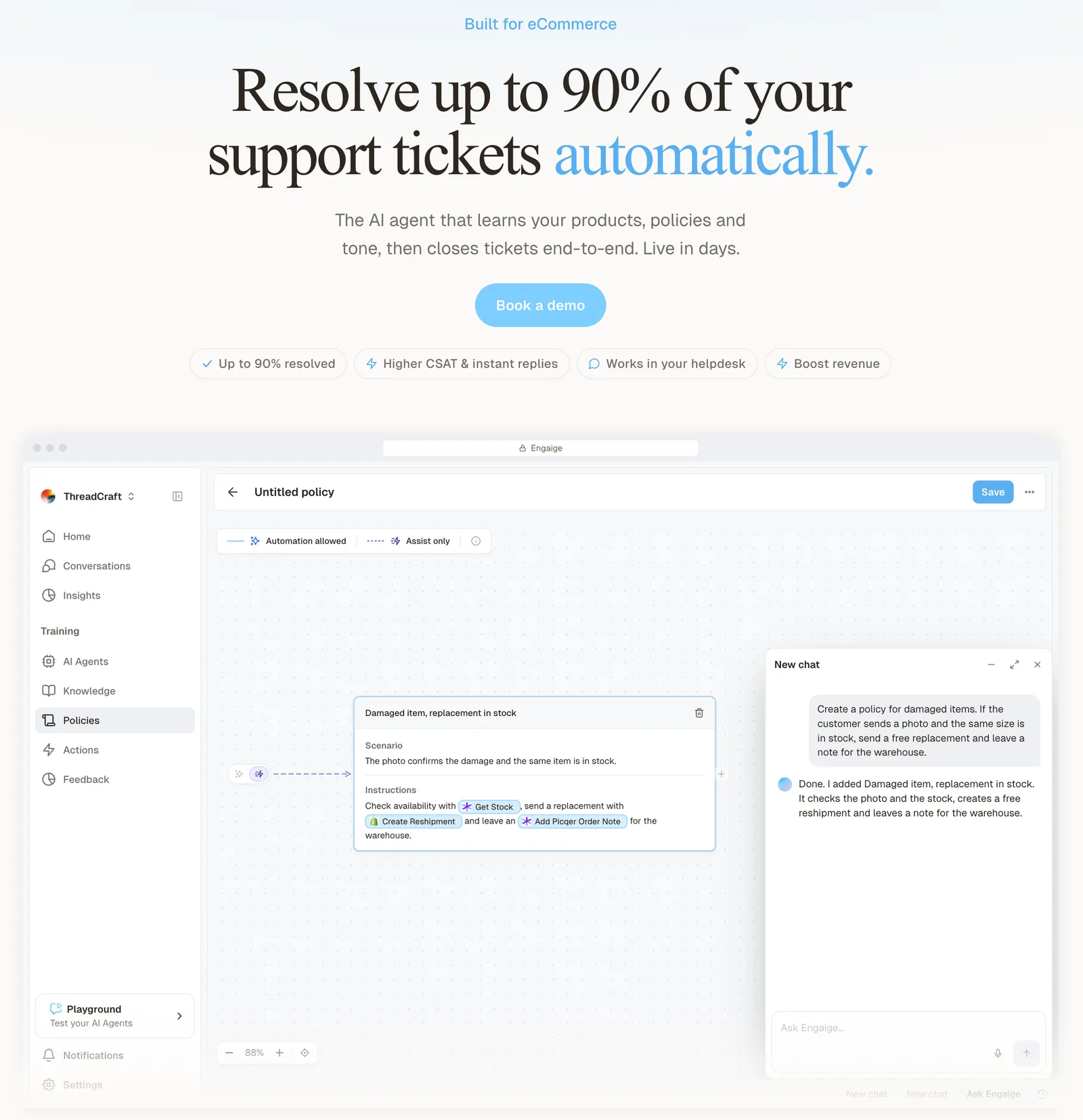
Engaige resolves rather than suggests: it takes the action in your stack (a refund, a reshipment, an address change), replies to the shopper and closes the ticket.
You can go live in Agent Assist in hours: Engaige drafts replies and suggested actions inside your help desk, nothing closes without a human, and your team answers faster from day one. Or you can go autonomous from day one. Most brands flip ticket types to autonomous one at a time in about a week, up to 90% of supported tickets.
Every reply your team sends becomes training data. Engaige AI compares what your team said with what the agent suggested, learns from the difference and improves itself, under your supervision: you approve the changes. That comparison is one signal next to the conversations, your inputs, hand-offs and emerging trends. Once autonomous, Engaige AI keeps learning from emerging trends and the tickets handed back, under the same supervision.
The angle for SLAs is the hand-over. When the agent hands a ticket to your team, it leaves a summary of its reasoning as an internal note in the ticket, so the person on the clock does not start from zero. Open any conversation in Engaige and you see the full reasoning behind every answer and action.
Hi, where is my order? It's been eight days and the tracking hasn't moved.

Shopify
Order 48219 · fulfilled

Picqer
Still processing Contradicts Shopify

DHL
Returned to depot · 3 delivery attempts
Settles it: the parcel is not with the customer
Reasoning…
Not deliverable. Reship to a confirmed address, booked in Picqer.
Suggested reply
Your parcel went back to the depot after three delivery attempts, so it will not arrive. I have booked a reshipment to the address you confirmed, arriving Thursday.
Within the AI we can see the reasoning, and how it comes to a response. That shows us where information is missing or unclear, and helps us improve our workflow.

What the agent may do alone stays your decision, set per step, with thresholds such as sending refunds above a certain amount to a person first. Test every policy in the Playground before it goes live, including real past tickets you paste in.
On Shopify, Engaige combines live Admin API data, pricing across markets and SKUs, inventory, orders and customers, with the marketing content from your storefront. Engaige is text-first by design: email, chat, WhatsApp, SMS and social DMs, no voice AI. A live call gives an AI seconds to reason; text gives it time to read the order, check your policy and act, so resolution quality is higher. If phone is a big share of your mix, a voice specialist is the honest answer.
Engaige is built for e-commerce, not as a generic horizontal tool, so its depth goes into your orders, returns and Shopify data. HelloPrint reports 90% faster first response with Engaige (HelloPrint).
Frequently asked questions
What is a ticket SLA?
It is a time target for the first reply, each next reply and resolution on a ticket, usually an internal promise rather than a contract with the shopper.
What is the difference between an SLA and an OLA?
In ITIL’s glossary, an SLA is an agreement with the customer, while an OLA is an agreement with another part of the same organisation. In a store, an OLA might be support and the warehouse agreeing how fast a reshipment is actioned.
Does the SLA clock stop when a ticket is pending?
It depends on the help desk and the metric. Freshdesk lets you switch the timer off for statuses such as Pending, so check how yours behaves.
Should ticket SLAs run on business hours or calendar hours?
Use business hours if nobody is staffed out of hours, and calendar hours if someone is. Write targets in hours, not days.
What happens when a ticket breaches its SLA?
The ticket is marked as breached. Reminders and escalations can alert the team, and in Gorgias missing any goal in the policy counts as a breach, even if the first reply was on time.
Can a quick placeholder reply meet a first response SLA?
Often yes, which is why first response alone misleads. Pair it with resolution time and reopened tickets.
Where do SLAs live when you use Engaige?
In your help desk, where you keep them. Engaige works inside that help desk: it resolves tickets and, when it hands one to your team, leaves its reasoning as an internal note so the next person does not start from zero.
How does Engaige help a team working to SLAs?
Engaige resolves tickets end to end inside your help desk: it takes the action, replies and closes. You can go live in Agent Assist in hours, so your team gets drafted replies from day one, or go autonomous from day one. MR MARVIS has Engaige resolving over 60% of the conversations it’s involved in, across over 120,000 questions a year. Separately, HelloPrint reports 90% faster first response with Engaige, which its case study credits to instant automated answers.