A ticket tag is a short keyword label on a support ticket, added by an agent or by a rule, that says what the ticket is about or how to handle it. Help desks such as Zendesk, Gorgias and Freshdesk use tags to filter views, fire automations, apply SLA policies and report on which ticket types keep coming back.
This guide is part of our series on running an e-commerce support team. It is help-desk agnostic, with the Zendesk, Gorgias and Freshdesk docs as sourced examples, as of October 2026, and it is written for the person who owns the tag list in an online store.
What is a ticket tag?
A ticket tag is a keyword label on a support ticket. Zendesk’s docs define tags as words, or combinations of words, that add context to tickets. They can sit on tickets, users and organisations, and a tag such as about_sales can then feed a view or a report (Zendesk, About tags).
Tags are easy to confuse with ticket fields and with categories or contact reasons, and tickets that arrive through an email-to-ticket system start with none, so someone has to define them. The differences decide which one you report on.
| Tag | Ticket field | Category or contact reason | |
|---|---|---|---|
| What it is | A free keyword label | A structured property with set values | A managed field that classifies why the shopper wrote |
| How many per ticket | Many (Zendesk sets no limit on the count) | One value per field | One, ideally |
| Who sets it | An agent, a rule or a user or organisation tag | An agent or an automation | An agent, or AI where the help desk offers it |
| Best for | Flags that drive workflow | Data you report on | The question “why did they write?” |
| Example in a store | vip, channel_whatsapp | A drop-down with return, refund and WISMO | Delayed shipment |
Two doc facts matter here. In Zendesk, drop-down fields also create tags, and each tag maps to one field value, so a field and its tag move together (Zendesk, ticket fields). For tags a field generates, Zendesk Explore advises reporting on the custom field attribute instead (Zendesk Explore). In Gorgias, agents or automations fill in ticket fields before closing a ticket, and only 25 fields can be active at once (Gorgias, ticket fields).
Our view: use one fixed field for the contact reason you report on, and tags for flags that drive workflow, such as VIP, channel or needs_order_lookup. It matches what ticket reporting recommends, a dropdown rather than free tags.
How do you build a ticket tag set step by step?
Decide what you need to report on, name tags in one pattern, set the reliable ones by rule and the rest by hand, restrict who can create tags, then review and prune on a schedule. Five steps, in that order, so the list answers questions instead of growing by accident.
1. Decide what you need to report on or act on
Start from the questions, not from a list of words. Which ticket types repeat? Which need a person? Which customers should jump the queue? Every tag you keep should feed a view, a rule, an SLA condition or a report. A tag nobody filters on is clutter.
2. Pick one naming pattern
Zendesk allows letters, numbers, dashes, colons, forward slashes and the _ character, and drops other special characters when the ticket updates. It also treats customer_refund, customer-refund and customer/refund as three different tags, so a trigger on one will not fire on the others (Zendesk docs). Freshdesk caps a tag at 32 characters (Freshdesk, using tags). Pick one connector and keep to it.
3. Set tags by rule where the signal is reliable
Channel, VIP and values taken from a form field are objective, so a rule can set them. In Zendesk, tags on users and organisations are copied to their tickets, but only at creation: change the requester or organisation later and the new tags do not follow (Zendesk). Judgement calls, such as a complaint that is really a return, stay with people. Rule recipes for Zendesk live in our Zendesk trigger guide.
4. Lock down who creates tags
In Zendesk, typing a tag that does not exist creates it when the agent presses Enter, which is how sprawl starts. In Gorgias, only Admins and Lead agents can create, edit or delete tags; other users can only use existing ones (Gorgias docs). Where your help desk allows it, restrict creation to one owner.
5. Review and prune on a schedule
Zendesk admins see the 100 most active tags of the last two months (Zendesk, managing tags). Freshdesk shows usage per tag under Agent Productivity, and Gorgias sorts tags by usage by default. Review monthly: merge duplicates, retire tags nobody uses, and check that each remaining tag still feeds something.
Which ticket tags does an online store need?
A small set covers the ticket types that repeat in an online store: WISMO, return, refund, damaged item, address change and product question. Add two routing flags, channel and VIP. The table is an example set, not tested results; rename the tags to fit your own pattern.
| Tag (example name) | What it marks | Set by rule or by hand | What it feeds |
|---|---|---|---|
wismo | ”Where is my order?” (WISMO) | By hand, or by rule on a form field | Counts, a delivery-delay view |
return_request | The shopper wants to return an item | By hand | Counts, a returns view |
refund_request | The shopper asks for money back | By hand | Counts, refund approvals |
damaged_item | Item arrived broken or missing (damaged items) | By hand | Counts, a priority rule |
address_change | The shipping address must change | By hand | A time-sensitive view |
product_question | A pre-sale or usage question | By hand | Counts, content gaps |
channel_<name> | Where the ticket came in | By rule | Channel reports, SLA conditions |
vip | A customer you prioritise | By rule, from a customer or organisation tag | Priority, routing, SLA policy |
Each of these is a ticket type you can count. The counts tell you which types repeat often enough to hand to an agent, which matters in the last section.
How do you name ticket tags and keep them clean?
Use lowercase, one connector and a prefix per group, and avoid common words. A pattern such as reason_, channel_ and flag_ is our suggestion, not a help desk rule. Then merge duplicates and delete dead tags every month, because no help desk does it for you.
Zendesk advises against tagging common words such as “and” and “the”, and search needs the exact string, as in tags:about_sales. Merging and deleting differ per help desk:
| Help desk | Where tags are managed | Merge | Delete |
|---|---|---|---|
| Zendesk | Admin Center, Objects and rules, Tickets, Tags | No merge in the docs cited here | Batch-remove a tag from non-closed tickets; closed tickets keep it |
| Gorgias | Settings, Productivity, Tags | Merge button; you confirm which tag is kept | A tag used in a Rule cannot be deleted until the Rule is edited |
| Freshdesk | Admin, Agent Productivity, Tags | Give two or more tags the same name | Delete tags from the same Tags page |
Sources, as of October 2026: Zendesk, Gorgias and Freshdesk. In Zendesk, deleting a tag from a ticket only removes it from that ticket, and a tag unused for 60 days stops appearing as a suggestion.
Should you tag tickets manually or automatically?
Both. Use rules for objective signals such as channel and VIP, and people for judgement. Automation limits differ per plan, so see our small-business help desk comparison before you design around one tool. Then check monthly that the rules still match reality, because a rule keeps firing on yesterday’s wording long after your policies change.
Zendesk can also add tags automatically, and our Zendesk automations guide covers the setup and how it works.
In Gorgias, you add tags individually, in bulk from a view or through a Rule. Add Tag appends, while Reset Tag removes all previous tags (Gorgias, Tags 101). Gorgias can also pre-fill the Contact Reason field with AI. In Freshdesk, Dispatch’r, Observer, Supervisor and Scenario automations can add tags, and the Add Tag action tags the ticket, not the contact.
How do tags feed reports, views and SLAs?
Tags are inputs to three things, and each has its own guide.
- Views: Zendesk views accept a Tags condition set to “Contains at least one of the following”. See Zendesk view.
- Reports: Zendesk Explore reports on tags with up to an hour of sync, Gorgias tracks tags in the Ticket attributes tab, and Freshdesk filters legacy reports by tag, except on Sprout. Which tag reports to read first is in the ticket reporting guide linked above.
- SLAs: Zendesk notes that tags like
vipcan set priority, route tickets or apply specific SLA policies. Our ticket SLA guide covers how SLAs work, and Zendesk SLA covers the Zendesk policies.
What mistakes break a tag set?
Most breakage comes from five habits, each visible in the docs above.
- Free-typed tags. Zendesk creates a tag the moment an agent presses Enter, so synonyms multiply.
- Mixed connectors.
customer_refundandcustomer-refundare different tags, so triggers miss. - Wiping tags other rules need. Zendesk’s “set tags” action and Gorgias’s Reset Tag both replace everything already on the ticket.
- Deleting a tag but leaving it in rules. Zendesk does not remove references in automations, macros and triggers.
- Reporting on a tag that duplicates a field. Zendesk advises the field attribute instead.
Where does Engaige fit?
Engaige (that’s us) is the e-commerce-native AI support agent that plugs into the help desk you already run, where your tags keep working. It is live in hours with no migration, and you set policy by talking to Engaige AI in plain language, like briefing a colleague, with no decision trees and no prompt engineers. Otrium has 60% of 120,000 annual tickets resolved end to end (Otrium).
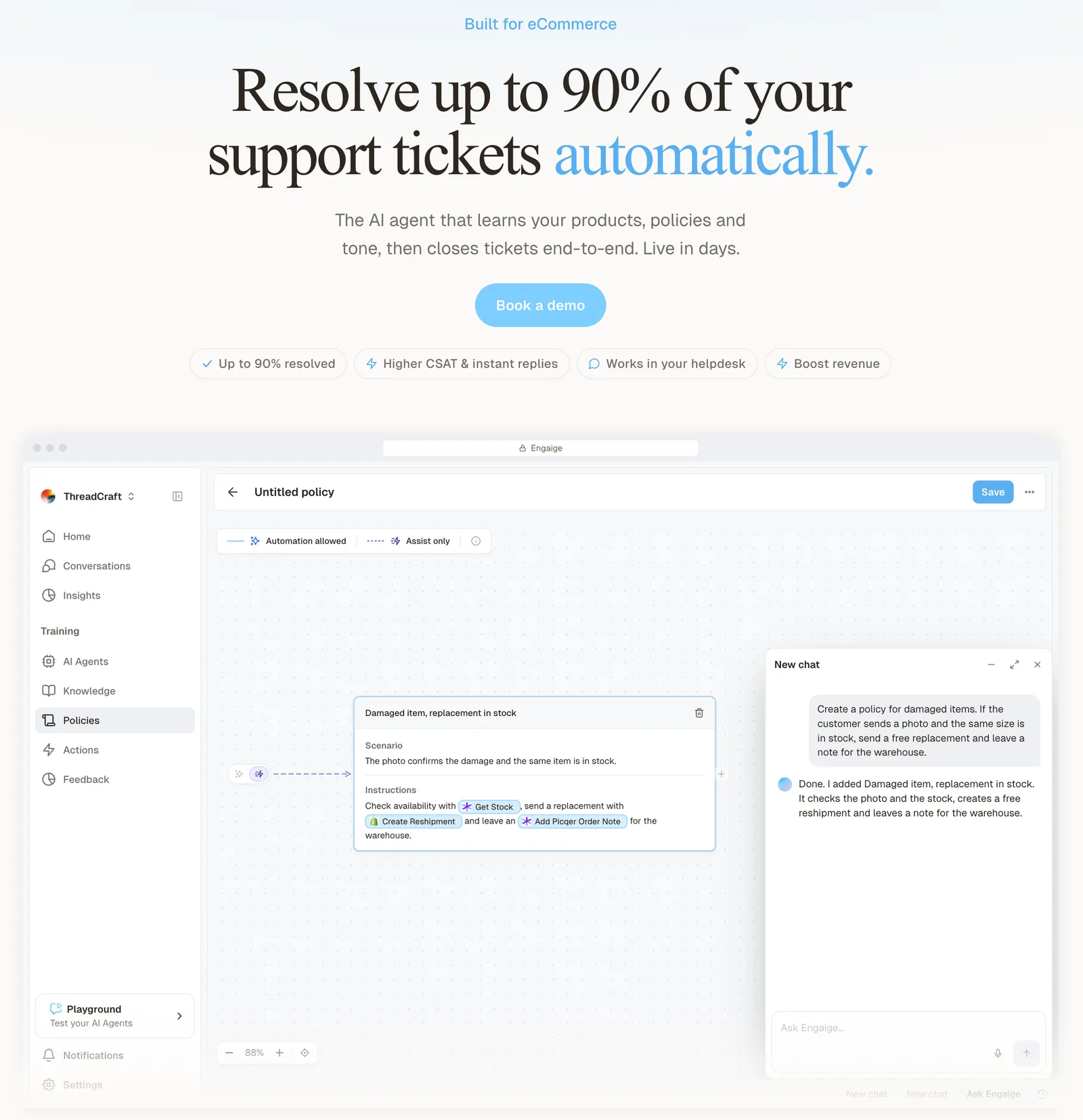
Your tag counts show which ticket types repeat, and those are the types to hand to the agent first. You flip them to autonomous one at a time, after a start in Agent Assist or from day one. Once a type is autonomous, Engaige takes the action in your systems, such as the refund, cancellation or address change, replies to the shopper and closes the ticket.
You decide per step whether the agent acts on its own or drafts for your team, and you can set thresholds, such as sending refunds above a certain amount to a person first.
Scenario
The customer asks about a delivery address.
Instructions
Read the order with Get order , then take the branch that matches.
 Get order
 Scenario
The order has not been picked yet.
Instructions
Move it with Change picqer shipping address .
 Change picqer shipping address
 Scenario
The parcel has already left the warehouse.
Instructions
Say it cannot be redirected, then offer Process refund .
Otrium’s Head of Operations describes the choice in terms of that control.
Engaige offered control, flexibility, and the ability to really incorporate AI in a more human way.

Engaige AI keeps improving the agent under your supervision. The replies your team sends are one signal it learns from, next to the conversations, your inputs, hand-offs and emerging trends, and it proposes each change with its reasoning for you to approve. Keep your helpdesk. Replace the AI.
Frequently asked questions
What is a ticket tag?
A keyword label on a support ticket, added by an agent or a rule, used to filter views, trigger automations and report on ticket types.
What is the difference between a ticket tag and a ticket field?
Tags are free labels, many per ticket, while a field holds one structured value. In Zendesk, drop-down fields create tags, and Zendesk advises reporting on the field.
How many tags should a store use?
No help desk sets a number. Our view: keep a short fixed set per ticket type plus routing flags, and prune what nobody uses.
How do you delete or merge duplicate tags?
In Gorgias, use the Merge button and pick the tag to keep. In Freshdesk, rename tags to the same name. Zendesk’s docs cited here describe no merge. To delete, Zendesk admins can batch-remove a tag from non-closed tickets, and closed tickets keep it.
Should tagging be manual or automatic?
Use rules for objective signals such as channel and VIP, and people for judgement. Zendesk can add tags automatically too.
Why did my trigger stop firing on a tag?
Tags match exactly. In Zendesk, customer_refund and customer-refund are different tags, so a trigger on one ignores the other.
Do tags still work once Engaige is live?
Yes. Tagging stays in your help desk, and Engaige works inside it, resolving the ticket types your tags reveal.
Can I let an AI agent handle only some ticket types?
Yes. In Engaige you flip ticket types to autonomous one at a time and decide per step what the agent does alone or drafts for your team, with thresholds such as sending refunds above a certain amount to a person first.