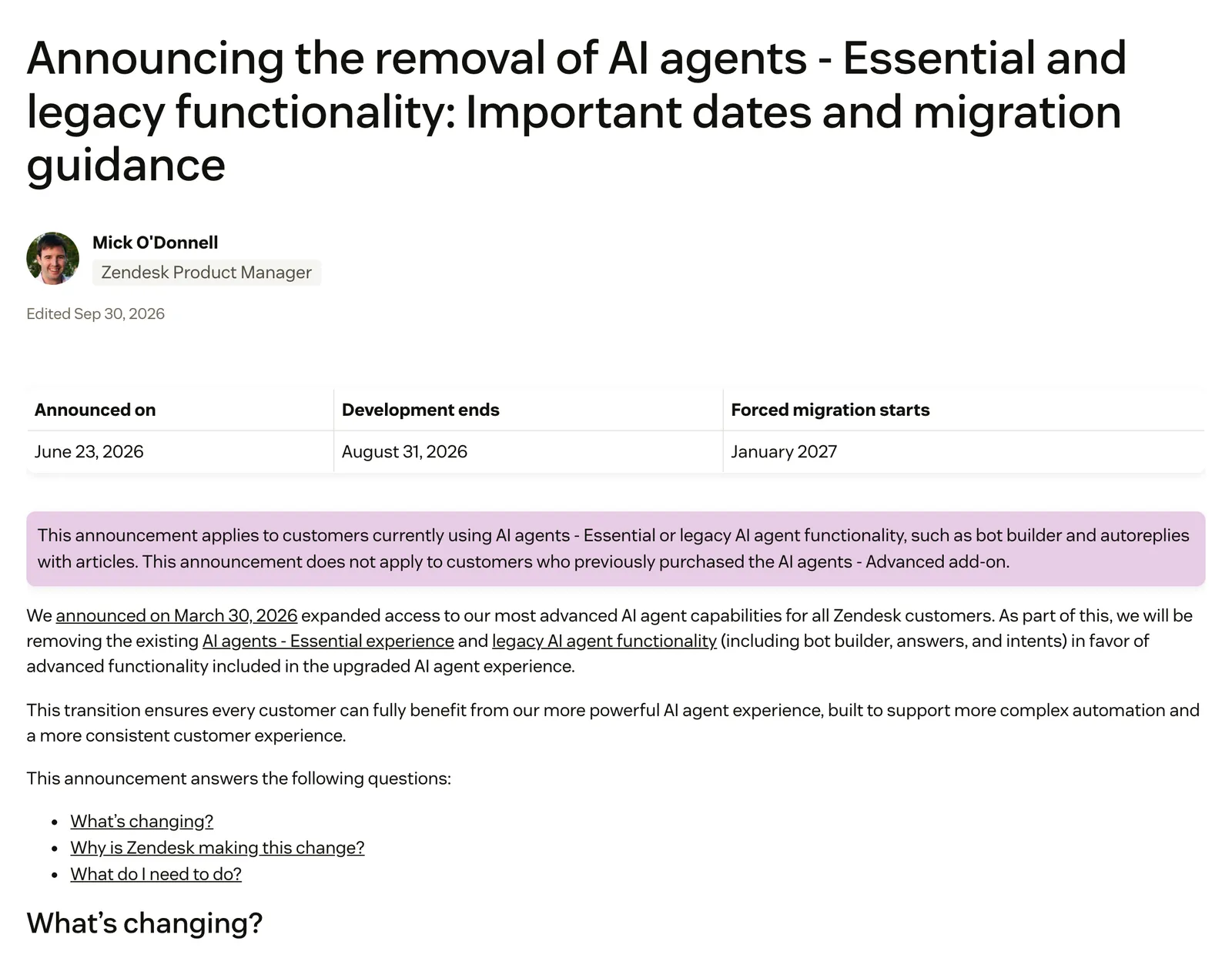
Zendesk AI essentials, officially AI agents: Essential, was Zendesk’s quick-setup AI agent: it answered customers from your help centre and other knowledge sources, with no use cases or flows to build. On 30 March 2026 Zendesk opened its advanced AI agent capabilities to all customers; its removal notice of 23 June 2026 says Essential is being removed as part of that. Essential is legacy, and Zendesk says it is no longer available on 10 December 2026.
If your store runs on Zendesk, that date is your deadline. The wider picture of Zendesk’s AI, from Copilot to Forethought, lives in our Zendesk AI guide and the Zendesk hub; this page covers only the Essential agent and what to do about it.
What is Zendesk AI essentials?
Zendesk AI essentials is the older, included level of Zendesk’s AI agents. Zendesk defines it as “designed for quick, self-service adoption”, letting you create generative agents that answer customer questions from the content in your knowledge sources. You connected sources and the agent answered from them.
As of 11 May 2026 Zendesk treats Essential as legacy functionality. Its own page says it will no longer be available on 10 December 2026.
Is Essential the same as zero-training agents?
No. Zero-training agents were an earlier generation that used generative use cases to link requests to scripted dialogues. Zendesk also made them legacy on 11 May 2026 and they can no longer be created. Answer Bot, the bot builder and autoreplies with articles are older still, and our chat bot page covers them.
How did Zendesk AI agents Essential differ from Advanced?
Essential was included and answered from knowledge. Advanced was a paid add-on for agentic work: procedures, dialogues, actions and API integrations. Since Zendesk’s March announcement the two are becoming one product, included across Suite and Support plans.
| Essential (legacy) | Advanced add-on | Today’s AI agents | |
|---|---|---|---|
| Answers from | Knowledge sources | Knowledge plus procedures and dialogues | The same, included |
| Actions and API integrations | Zendesk documents none | Yes | Yes, you configure them |
| Channels per agent | Several at once | Not stated | One channel type per agent |
| Where you manage it | Admin Center | Not stated | AI agent workspace |
| How you got it | Included | Add-on | Included in Suite and Support plans, with an allowance of automated resolutions |
| Status | Legacy, ends 10 December 2026 | Zendesk says the removal notice does not apply to its buyers | Current |
Zendesk now markets AI agents that “learn from every outcome”. For a store the questions are whether you can see and approve what changes, and how much work it takes: the built-in agent still needs you to configure what it may do with an order.
What changes for an Essential agent in 2026?
Plan for 10 December 2026. That is the date Zendesk’s About AI agents page gives for Essential no longer being available. The removal notice adds that Zendesk migrates the agents you have not moved yourself.
| Date | What happens | Source |
|---|---|---|
| 31 August 2026 | Essential gets no more bug fixes or technical upgrades | About AI agents |
| 10 December 2026 | Essential is no longer available: your deadline | About AI agents |
| January 2027 | Unmigrated Essential agents are migrated for you, “with some exceptions” | Removal notice |
The sources do not line up perfectly. The removal notice documents no shut-off date, only the January 2027 forced migration, and Zendesk’s removal list says removal starts in December 2026. Treat 10 December as the date and 31 August as the point where Essential stops improving. For the full legacy sequence, see the full timeline.
Zendesk advised migrating before 31 August 2026 to avoid disruption, a date now passed, so 10 December is the practical limit (removal notice). The notice does not apply to customers who bought the AI agents: Advanced add-on. Its pricing note says automated resolution counts may change after migration and your existing overage configuration is kept.
What do you keep, lose and rebuild when you migrate?
Zendesk’s migration tool copies settings, instructions, knowledge sources, brand, language and channel connections. It does not bring history, it interrupts live messaging chats, it cannot be undone, and anything an order needs you still build yourself.
| What it covers | |
|---|---|
| Keep | Instructions and settings; greetings, escalation flow, feedback and fallback; connected knowledge sources; brand; default language and translations; channel connections |
| Lose | Past conversation logs, analytics and insights; in-progress messaging conversations; sync with the old agent after migration; the ability to undo |
| Rebuild or change | One agent per channel, so you update both on every change; standard responses become system replies; per-language replies; proactive messaging repointed; the tags Essential applied and the triggers that use them; order jobs through use cases, procedures, actions and API integrations |
The tags row catches teams out. One in-house admin on Zendesk Community notes that Essential added an “ai_agent_automated_resolution” tag to tickets, which the new agents do not, so reports and triggers move to the Resolution type and Resolution tier fields.
How should an online store migrate its Essential agent?
Work through four groups, then timing. Zendesk’s own getting started guide says without use cases an agent answers from knowledge only, so decide first which of your store’s questions are knowledge questions and which need an order.
- Knowledge sources. List what Essential answers from. Zendesk recommends a help centre as the primary source and says the agent skips live data; for product information it recommends building an integration. A returns policy is fine from knowledge. WISMO is not.
- Behaviour. Copy your instructions across. Check the system replies, including the new ones for unsupported language, failed escalation and technical error. Check translations and any proactive messaging.
- Hand-off. Re-check the escalation reply and any tags and triggers your team’s routing relies on. Tags Essential set do not carry forward. For the states a ticket moves through after a hand-back, see Zendesk statuses.
- Reporting. History does not migrate, so export or snapshot the numbers you need before you switch. The Essential tag gives way to Resolution type and Resolution tier, and Zendesk’s resolution tiers are set after a conversation ends: 72 hours for email, 2 hours by default on messaging.
- Timing. Pick a low-traffic hour. Messaging chats in progress are interrupted and email is not, so check how your live chat is set up first, and remember the change cannot be undone.
Test on a separate support address before you activate. One Zendesk Community admin on Suite Professional reports no sandbox on that plan and ran the new agent on a dummy contact address alongside the live Essential one. Our view: a separate address lets you see the new agent’s replies on a test ticket before customers do.
What could Essential do for a store, and where did it stop?
Essential answered policy and FAQ questions from knowledge. Zendesk documents no way for it to read an order or act on one. In today’s agents that takes use cases, generative procedures, actions and API integrations you design and maintain, and email agents cannot use dialogues.
| Store job | Essential | Today’s AI agents |
|---|---|---|
| Shipping and returns policy | Answered from knowledge | Answered from knowledge |
| Where is my order | Not from knowledge alone | Needs an integration you build |
| Refunds and returns | Not from knowledge alone | Needs procedures and actions you build |
| Cancellations and address changes | Not from knowledge alone | Needs actions or API integrations you build |
| Product advice | Not from live data | Zendesk recommends an integration |
Our view: a store’s real automation rate depends on how many of its tickets need an order action rather than an answer. The more your volume is returns flows, the less a knowledge-only agent ever covered. Our piece on agent benefits explains why.
Where does Engaige fit?
Engaige (that’s us) is the e-commerce AI layer you put in Essential’s place inside the Zendesk you already run: keep your helpdesk, replace the AI. Engaige AI learns from your conversations and inputs, configures your support agent, and shows which policies it used. Otrium, for example, has 60% of 120,000 annual tickets resolved end to end. Here is the Zendesk integration.

Replacing Essential is the moment to decide how much your AI does alone, and the path is your choice. You can go live in Agent Assist in hours: drafts appear inside your Zendesk, Engaige AI compares what your team sent with what the agent suggested, learns from the difference and proposes changes you approve. Or you can launch autonomous from day one.
Either way you choose per ticket type, one at a time. Returns-policy questions can run autonomously on day one while refunds stay in Agent Assist until the agent matches your team. For each policy you decide what Engaige may do alone and where a person checks first. Most brands go autonomous in about a week, on up to 90% of supported tickets.
Scenario
The customer asks about a delivery address.
Instructions
Read the order with Get order , then take the branch that matches.
 Get order
 Scenario
The order has not been picked yet.
Instructions
Move it with Change picqer shipping address .
 Change picqer shipping address
 Scenario
The parcel has already left the warehouse.
Instructions
Say it cannot be redirected, then offer Process refund .
The contrast with Essential is what the agent works from: Essential answered from your knowledge sources, while Engaige acts in the connected system first, then replies and closes the ticket, and the rest goes to your team. Every answer and action shows why, with the source. On Shopify, see our Shopify integration.
HelloPrint automated 80% of its tickets with Engaige, first response 90% faster and went from 100 to 28 agents.
Engaige proved to be invaluable. Their hands-on support during the implementation phase resulted in significant improvements to our automated resolution rate and CSAT.

You can read how the two compare on our Zendesk comparison page. If you want plain-language instructions to start from, our service prompts are a useful starting point.
Frequently asked questions
What is Zendesk AI essentials?
It is AI agents: Essential, the quick-setup agent that answered customers from your help centre and other sources. Zendesk has treated it as legacy since 11 May 2026.
Is Zendesk AI agents Essential still available?
Not for long. Zendesk’s About AI agents page gives 10 December 2026 as the end date, after the maintenance cut-off of 31 August 2026.
What is the difference between Zendesk AI agents Essential and Advanced?
Advanced was the add-on for procedures, dialogues, actions and API integrations. Since Zendesk’s 30 March 2026 announcement of expanded access, the two are becoming one product, included in Suite and Support plans.
What happens if I do not migrate my Essential agent?
Zendesk migrates remaining Essential agents for you from January 2027, with some exceptions. Migrating yourself lets you pick the time.
Does the migration tool keep my analytics and conversation history?
No. Past conversation logs, analytics and insights are not migrated, so export what you need first.
Will my Essential agent still work on email and messaging after migrating?
Yes, but as two agents, one per channel, and you update both whenever your instructions change.
Can Engaige replace my Zendesk Essential agent without leaving Zendesk?
Yes. Keep your helpdesk, replace the AI: Engaige plugs into the Zendesk you run and works on your existing tickets. Engaige AI configures your support agent from your conversations and inputs, and you test every policy before launch.
Do I have to start in Agent Assist with Engaige?
No. The path is your choice: Agent Assist first, or autonomous from day one. You switch ticket types to autonomous one at a time, and most brands go autonomous in about a week.