The Zendesk Marketplace is Zendesk’s catalogue of add-ons, reached at zendesk.com/apps. It lists apps, connectors, themes and partners, built by Zendesk and by third-party developers, with more than 1,200 apps on offer. Some are free to install, others are paid. Public apps work on every current plan; private apps need Suite Growth and above, or Support and Chat Professional and above.
What is the Zendesk Marketplace?
The Zendesk Marketplace is, in Zendesk’s words, “the hub for apps to customize Zendesk Support and Zendesk Chat” (per its help article). Its Marketplace page promises apps, connectors, themes and more, and says you can choose from more than 1,200 apps (as of 15 October 2026).
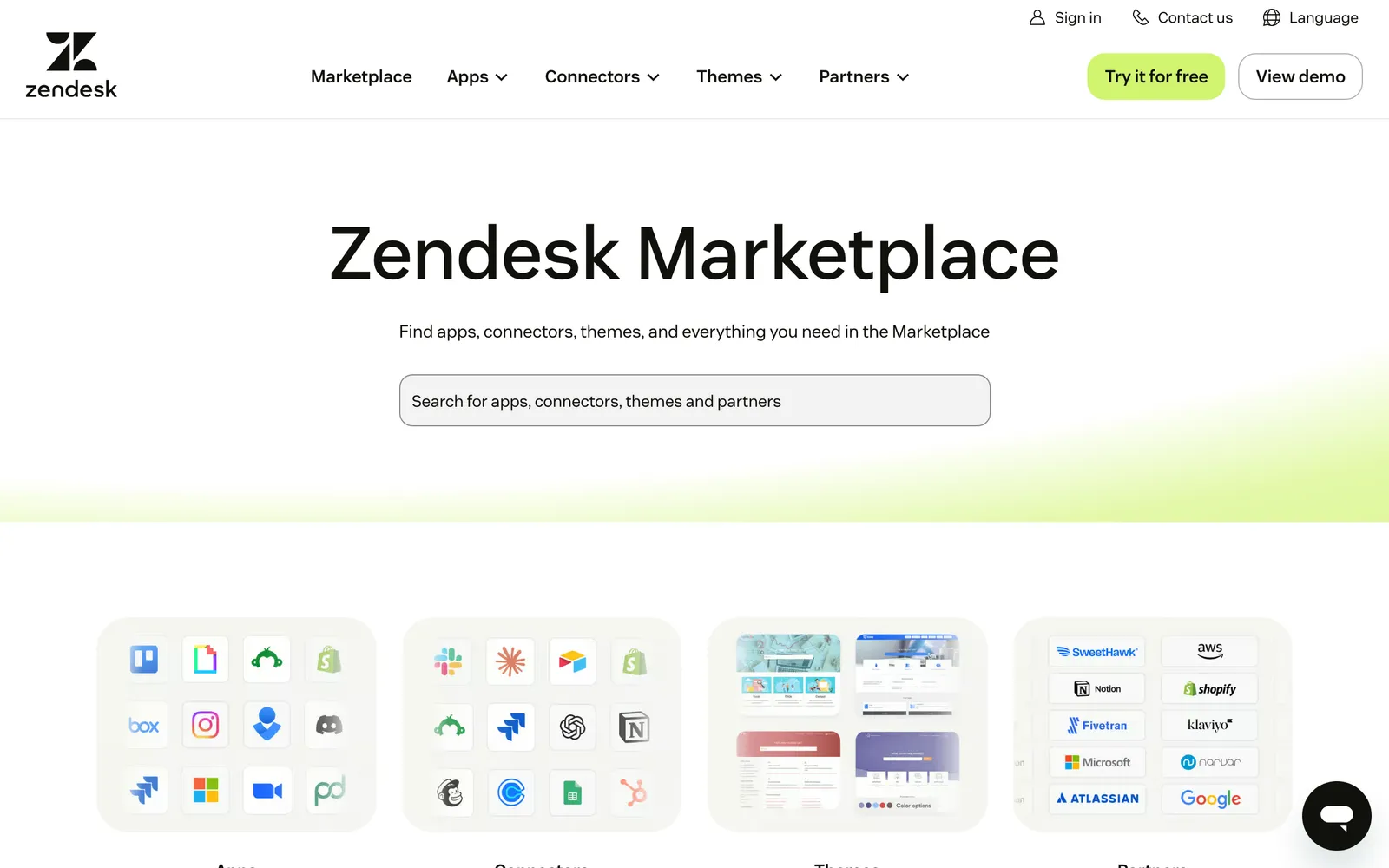
The Marketplace has four listing tabs. Zendesk describes each in one line:
| Listing type | What it adds | Example category |
|---|---|---|
| Apps | Increase agent productivity and streamline workflows | eComm and Payments, Agent Productivity |
| Connectors | Connect your data to automate and improve workflows | CRM and Marketing |
| Themes | Give your Help Centre a fresh new look | Help Centre design |
| Partners | Speak to a local expert about integrating Zendesk | By region |
| Bots and AI listings | Third-party bots that talk to customers | AI and Bots |
The “What it adds” wording in the first four rows is Zendesk’s; the bots row is our description. Bots sit among the apps, and the developer docs name them as their own kind of integration.
Zendesk builds some listings itself, including early-access apps under Zendesk Labs. Many are built by third parties: the Marketplace terms say they are created, offered, supported and maintained by parties unaffiliated with Zendesk. Technically, public apps use the Zendesk Apps framework and integration apps use the REST API.
Our view: most listings put more information, or one more button, in front of a human agent. They don’t take the ticket off the queue. For the product overview, see our Zendesk hub.
Are Zendesk Marketplace apps free?
Some are and some aren’t. Listings carry labels such as “Free”, “Free to install” and “Multiple plans available”. The developer decides: a paid app can run up to four plans, and the developer can offer a free trial of 1 to 90 days, per the submission guide.
“Free to install” describes the connector, not the service behind it. A commerce or returns app often needs your own account with that vendor, and developers flag a subscription or purchase outside Zendesk as “Additional fees”. Read that label before you plan a rollout.
Plan gates are separate from price. Public apps work on every current plan. Private apps need Suite Growth and above, or Support and Chat Professional and above, per the managing guide.
How do you install and manage Zendesk apps?
You find the app, complete any pre-install tasks, click Install and configure it. Zendesk lets you browse icons, search by name, function or keyword, or filter by product and category. Afterwards you manage the app in Admin Center, where you can restrict it to chosen agents.
Zendesk’s install steps:
- Find the app and open its info page.
- Open the “How To Install” tab and complete any pre-install tasks.
- Click Install, top right.
- Configure the app’s settings.
- Read the Marketplace Terms of Use and click Install again.
To manage installed apps, go to Admin Center, then Apps and integrations, then Apps, then Zendesk Support apps. The rules from Zendesk’s managing guide:
- Enabling or disabling an app applies to every agent.
- You can restrict an app to the groups or roles you list. Admins and billing admins count as separate roles.
- Apps update to their latest version automatically.
- Uninstalling removes the app for all agents.
- On Enterprise, admins or agents in custom roles with permission can manage Support apps.
Private apps are built for your own account. You upload a zip file (2 MB maximum) with Upload App on the same Admin Center page, per Zendesk’s guide. Zendesk’s App Builder creates apps from natural-language prompts on Professional plans and above, with about 3,600 prompts at no cost, and advises testing in a safe environment first. Our sandbox guide covers that environment.
How do you judge a Marketplace app before you install it?
Read the listing, ask who supports the app, and check what data it can reach. Zendesk doesn’t support third-party apps: each has its own author and support, per Zendesk help. The terms also say you bear the risk of using them, and that apps may be able to reach your service data.
| Check | Where to look | Why it matters for a store |
|---|---|---|
| Reviews and installs | Listing header: review count and an installs band | A thin install base is a risk in peak season |
| Developer and support | Developer field and Contact Us | Zendesk sends you to the author, so you need one who answers |
| Data access | Requirements, and the app’s privacy policy | The terms say apps may access your service data, which for a store can include customer details on tickets |
| Maintenance | Ask how often they ship and how they handle API changes | Apps update automatically, so ask the developer how they handle API changes before a new version reaches your agents |
| Who can see it | Role and group restriction in Admin Center | Not every agent needs order or payment context |
| Cost | Free to install or Additional fees | The vendor account behind the app can cost more than the app |
Since 12 August 2025, apps built for distribution to multiple Zendesk customers must be submitted for review and approval (Zendesk’s developer update); private apps are exempt. Zendesk’s docs put the turnaround at 1 to 3 weeks for new apps and 1 to 2 for updates, and describe branding checks and a compliance question. They don’t describe a security test, so don’t treat approval as one.
For a store, the question that matters is whether the app only shows the order or can also change it, and who presses the button.
Which Zendesk Marketplace apps matter for an online store?
Browse by category, not by name. The ones that matter for a store are eComm and Payments for order and payment context, Surveys and Reviews, Messaging, Translations, AI and Bots, Reporting and Analytics, and Workflows. The Marketplace category list (read on 15 October 2026) shows no separate returns or shipping category, so those tools sit wherever the developer filed them.
| Store job | Marketplace category to browse | What to check |
|---|---|---|
| Order lookups (WISMO) | eComm and Payments | Does it match the requester to the order, and can it act? |
| Returns and refunds | eComm and Payments or Workflows | Does it start the return or just show it? |
| Shipping and carrier tracking | eComm and Payments | Live tracking or only a link? |
| Reviews and CSAT | Surveys and Reviews | Where does the data land? |
| QA and coaching | Look under WEM or Agent Productivity | Does it sample tickets or read every one? |
| AI | AI and Bots | Does it work on your existing tickets or on a separate channel? |
Zendesk’s own pitch for e-commerce, on its Marketplace page, is prebuilt integrations that provide a smooth customer journey. The “look under” row is a pointer, not a Zendesk rule: check the category pages yourself.
What can’t a sidebar app do?
A sidebar app works for the human agent. It sits in the apps tray of the ticket, surfaces context and, per the design guide, can even “resolve an issue or answer a question for the agent”. The agent still reads the ticket, decides, replies and solves it; our ticketing guide follows a ticket from start to finish.
A commerce listing, for example, promises order, shipping, payment and return information “without leaving Zendesk” (see the example listing). That saves a tab. It doesn’t remove the ticket.
Zendesk documents ten app locations, from the ticket sidebar to top navigation, background and modals. Commerce apps such as order lookups typically sit in the ticket sidebar.
Our view: five sidebar apps means five panels to scan on every ticket. The work per ticket stays with your team, so peak volume still lands on people.
Listings under AI and Bots are different, because bots talk to customers. For Zendesk’s own, see our Zendesk chatbot guide. Other pieces sit beside the apps: asking a warehouse or carrier from the ticket is in side conversations, and classification before an app is even opened is in intelligent triage. For chat that sits on the storefront itself, see our Shopify chat guide.
Where does Engaige fit?
Engaige (that’s us) isn’t one more app for your agents to consult. It is the e-commerce-native AI support agent that works inside the Zendesk you already run: it drafts replies there in Agent Assist and works on your existing tickets. Keep your helpdesk, replace the AI. MR MARVIS, a Shopify Plus brand, has Engaige handling over 120,000 questions a year, resolving over 60% of the conversations it’s involved in.

The angle on integrations: Engaige AI configures an integration when you enable it. Enable one and Engaige AI sets it up so the agent can use those actions, with no prompt engineers and no decision trees. Engaige has 50+ native integrations with vetted, plug-and-play actions you just enable, and it connects to any system you run.
You go live in Agent Assist in hours, or launch autonomous from day one. In Agent Assist, Engaige AI compares what your team sent with what the agent suggested, learns from the difference and proposes changes you approve; ticket types then go autonomous one at a time, most brands in about a week, on up to 90% of supported tickets. Every answer and action shows why, with the source.
Within the AI we can see the reasoning, and how it comes to a response. That shows us where information is missing or unclear, and helps us improve our workflow.

Zendesk is a proven ticketing foundation, and the Marketplace extends it. But Zendesk doesn’t think in orders, returns or subscriptions. It wasn’t built to. A sidebar app shows your agent the order; Engaige acts on it. For how the action, the reply and the hand-off fit on one ticket, see side conversations. See how the two compare on our Zendesk comparison page, or read about the Zendesk integration.
Frequently asked questions
What is the Zendesk Marketplace?
Zendesk’s catalogue of apps, connectors, themes and partners, built by Zendesk and by third-party developers.
Are Zendesk Marketplace apps free?
Some are, and the developer sets the price; check the listing label before you plan a rollout.
Who builds Zendesk Marketplace apps?
Zendesk builds some, and many are built by third-party developers unaffiliated with Zendesk.
How do you install a Zendesk app?
From the app’s page, then manage it in Admin Center under Apps and integrations.
Can private apps run on every plan?
No. Private apps need Suite Growth and above, or Support and Chat Professional and above. Public apps work on every current plan.
How do you judge a Marketplace app?
Check reviews and installs, developer support (Zendesk doesn’t provide it), data access, maintenance, who can see the app and what it costs.
Which app categories matter for an online store?
Start with eComm and Payments, then browse Workflows, Surveys and Reviews, and AI and Bots.
Does a sidebar app resolve the ticket?
No. It works for your agent, who still reads the ticket, decides and replies.
How does Engaige work with Zendesk?
Engaige connects to the Zendesk you already run, drafts replies inside it in Agent Assist and works on your existing tickets. Where a sidebar app shows your agent the order, Engaige acts on it; see our Zendesk integration.
How does Engaige connect to your store systems?
You enable an integration and Engaige AI configures it. There are 50+ native integrations with vetted, plug-and-play actions, and Engaige connects to any system you run.